
Motor management
Main areas
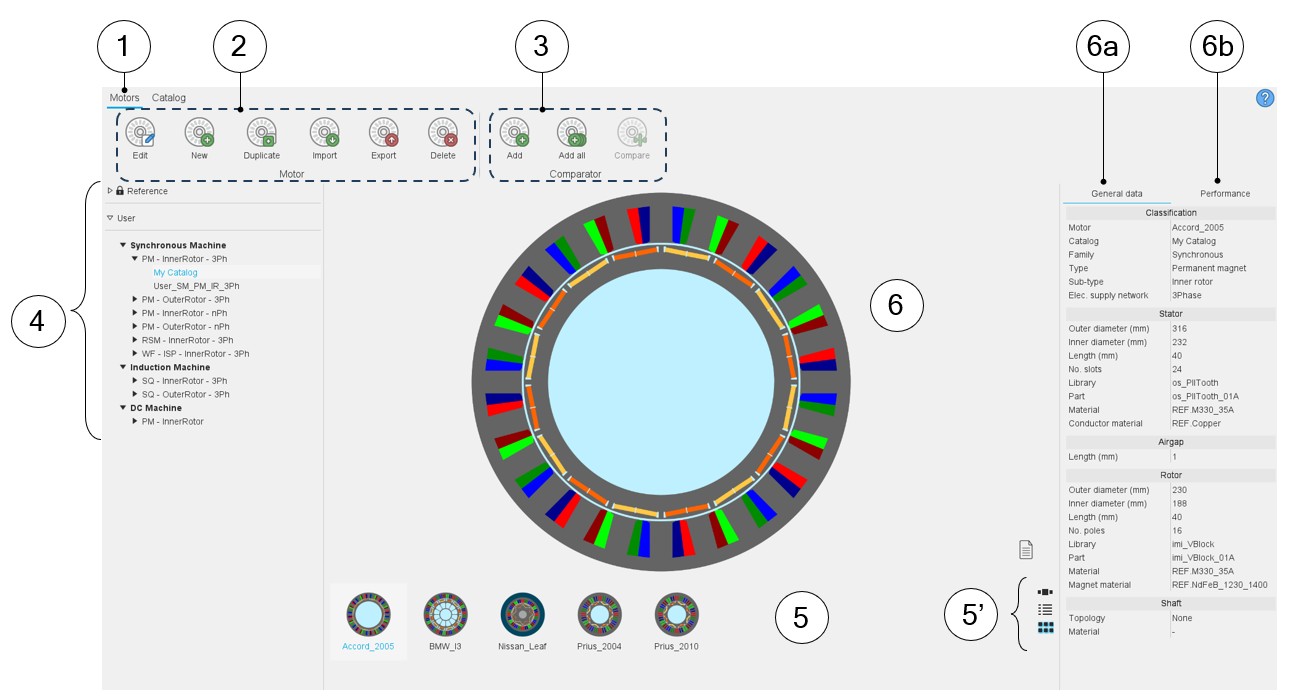
Here are the main zones that compose the “Motors” environment of the Motor Catalog.
 |
|
|---|---|
| 1 | Selection of the motors area of the Motor Catalog application. |
| 2 | Motors can be managed in this area:
|
| 3 | Tools to manage the comparison between motors – Access to the comparator. |
| 4 | Reference catalogs are available. Motors of these catalogs are read only. However, they can be copied and moved into user’s catalogs. User’s catalogs. The users can create new catalogs. See the process in the chapter “Reference commands”. |
| 5 | Visualization of all the motors (thumbnails) are stored in the selected catalog. Clicking on one thumbnail allows displaying the corresponding motor in the central area (6). |
| 5' | The motors can be displayed as a slide show or as a list or as a matrix view of pictures. |
| 6 | Visualization of the selected motor. |
| 6a | Displaying general data of the selected motor. |
| 6b | Displaying performance of the selected motor. |