
Since version 2026, Flux 3D and Flux PEEC are no longer available.
Please use SimLab to create a new 3D project or to import an existing Flux 3D project.
Please use SimLab to create a new PEEC project (not possible to import an existing Flux PEEC project).
/!\ Documentation updates are in progress – some mentions of 3D may still appear.
Adjustment: meshing by shading (on the close faces in 3D)
Introduction
Shading improves the meshing of close faces.
Principle
Shading permits the user to take into account the proximity between two geometric objects to define the mesh.
Notion of shading
When two geometric objects (generally two non-adjoining volumes), are close to one another, shading will influence the size of the nodes in function at the proximity of the two entities.
Example
In the example below, volumes (2) and (3) are very close to volume (1) but they do not touch. The zones where the volumes are almost in contact will be meshed in a denser manner.
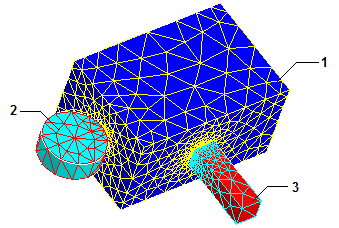
Aided mesh
For each 3D project, the software creates an aided_shadowface instance dedicated to the Aided mesh.