
New
How to create a new motor?
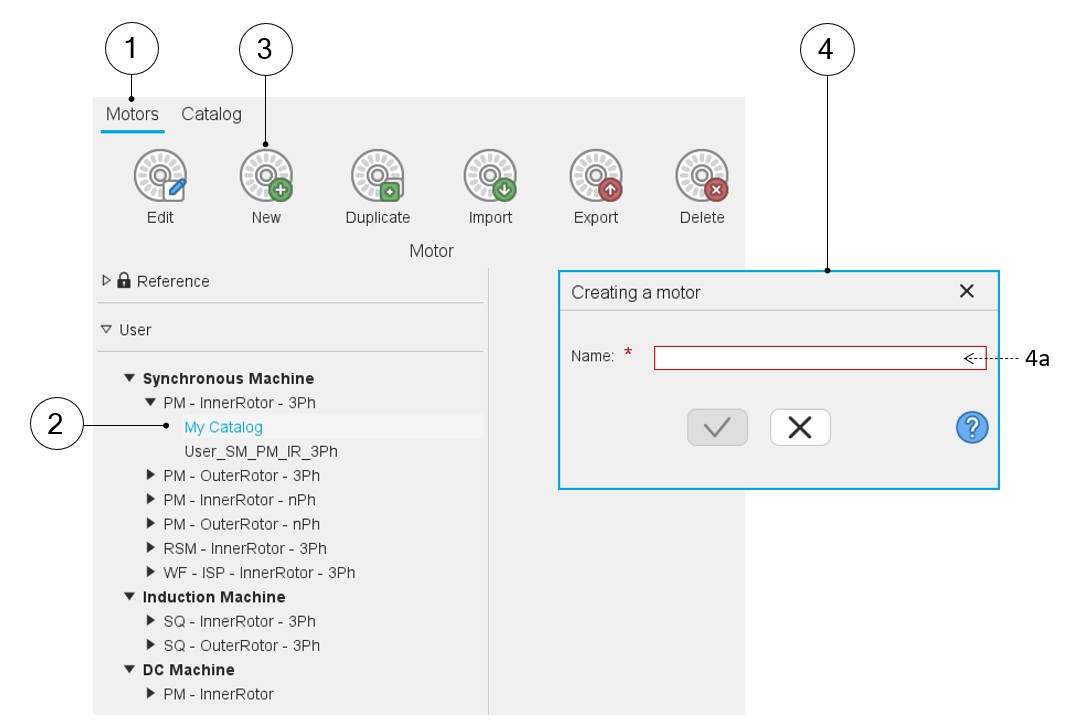
The creation of a new motor is possible only in a user’s catalog. If you select a reference catalog, the icon "New" is disabled.
 |
|
|---|---|
| 1 | Selection of the motors area of the Motor Catalog application. |
| 2 | Selection of a user’s catalog in which the new motor will be
stored. The selected catalog must correspond to the type of motor to be created. |
| 3 | Click on the icon “New”. |
| 4 | A dialog box is automatically opened to allow the process of creation. |
| 4a | A name must be given to the new motor. It will be stored in the
selected catalog. Then, the Motor Factory environment is opened to
design the new motor. Note: A default new
name is proposed. One must choose a name that is not already
used in the Motor Catalog. |
Note: The new motor previously created is stored in the
corresponding catalog. Its general data is displayed in the corresponding
tab.
Performance will be added only if the dedicated test has been performed (The test datasheet for SM-PM-3Ph machines, for instance).