
Edit
How to edit a motor?
- Motor from the reference catalogs
Edit a motor allows modifying its general data and properties by using Motor Factory.
As all the motors from reference catalogs are in read only mode, before editing such a motor, user must copy it in a user’s catalog.
A dedicated dialog box allows doing that quickly, as it is shown below.
Table 1. Edit a motor from reference catalogs 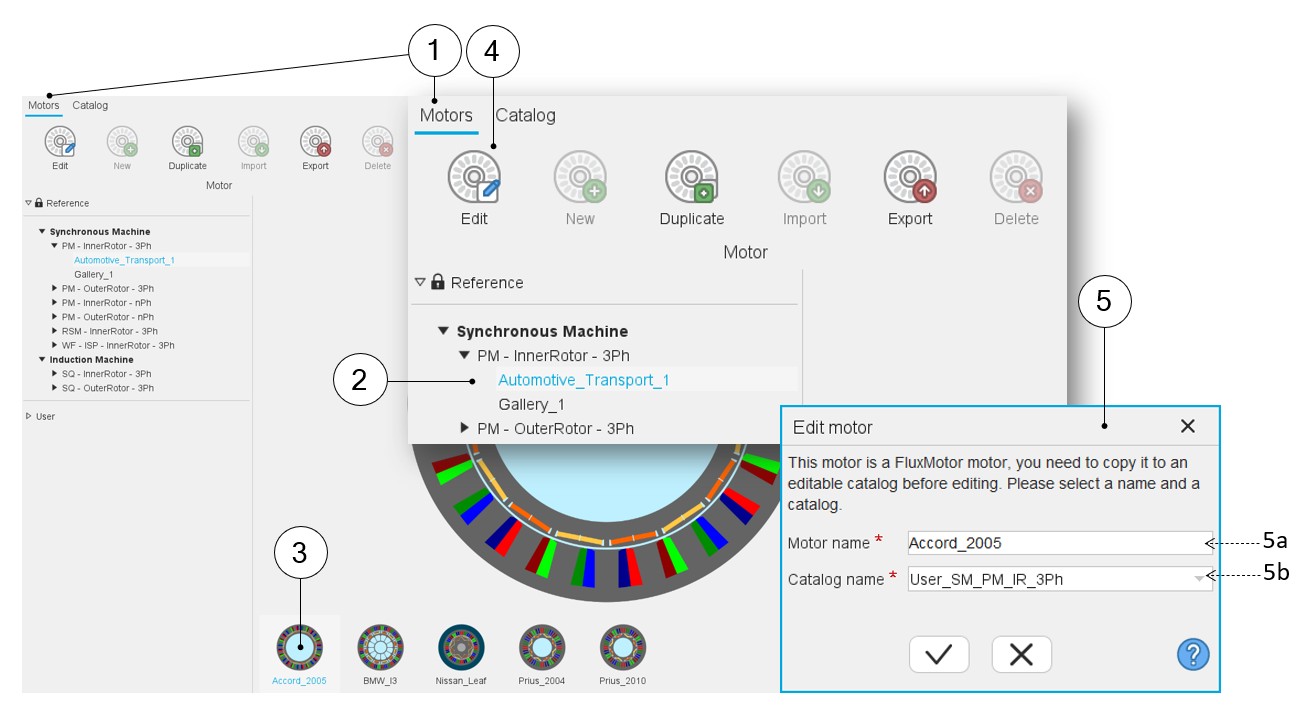
1 Selection of the motors area of the Motor Catalog application. 2 Selection of a reference catalog. 3 Selection of one motor in the selected catalog. This motor is displayed in the central area. 4 Click on the icon “Edit”. 5 As a motor from reference catalog is considered, a dialog box allows copying the selected motor in a user’s catalog.Note: When one selects a motor from a user’s catalog, this dialog box is not displayed. Motor Factory is then opened without any additional question.5a Give a name to the motor. 5b Choose a user’s catalog in which the copied motor will be stored. - Motor from User’s catalogs
In this case, as the motor is not in a “Read only” mode, it allows opening the motor directly with the Motor Factory application, which can be used to read or/and modify its characteristics.