
Multiwindow Results
Visualize analysis and optimization results with multiple modeling windows that show the results of each run.
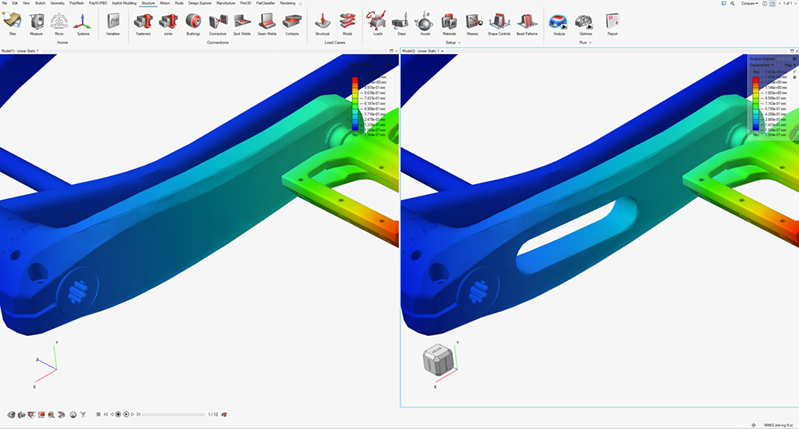
Arranging Analysis Windows
Arrange analysis run windows.
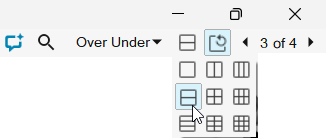
- Click Set Page Layout
 in the top-right
corner of the workspace.
in the top-right
corner of the workspace. - Select a layout to choose how the windows are arranged. In the following
example, the Over Under layout is updated to use two
horizontal windows.
 Note: Select Synchronize Windows
 if you want to
present the same view in each window. When you zoom, rotate, pan, or select
a view, all windows are updated.
if you want to
present the same view in each window. When you zoom, rotate, pan, or select
a view, all windows are updated.
Saving and Recalling Window Layouts
Save and recall window layouts for analysis runs.
-
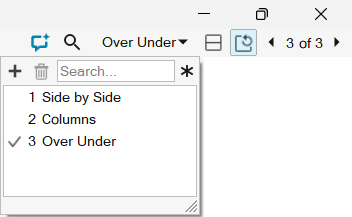
Click the dropdown next to the Set Page Layout
button.
-
Use the dropdown to recall, save, or delete layouts:
- Click a window layout name to load it.
- Click Add
 to create a
new, blank window layout.
to create a
new, blank window layout. - Click Delete
 to remove
the selected window layout.
to remove
the selected window layout.
Note: To rename a layout, right-click it, select Rename, and type a new name.