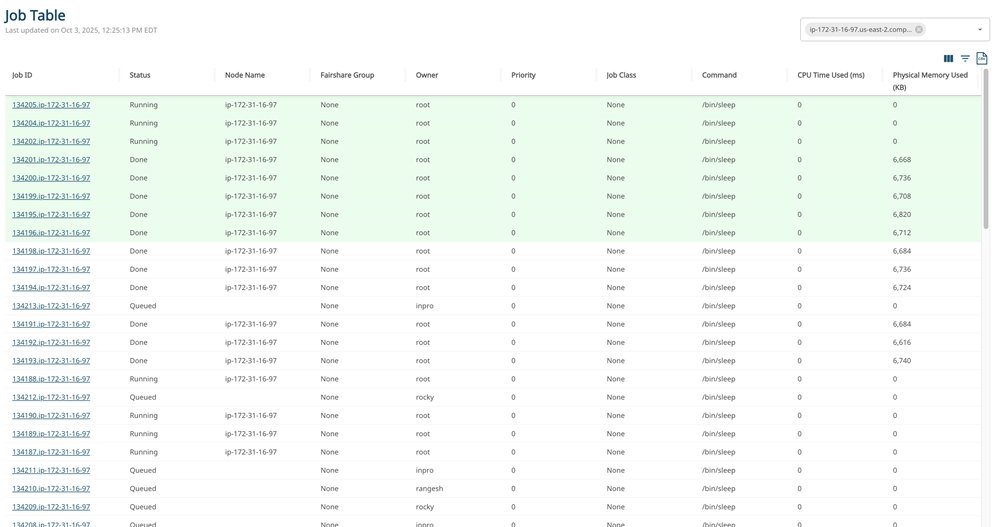
The Job Table report displays job details such as job states and system resource
usage.
Rows highlighted in the report indicate jobs that were updated within the last five
seconds.
The following metrics provide insights into job-level insights, monitoring job status and
analyzing jobs requested and usage. You can also select more job attributes by clicking
the icon. For
more details on how to select job attributes, see Customize the Summary Table in the Report.
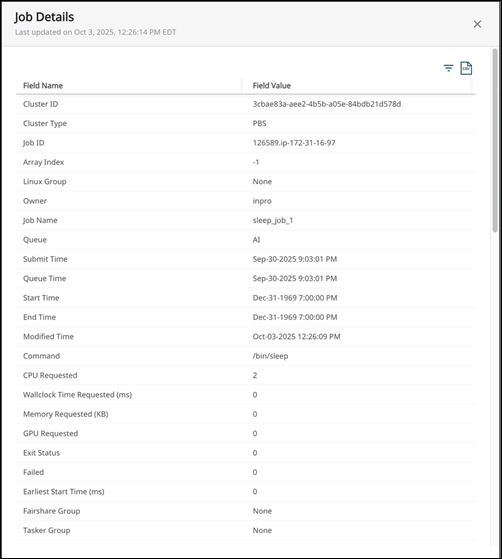
Job ID: A unique identifier assigned to each job submitted to the scheduler.
You can open the details of each job by clicking the link.
Status: Indicates the current state of the job.
Node Name: Specifies the compute node where the job was executed.
Fairshare Group: Displays the associated project or user group path, used for
scheduling fairness policies.
Owner: The username of the individual who submitted the job.

 icon. For
more details on how to select job attributes, see Customize the Summary Table in the Report.
icon. For
more details on how to select job attributes, see Customize the Summary Table in the Report.