
Depuis la version 2026, Flux 3D et Flux PEEC ne sont plus disponibles.
Veuillez utiliser SimLab pour créer un nouveau projet 3D ou pour importer un projet Flux 3D existant.
Veuillez utiliser SimLab pour créer un nouveau projet PEEC (pas possible d'importer un projet Flux PEEC existant).
/!\ La documentation est en cours de mise à jour – des références au 3D peuvent subsister.
Comment créer une région mécanique ?
Remarque : Le contenu de cette page est en anglais et sera traduit
ultérieurement en français.
To create a Mechanical region, click the Mechanical regions node of the Data tree:
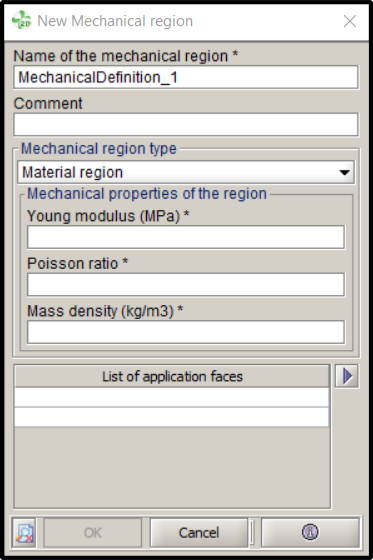
Then, in the New Mechanical region dialog box:
- Provide a name for the Mechanical region;
- Select the type of the Mechanical region in the drop-down menu. Two
region types are available:
- Material region and
- Air region (only useful in the context of free-shape optimization).
- In the case of a Material region, also provide the following
Mechanical properties of the region:
- the Young modulus (MPa),
- the Poisson ratio and
- its Mass density (kg/m3).
- Finally, inform the geometrical faces that integrate the Mechanical region in the List of application faces.