
Since version 2026, Flux 3D and Flux PEEC are no longer available.
Please use SimLab to create a new 3D project or to import an existing Flux 3D project.
Please use SimLab to create a new PEEC project (not possible to import an existing Flux PEEC project).
/!\ Documentation updates are in progress – some mentions of 3D may still appear.
Electro Static face (3D) / line (2D) region
Introduction
The face (in 3D) / line (in 2D) regions are:
-
either material regions: used to model thin regions in the study domain
-
or non-material regions: used to impose boundary conditions (BC) inside or on the frontiers of the study domain
Material regions (thin regions)
Thin regions enable the modeling of small thickness regions (cracks, air-gap, etc.).
The thin regions are described in the same way as the massive regions, with in addition the thickness of the regions.
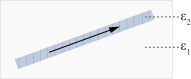
In 3D, the direction of the E and D fields is selected by the user, as indicated in the table below.
| Thin region | Direction of fields E and D | |
|---|---|---|
| no restriction | quasi tangential | |
|
dielectric (+ electric charge sources q) |
thin region with random ε permittivity |
thin region with: ε2 >> ε1
|
Non-material regions
Non-material regions enable to impose the boundaries conditions (BC).
| A region… | is a BC that enables one to impose… | It is defined by… |
|---|---|---|
| Perfect conductor | an uniform electric potential and a normal electric field |
an electric potential: floating or fixed value (in V) |
| Imposed surface charge | a surface density of electric charge |
a surface density of electric charge (in C/m²) (formula with input/output parameters or formula with spatial quantities) |
| Imposed electric potential | an electric potential |
an electric potential (in V) (formula with input/output parameters or formula with spatial quantities) |
| Normal electric field | a normal electric field |
an electric potential: floating or fixed value (in V) |
| Tangential electric field | a tangential electric field | |
| … on the faces/lines that form the region | ||