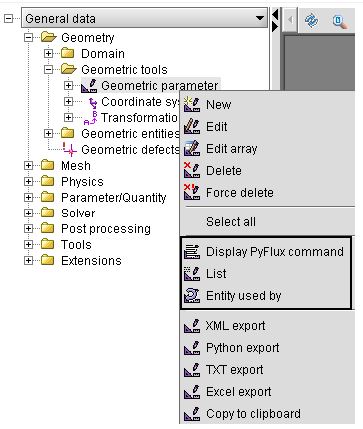
Informations on the entities: Display PyFlux, List and entity used by
Introduction
This paragraph presents the different commands that equip the user to display information regarding the entities: Displaying the PyFlux expression, Listing and Using by.
Role of information commands
The role of each of the information commands of an entity is described below.
| Command | Function/Use |
|---|---|
| Display PyFlux command |
This command permits the display of the Pyflux expression associated with an entity. The user can recover it to use in a python sequence. |
| List |
This command permits the list of the contents of an entity type to be displayed. This command is accessible only starting from the contextual menu of an entity type. |
| Entity used by | This command permits the user to know all the entities related to an entity |
Access to entity information commands
The information commands are accessible starting from the contextual menu of each entity or entity-type.