
Layers Mesh Generator improvements
Introduction
The "Layers Mesh Generator was implemented in Flux 2019.
This mesh generator, based on the MeshGems-Hybrid module of Distene, is a mixed mesh elements generator in Flux (it creates hexahedra, prisms, pyramids, or tetrahedra). It allows to mesh the skin depth with extruded elements (prisms, hexahedra) and relax the mesh in the remaining volume. It is based on the initial surface mesh of the volume without modifying it.This mesh generator can be assigned to volumes only. It is robust, simple and fast to use, even on complex shapes.
Flux 2022 improvement
Before Flux 2022, the mesh layer was applied of all faces of the volume, even on internal faces. For the physical aspect, it is not necessary to have the skin effect on internal face or symmetry / periodicity plane.
With Flux 2022, it is now possible to avoid the application of the Layers mesh generator in some faces. It will be useful to not have layers on:
- internal faces of a volume
- boundary faces of a symmetry or periodicity
Illustration
| Internal face not excluded (NO) | Internal face excluded (YES) |
|---|---|
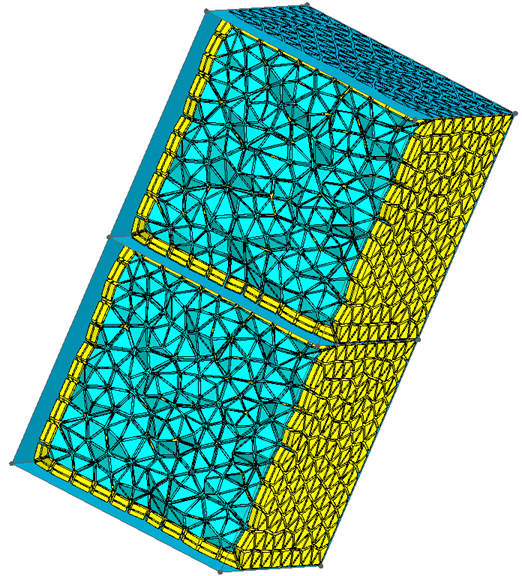 |
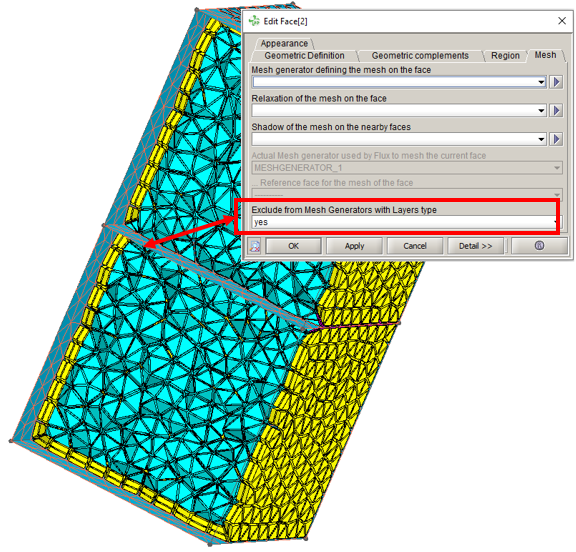 |
| The layer are generated around the internal face | The layer is not applied in the internal face |