
Store
Store
 |
|
|---|---|
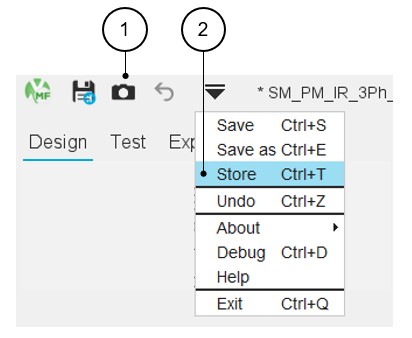
| 1 | “Store” a project is possible, directly from the top part of the Motor Factory or via a dedicated icon that represents a Camera. |
| 2 | The Store function is also available from the drop-down
menu. Note: Access by using the shortcut
CTRL+T defined in the user preferences is also
possible. Warning: A
project cannot be stored until a name has been assigned to it
using the “Save as” function. |
 |
|
|---|---|
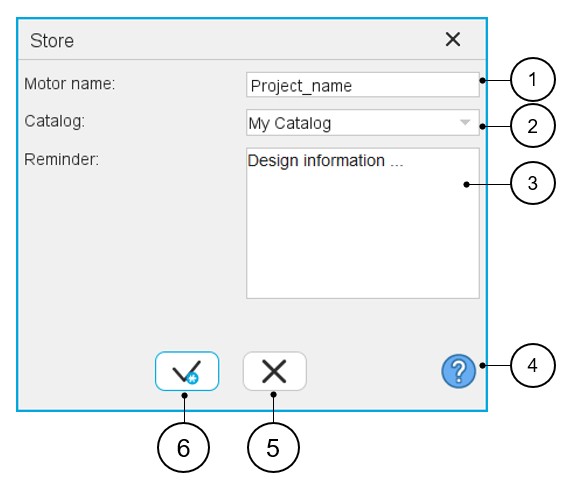
| 1 | Give a name to the project that corresponds to the design stage one wants to store. |
| 2 | Select an existing catalog in which the motor will be stored. |
| 3 | Memo to remind us of the main characteristics of the design one wants to store. |
| 4 | Access to the online user help guide, that corresponds to the dialog box of the function “Store”. |
| 5 | Button to cancel action and close the panel. |
| 6 | Button to apply inputs and close the panel. |
 |
|
|---|---|
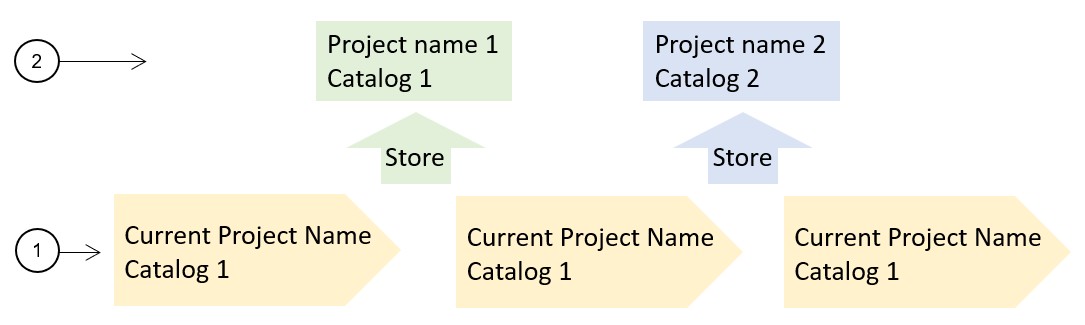
| 1 | The main design workflow is defined step by step. Some design stages can be "stored" during the design process to keep the main project variants and then to be able to recover and to compare them with the main workflow solution. |
| 2 | The “Store” function allows to store different design stages with a specific name and store them in a specific catalog. Hence, the user can continue the design work on the main design line. |