
Save as
Save as
 |
|
|---|---|
| 1 |
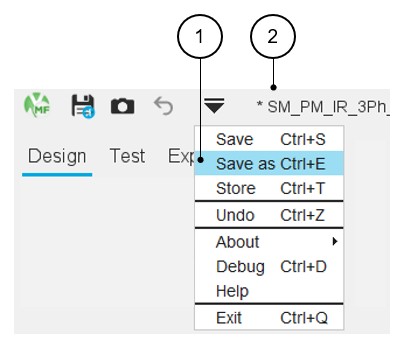
“Save as” a project is possible only via the top drop-down menu. “Save as” a project allows to choose a new name for the project and save it in another catalog. The user must give a new name to the motor and select an existing catalog in which the motor will be stored. Note: Access by using the shortcut CTRL+E
defined in the user preferences is also possible.
|
| 2 | When a new project is created, before being “save as”, no default name is assigned to it, just the name of the default catalog and the star symbol (*) in front indicating that the project is not yet saved. |