
Export datasheet
How to export datasheet?
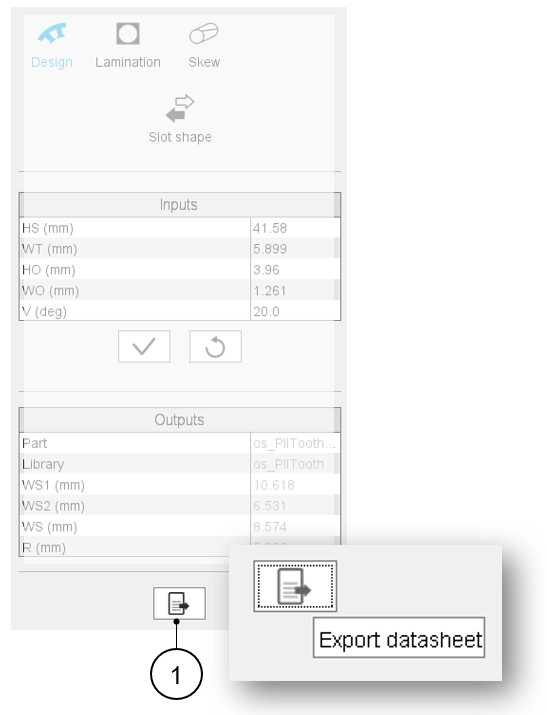
In the Motor Factory – Design area, whatever is the considered context of design for the machine, rotor, stator, cooling or materials, it is possible to export data that define the design of the machine. In each context, on the bottom part of the user inputs, one finds a button (Export datasheet) that opens a dialog box that helps the user to select and to export datasheet in a *.txt or *.xlsx format.
 |
|
|---|---|
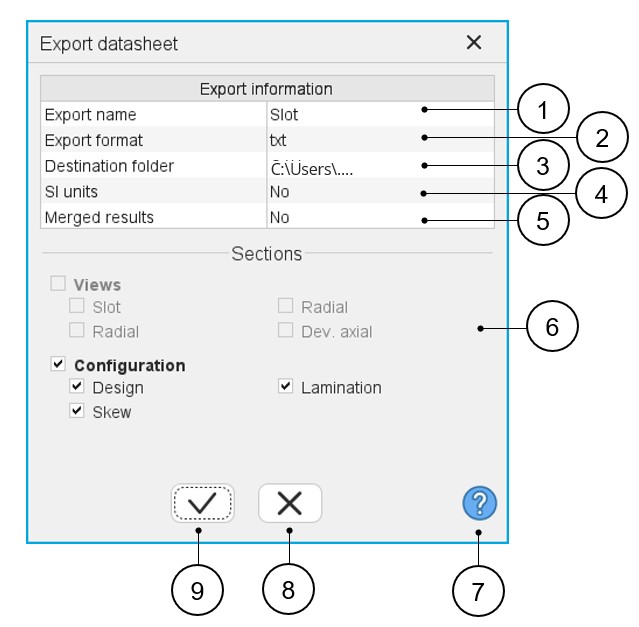
| 1 | Name of the exported text file. |
| 2 | Choice for exporting data into *.txt or *.xlsx files. |
| 3 | Folder in which the exported file will be stored. |
| 4 | System of units for numerical data can be given using SI Units
(Units based on International System of Units). When the answer is “No”, the default units used in FluxMotor are considered. |
| 5 | Merged results means the results are written in one text file.
When the answer is no, a text file is provided for each category
of result (Design, Lamination and Skew in our example). Note: When datasheet is exported in a *.xlsx
file, a tab is dedicated to each category of
result. |
| 6 | Visualization of all categories of results. Categories must be checked to add them to the selection of exported data. |
| 7 | Access to the online user help guide dedicated to the usage of the dialog box. |
| 8 | Button to cancel action and close the panel. |
| 9 | Button to apply inputs, close the panel and export the *.txt or *.xlsx file (in which the datasheet is stored. |