
Software Status
This report displays the current status of each tracked software vendor.
- Goal
- Determine the current status of each licensed software’s capacity, including how many licenses are in use, how many remain available, and identify which ones are nearing full capacity by analyzing their saturation levels. Additionally, review the longest and average session lengths to ensure they align with the type of software being used.
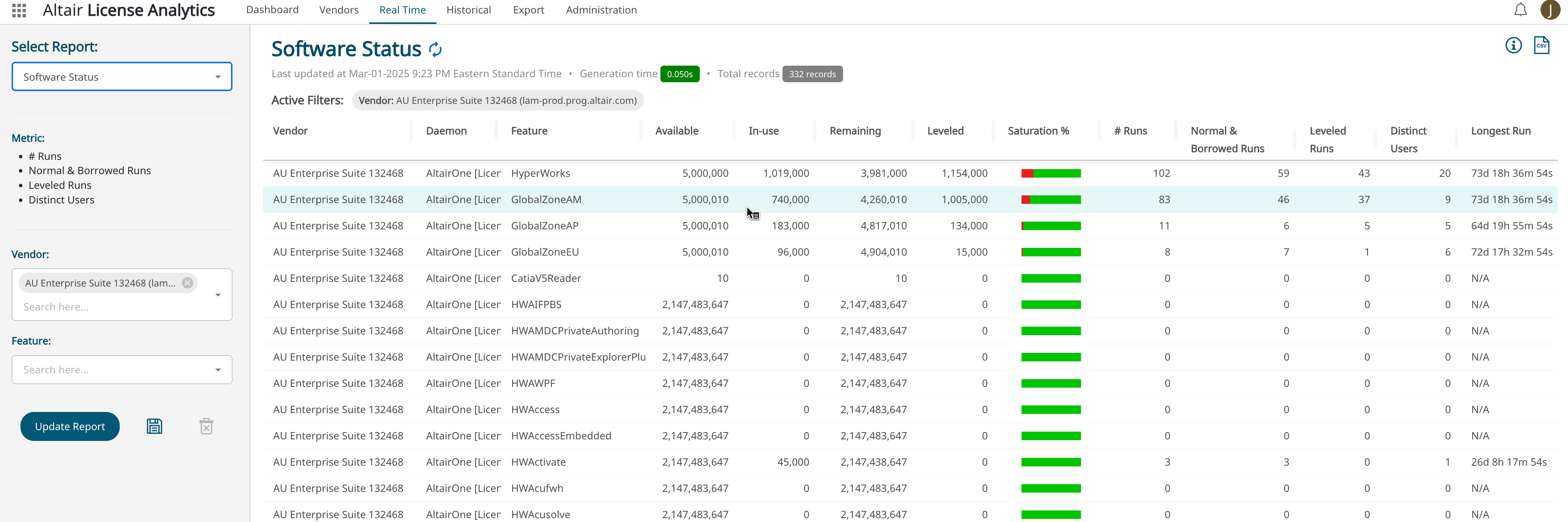
The report details are as follows:
| Name | Description |
|---|---|
| Vendor | Software |
| Daemon | Licensed software daemon (for AltairOne it is the license_id, for FlexLM it is the license software executable, and for Ansys it is ansyslmd) |
| Feature | Licensed feature |
| Available | License availability |
| In-Use | Current concurrent used licenses |
| Remaining | Quantity of licenses remaining: Available - “In-use” |
| Leveled | Current used licenses that are leveled (does not reduce license availability) |
| Saturation % | Saturation is taking In-Use / Available. It represents how close you are to capacity |
| # Runs | Number of runs (checkouts) |
| Normal and Borrowed Runs | Number of normal and borrowed runs |
| Leveled Runs | Number of leveled runs |
| Distinct Users | Number of distinct users |
| Longest Run | Longest checkout length expressed in Day Hour Minute Seconds |
| Shortest Run | Shortest checkout length expressed in Day Hour Minute Seconds |
| Average Run | Average checkout length expressed in Day Hour Minute Seconds |
- Drill-Down Option
-
- Open Sessions - Explore who the current users are
- Export Runs - Export runs for the selected Software Vendor