
Since version 2026, Flux 3D and Flux PEEC are no longer available.
Please use SimLab to create a new 3D project or to import an existing Flux 3D project.
Please use SimLab to create a new PEEC project (not possible to import an existing Flux PEEC project).
/!\ Documentation updates are in progress – some mentions of 3D may still appear.
Structure of a macro file
Structure
The structure of a file defining the macro (*.py) is presented in the example below.
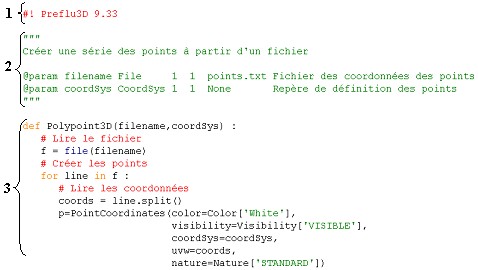
| Part | Description |
|---|---|
| 1 | Header of an executable Flux program |
| 2 | Description of input parameters of the macro |
| 3 | Definition of a parameterized function in the PyFlux language |
(1) Program header
The Flux program header is compulsory. It specifies which Flux program (2D and/or 3D) will execute the macro and its version*.
(2) Description of parameters
This second part deals with the description of the input parameters of the macro.
For each parameter it is necessary to define:
- a parameter name
- a PyFlux type
- minimal and maximal cardinalities (numbers of minimal and maximal values corresponding to the data structure)
- a default value or a keyword None
-
a label associated to the parameter
(this label appears in the dialogue box for the running macro)
(3) Parameterized function
This second part deals with the description of the parameterized function.
For this function it is necessary to define:
- a function name (= name of the macro)
- input parameters of the de function
- a body of the function (PyFlux instructions)