Since version 2026, Flux 3D and Flux PEEC are no longer available.
Please use SimLab to create a new 3D project or to import an existing Flux 3D project.
Please use SimLab to create a new PEEC project (not possible to import an existing Flux PEEC project).
/!\ Documentation updates are in progress – some mentions of 3D may still appear.
Introduction
About
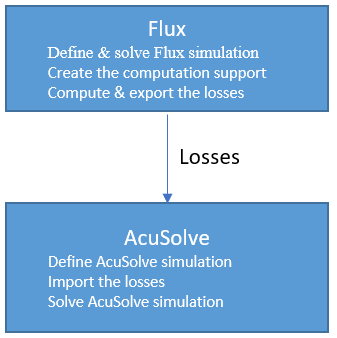
Flux-AcuSolve coupling allows to make thermal analysis in AcuSolve by taking the losses computed in Flux (Joule losses or Iron losses) as heat sources.
This specific document gives the optimal workflow to follow in Flux and AcuSolve to make the thermal analysis of a cable.
Concerning the software version to use: from Flux2018.1 (mandatory) and from AcuSolve 2017.2 (advised).Study case
In this document we consider a cable as study case.
Joule losses generated in the cable involve temperature increase which can destroy the materials.
The Flux-AcuSolve coupling allows predicting and evaluating the temperature increase.
Steps