
Path
Path preferences
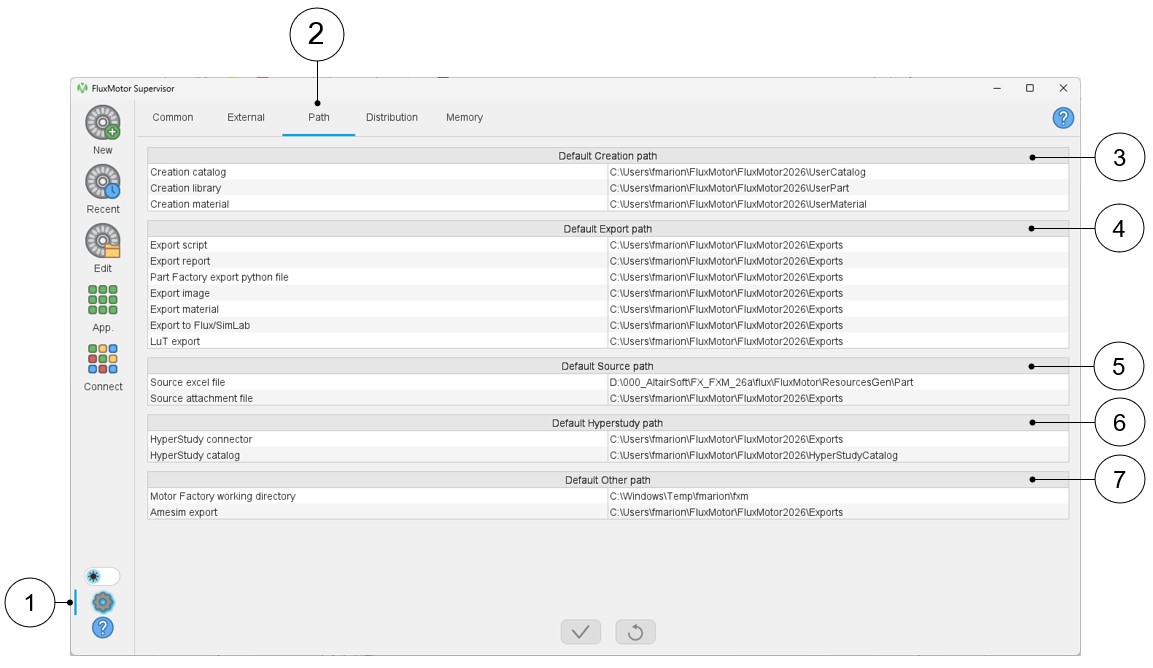
In the path user preferences, the different path types are classified into several sections for better visibility.
 |
|
|---|---|
| 1 | Access to user’s preferences |
| 2 | Selection of the path user preferences |
| 3 | Default Creation path: For storing files generated by applications like Motor Catalog, Part Library or Materials. |
| 4 | Default Export path: For storing files that are exported from different applications. |
| 5 | Default Source path: For defining the default folder where files can be loaded either for building the part or for adding attachments (Part Library or Motor Catalog). |
| 6 | Default HyperStudy path: For defining the default folder where the connectors generated for HyperStudy are stored and where the catalog provided during the HyperStudy process will be stored. |
| 7 | Default Other path: Motor Factory working directory and Amesim export folder. |