
External
External software preferences
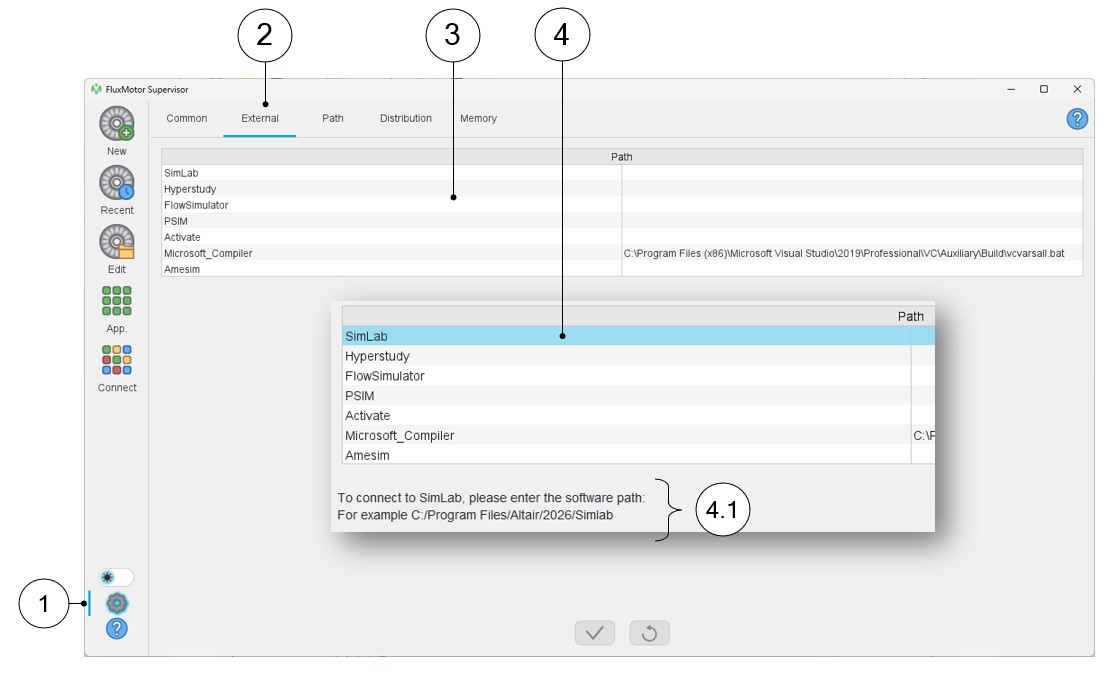
The different External software preference parameters are listed and illustrated below.
In this section, one can define all the links needed to reach and launch the
available external software. Once a software name is selected and highlighted
(SimLab in the example below), a typical path for the considered software is
provided for helping the user.
Note: The user must adjust the
link to his proper case.
 |
|
|---|---|
| 1 | Access to user’s preferences |
| 2 | Selection of the external software preferences |
| 3 | List of external software where the path can be defined. |
| 4 | Definition of the path for the software considered (SimLab in the example). |
| 4.1 | Once a software name is selected and highlighted (SimLab in the example), a typical path for the software considered is provided for helping the user. |
Note: The path to locate the Microsoft compiler is automatically
detected if loaded on the computer. The paths of other software are not
automatically defined. The users must define all these paths by themselves.