
Memory
Memory user preferences
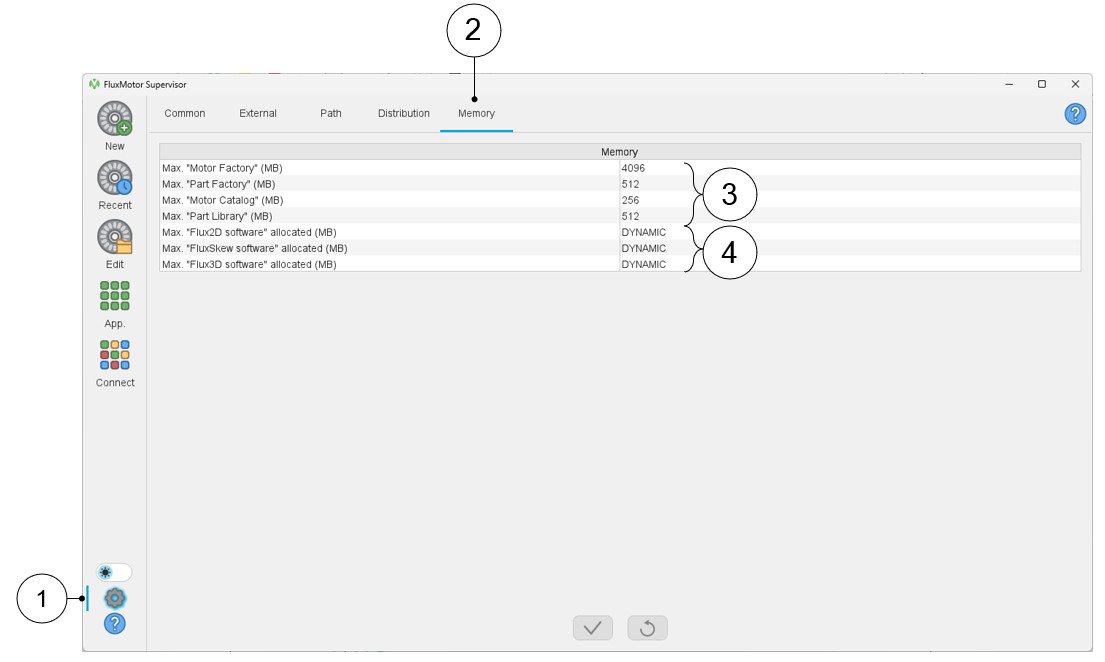
In the Memory user preferences, one can define the memory allocation for the different applications used.
 |
|
|---|---|
| 1 | Access to user’s preferences |
| 2 | Selection of the memory preferences |
| 3 | Maximum memory allocation for FluxMotor
applications. It is recommended to keep default values as far as possible. In case of trouble, consult our support team. |
| 4 | Maximum memory allocation for Flux2D and FluxSkew
applications. It is recommended to keep default values as far as possible. In case of trouble, consult our support
team. Warning: “Maximum Flux3D software allocated (MB)”
is a user entry that should not be used. It serves no
purpose in this version |