
Example: Raspberry Pi Target Support
The creation of a new code generation wrapper library for Twin Activate is discussed here.
Some of the steps are illustrated using the existing Raspberry Pi target as an example.
The Raspberry Pi extension is available to download on AltairOne.
Create a Library
Create a Library through the Library Manager.
-
Select .
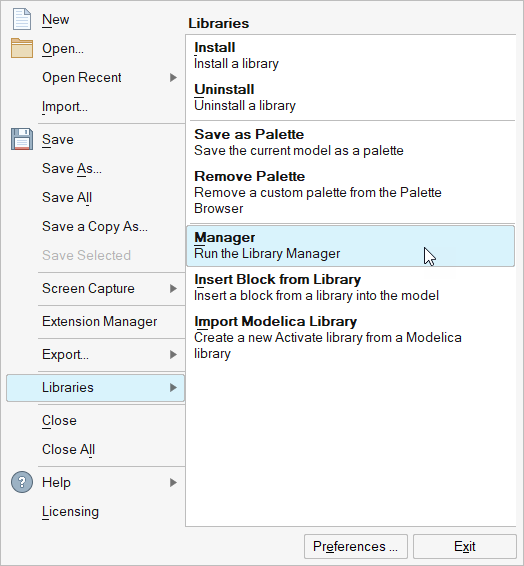
-
Select Create a new library.
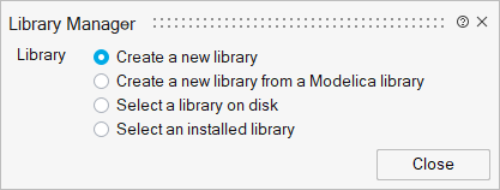
-
Enter a name and path for the new library.
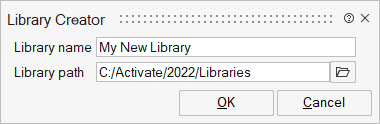
-
Press OK.
- A new empty library is created in the specified directory and installed in the software.
- The library is accessible from where you can use the load button on the library
extension to uninstall
 or install
  your library as needed.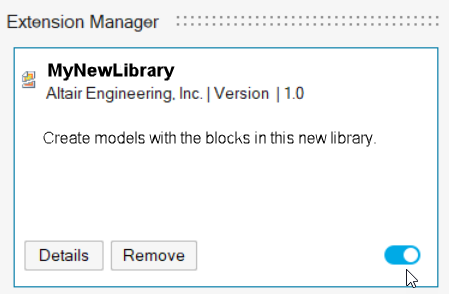
Set up the Super Block
Set up a super block after creating the RaspberryPi library.
- Place an empty super block in a new model. Right-click an empty area and select Super Block from the menu.
-
Customize the super block for the target.
Right-click on the super block and rename it to the Target name (RaspberryPi in this case).
-
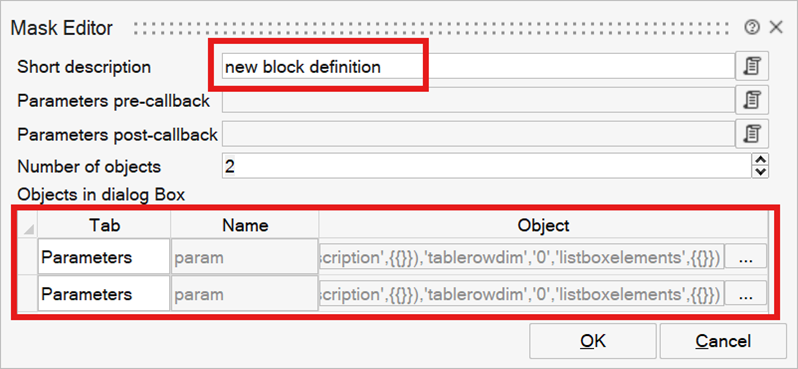
Edit the mask of the super block. Update the Number of
objects to 2 or more based on the requirements, as shown in the
image below.
-
For each parameter, define the name and the properties. Click the
... button to open the Parameters Creator tab.
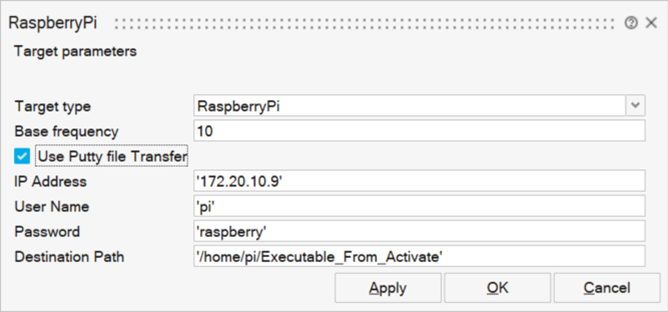
In this example, the following parameters are defined. The first one defines the Target and must be present. The base frequency The others are specific to Raspberry PI target.
- Target type: This is a combo box and must be present. The parameter name is Target and its value is an OML structure containing the sub parameters defined in the mask. The name of the active sub parameter corresponds to the name of the redirecting OML function, which calls the generic custom wrapper passing the name of the OML code generator for the target.
- Base Frequency: This is an Edit box in which a numeric value is entered. It is used for most targets to define the frequency of the main loop in the generated code. The base frequency in general corresponds to the frequency of the main loop in the generated code.
- Use Putty for file transfer check box: This check box enables/disables the Ipaddress, username, and password for the file.
- IP address: Edit box to enter the Ipaddress.
- UserName
- Password
- Destination Path
The RaspberryPI library can now be used by placing the above super block in a model and using the custom code generator to generate code for its content.
The library is currently empty. It does not contain any wrapper blocks, and the code generation functions are missing. The name of the redirecting code generation function was defined as ToRaspberryPiWrapper. This file must be placed under _macros folder.
Create Wrapper Blocks for the Library
The serial write block is used as an example of creating a wrapper block.
The library blocks that need to be developed for the target are, for the most part, not regular Activate blocks, but wrapper blocks. These blocks are used to specify the way code should be generated for embedded code but should not be used for simulation.
The wrapper blocks are constructed based on the generic wrapper block. For the most part, they are constructed as a super block containing a Generic Wrapper block. The following illustrates the steps to create such a block. The serial write block is used as an example.
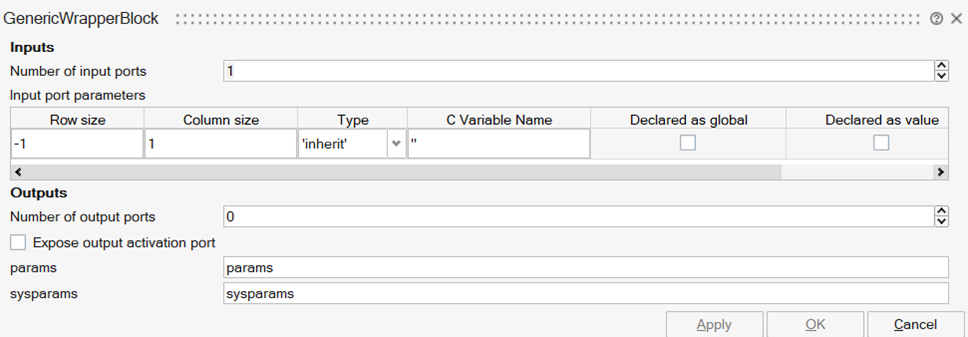
This sets the number of inputs of the block to one. The block can then be placed in a super block defining the serial write block. The values of the parameters params and sysparams are defined by variables bearing the same names and defined in the super block context. The super block can then be named after the desired name for the write block. Finally, the super block is masked, and its default parameter values specified. The masked super block can now be placed in the library. The following figure shows the full content of the block RPiSerialWrite.
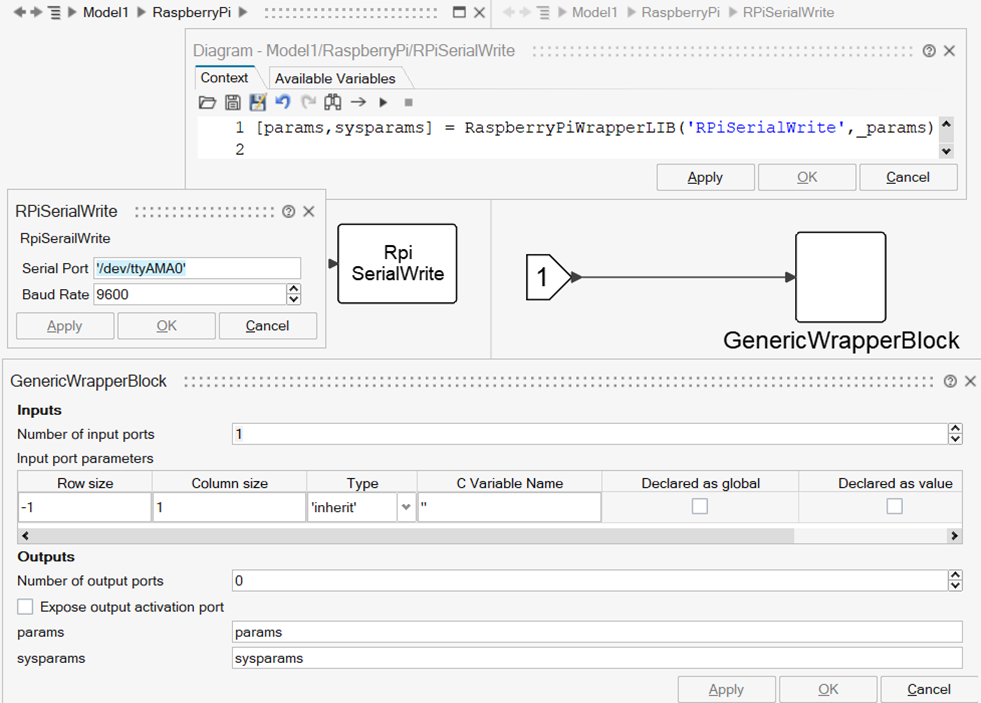
The variables params and sysparams are obtained in the context by calling the wrapper library function, RaspberryPiWrapperLIB, to be developed. The variable _params in the context of the masked super block contains the mask parameter values. The block parameters, along with the name of the block, are used to call the library function, which in return, provides the block params and sysparams parameters.
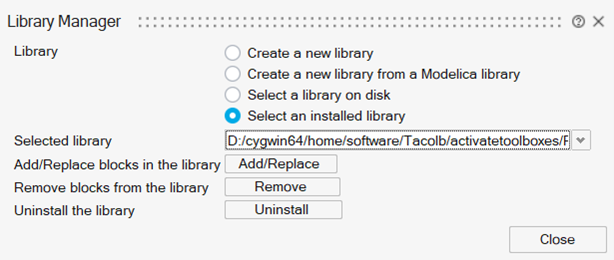
- Open the library manager and select the library being developed.
- Select the block to add to the library.
- Use the Add/Replace menu to add the new block to the library.
Create a Wrapper Library Function
This library function defines the code-snippets associated with all keywords and for all the blocks in the library in a unique file.
The use of the wrapper library function facilitates the definition of wrapper block parameters defining code snippets for various keywords.
case 'RPiSerialWrite'
	% Define the Include, PreCallStringInit, and PostCallString

	params = struct();
	includeStrings = {
	'#include "RPiserReadWrite.h"',
	};
	includeStrings_joined = strjoin(includeStrings, char(10));
	sysparams = struct('Include', {{includeStrings_joined}});
	serHandle = ['ser_handle_',getUniqueInoutName()];
	localDeclarationStrings = { ['	int ',serHandle ';'];
								['	'serHandle ' = serial_init("'_params.SerialPort '",' num2str(_params.BaudRate) ');'];
								['	if ('serHandle '< 0) {'];
								'		gpioTerminate();';
								'		return 1;';
								'	}'
	   						};
	params.localDeclarationStrings=strjoin(localDeclarationStrings,char(10));

	postCallStrings = { 	['		serial_write('serHandle ', $1, __1__);'];

					 };
	% Join the array of strings using `char(10)` as the separator to preserve newline characters
	params.PostCallString = strjoin(postCallStrings, char(10));

	% PostCallString
	postLoopStrings = {
	['	serial_close('serHandle ');'];
	};
	params.PostLoopString = strjoin(postLoopStrings, char(10));
clearvars serHandle;- IncludeStrings – Required include statements
- localDeclarationStrings – Declaration of local variables
- postCallStrings – Actual write function placed after the call to the step function
- postLoopString – Final instructions to be executed at the end of the program
Target Code Generation Files
Details of the files used in target code generation.
The main effort for supporting a new target consists of developing the code generator function. The custom wrapper target code generator is a generic code generator that prepares the super block model data but relies on the specific code generator function of the target to generate code.
function ToRaspberryPiWrapper(varargin)
  [blk,ppparams]=pproj_getsblock(varargin);
  genmainfunc=@RaspberryPiWrapper;
  vssCompileToWrapper(blk,ppparams,genmainfunc);
end
In this “redirection” function, which is called with arguments containing super block information required for code generation, the main target code generation function is passed to the custom wrapper generator. This is done by passing this function as an argument of the vssCompilerToWrapper function.
For the most, there is no reason to make changes to this function other than placing the name of the main code generation function for the target. In this case, it is RaspberryPiWrapper. So, the two functions to define for code generation are ToRaspberryPiWrapper and RaspberryPiWrapper.
The corresponding OML files ToRaspberryPiWrapper.oml and RaspberryPiWrapper.oml are defined in the _macros folder in the library folder.
Main Code Generator Function
The main code generator function receives the arguments callbacks, Wparams, and Sysparams, providing the information required to generate the main.c file for the specified target. The way the main code generator creates this file is target-dependent, particularly in the presence of interrupts. The example of the Raspberry PI generator is useful to understand the process. To get a better understanding, it is recommended to examine the code generators for other targets.
Main Code Generator for Target Raspberry PI
This code generator, as for most other code generators, starts by extracting and transforming the information received through its arguments:
function RaspberryPiWrapper(callbacks, wparams, sysparams)
	period=sysparams.period;
	folder=sysparams.folder;
	extlibs=sysparams.extlibs;
	clocks=sysparams.clocks;
	nin=sysparams.nin;
	nout=sysparams.nout;

	[wparams0, lwparams] = vssWrapperSeparatewparams(wparams);
	[globaldecl, localdecl, args] = vssGetWrapperIOList(wparams);
The clocks variable contains information regarding various activations: the mainloop activation and the interrupts. The codes for the interrupt functions are first generated:
interruptcodes = {};
loop_present = 0;
ninterrupts = size(clocks, 2);
[sharedInterruptTImerFlag,timePeriodValue]=checkPeriodsForIntegerMultiples(ninterrupts,clocks);
loopFlag=true;

for i = 1:ninterrupts
	inter = clocks{1, i};
	if ~isequal(inter, 'mainloop')

%	 disp('TIDS')
	tids=vssInterruptsProps(inter,'timerID');
	tid = ~isempty(tids);

	if ~isempty(tids)
%		disp('here ')
		try
			tperiods=vssInterruptsProps(inter,'tperiod');
		catch
			error(['Period not defined for timer interrupt ',inter]);
		end
		for ii=1:length(tids)
			tid=tids{ii};
			if ~isempty(intersect(TID,tid))
				error(['Timer ID ', num2str(tid),' defined more than once.']);
			else
				TID(end+1)=tid;
			end
		tperiod=tperiods(ii);
		end
	end

	if(sharedInterruptTImerFlag)
		if(loopFlag)
			interruptcodes{i} = {['void shared_interrupt_handler(int signum) {']};
			loopFlag=false;
			interruptcodes{i}{end + 1} = '  double_t t;';
			interruptcodes{i}{end + 1} = '  tr = ((double_t) clock() / CLOCKS_PER_SEC);';
			interruptcodes{i}{end + 1} = '  t = tr;';
		end
	else
		interruptcodes{i} = {['void ', inter, '_handler(int signum) {']};
		interruptcodes{i}{end + 1} = '  double_t t;';
		interruptcodes{i}{end + 1} = '  tr = ((double_t) clock() / CLOCKS_PER_SEC);';
		interruptcodes{i}{end + 1} = '  t = tr;';
	end

	interruptcodes{i}{end + 1} = '  ';
	interruptcodes{i} = [interruptcodes{i}, localdecl];
	%interruptcodes
	interruptcodes{i}=vssWrapperGetBlocksCode(interruptcodes{i},lwparams{i},'localDeclarationStrings');
	interruptcodes{i} = vssWrapperGetBlocksCode(interruptcodes{i}, lwparams{i}, 'PreCallString');
	STEP=clocks{2,i};

	if(sharedInterruptTImerFlag)
		interruptcodes{i}{end + 1} = ['if(fabs(fmod(counter * ',num2str(timePeriodValue),',',num2str(tperiod{1}),')) < 0.0001) {'];
	end

	interruptcodes{i}{end + 1} = sprintf('  %s(%s);', STEP, args);
	interruptcodes{i} = vssWrapperGetBlocksCode(interruptcodes{i}, lwparams{i}, 'PostCallString');

	if(sharedInterruptTImerFlag)
		if(i==(ninterrupts-1))
			interruptcodes{i}{end + 1} = '  } ';
			interruptcodes{i}{end + 1} = '  counter++ ;';
			interruptcodes{i}{end + 1} = '  if (counter >= 1000) {  ';
			interruptcodes{i}{end + 1} = '             counter = 0 ;';
			interruptcodes{i}{end + 1} = '}';
			interruptcodes{i}{end + 1} = '//printf(" \n debug statement to print within Interrupt  \n");';
			interruptcodes{i}{end + 1} = '}';
			interruptcodes{i}(end + 1) = '';
		else
			interruptcodes{i}{end + 1} = '}';
		end

	elseif(~sharedInterruptTImerFlag)
		interruptcodes{i}{end + 1} = '//printf(" \n debug statement to print within Interrupt  \n");';
		interruptcodes{i}{end + 1} = '}';
		interruptcodes{i}(end + 1) = '';
	end
    else
    	loop_present = 1;
	end
end
The OML cell interruptcodes now contains the C codes associated with different interrupt functions. The variable loop_present indicates whether there exist any blocks to be activated in the main loop.
The string variable mainc is used to store the content of the main.c file to be generated. The following code declares the initial declarations and include instructions:
mainc = {};
  mainc{end + 1} = '// This file is generated for Raspberry Pi';
  mainc{end + 1} = '';
  mainc{end + 1} = '#include <pigpio.h>';
  mainc{end + 1} = '#include <stdio.h>';
  mainc{end + 1} = '#include <stdlib.h>';
  mainc{end + 1} = '#include <signal.h>';
  mainc{end + 1} = '#include <time.h>';
  mainc{end + 1} = '#include "body.h"';
  mainc{end + 1} = '#include <unistd.h>';
  mainc{end + 1} = '';
   if(sharedInterruptTImerFlag)
		mainc{end + 1} = 'double counter=0;';
  end
mainc = vssWrapperGetSystemCode(mainc, sysparams, 'Include'); for i = 1:ninterrupts
inter = clocks{1, i};
if ~isequal(inter, 'mainloop')
tid=vssInterruptsProps(inter,'timerID');
if ~isempty(tid)
if(sharedInterruptTImerFlag)
mainc{end + 1} = ['void shared_interrupt_handler(int signum);'];
break;
else
mainc{end + 1} = ['void ', inter, '_handler(int signum);'];
end
end
end
end
mainc{end + 1} = '';
%disp('entered4')
mainc = [mainc, globaldecl];
mainc{end + 1} = '';
mainc{end + 1} = 'static double_t tr;';
mainc{end + 1} = 'static int terminate_program = 0;';
mainc{end + 1} = 'timer_t my_timerid;';
mainc{end + 1} = '';
for i = 1:length(interruptcodes)
mainc = [mainc, interruptcodes{i}];
endThe mainloop activation might or might not be present; it depends on the content of the super block, so both cases must be considered. In the case where mainloop is present, a wait function needs to be used to slow down the main loop by synchronizing it with the Base frequency. The function waitfor is then defined only if the mainloop is present:
  mainc = vssWrapperGetBlocksCode(mainc, wparams, 'AllocateString');
  mainc{end + 1} = '';

  if loop_present
    mainc= vssWrapperGenerateWaitUntil(mainc);
  end

  mainc{end+1} = '#define MAX_IDLE_LOOP_TIME_SEC 1';
  if loop_present
    mainc{end + 1} = 'void handle_termination_signal(int signum) {';
    mainc{end + 1} = '  terminate_program = 1;';
    mainc{end + 1} = '  struct itimerspec its;';
    mainc{end + 1} = '  its.it_value.tv_sec = 0;';
    mainc{end + 1} = '  its.it_value.tv_nsec = 0;';
    mainc{end + 1} = '  timer_settime(my_timerid, 0, &its, NULL);';
    mainc{end + 1} = '  gpioTerminate();';
    mainc{end + 1} = '  exit(0);';
    mainc{end + 1} = '}';
    mainc{end + 1} = '';
  end

  mainc{end+1}=[''];
  mainc{end+1}=[''];
  mainc{end+1}=[''];
  mainc{end+1}=[''];
  mainc{end + 1} = 'void setup() {';
  mainc{end+1} = '  tr = ((double) clock()*1000 / CLOCKS_PER_SEC);' ;
  mainc{end + 1} = '  if (gpioInitialise() < 0) {';
  mainc{end + 1} = '    fprintf(stderr, "pigpio initialization failed\n");';
  mainc{end + 1} = '    exit(1);';
  mainc{end + 1} = '  }';
  mainc{end + 1} = '  ';
  mainc{end + 1} = '';
mainc{end+1}=['']; TID=[];PINS=[];
for i=1:ninterrupts
inter=clocks{1,i};
if ~isequal(inter,'mainloop')
tids=vssInterruptsProps(inter,'timerID');
if ~isempty(tids)
try
tperiods=vssInterruptsProps(inter,'tperiod');
catch
error(['Period not defined for timer interrupt ',inter]);
end
for ii=1:length(tids)
tid=tids{ii};
if ~isempty(intersect(TID,tid))
error(['Timer ID ', num2str(tid),' defined more than once.']);
else
TID(end+1)=tid;
end
tperiod=tperiods(ii);
endYou can inspect the source code for details.
  if ~isempty(callbacks.init)
    mainc{end+1}=sprintf('  %s();',callbacks.init);
  end
  if ~loop_present

    mainc{end + 1} = '  while (!terminate_program) {';
    mainc{end + 1} = '    struct timespec idle_time;';
    mainc{end + 1} = '    idle_time.tv_sec = 0;';
    mainc{end + 1} = '    idle_time.tv_nsec = MAX_IDLE_LOOP_TIME_SEC * 1e9;';
    mainc{end + 1} = '    nanosleep(&idle_time, NULL);';
    mainc{end + 1} = '  }';
    mainc{end + 1} = '';

    mainc{end + 1} = '  gpioTerminate();';
    mainc{end + 1} = '  exit(0);';
  end

  mainc{end + 1} = '}';
  mainc{end + 1} = '';

  mainc{end + 1} = 'int main(void) {';
  mainc{end + 1} = '  setup();';
  if loop_present

    mainc{end+1}= '  double_t t;';
    mainc=vssWrapperGetBlocksCode(mainc,wparams0,'localDeclarationStrings');
    mainc=[mainc, localdecl];
    mainc{end+1}= '  while(1) {';
    mainc{end+1}= ' 		t = ((double_t) tr)/1000.0;';
    mainc=vssWrapperGetBlocksCode(mainc,wparams0,'PreCallString');
    STEP=clocks{2,end};
    mainc{end+1}=sprintf('  		%s(%s);',STEP,args);
    mainc=vssWrapperGetBlocksCode(mainc,wparams0,'PostCallString');
    mainc{end+1}=sprintf('  		tr = ((double) clock()*1000 / CLOCKS_PER_SEC) + %g;', fix(period*1000));
    mainc{end+1}='  		waituntil(tr) ; ';
    mainc{end+1}='  }';
    mainc=vssWrapperGetBlocksCode(mainc,wparams0,'PostLoopString');

  end
  mainc{end + 1} = '  return 0;';

  mainc{end + 1} = '}';
mainc{end + 1} = ''; % Write the generated code to a file
filename = fullfile(folder, 'main.c');
fid = fopen(filename, 'w');
for i = 1:length(mainc)
fprintf(fid, '%s\n', mainc{i});
end
fclose(fid);