The Model Browser displays the construction history of an object in a tree. Like a
real tree, the parent, root nodes are at the bottom of the tree, and the child nodes, like
branches, are on the top.
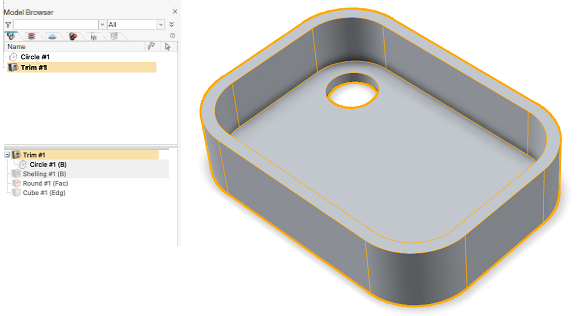
For example, in the following image, selecting Trim #1 in the modeling view (upper window
of the Model Browser) displays the construction history of the object in the tree
(bottom window of the Model Browser). The tree displays two highlighted objects in gray:
Circle #1 and Shelling #1. These two are source, parent objects for the Trim. The Trim
is the child object.
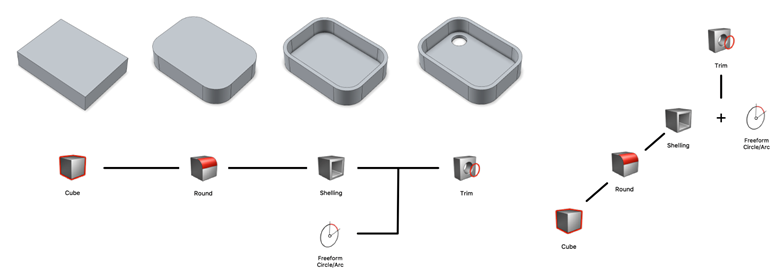
The following diagrams show the linear flow of the object's construction. Note that the
diagrams are an illustration only, not a view from the Model Browser.
As you can see in the tree and the diagrams, the construction of the final object, Trim,
which includes the cutout, began with the Cube object. The Cube was modified and saved
as the Round object. Hence, the Cube is both a source object and parent of the Round
object.
When the round operation is performed, two things happen in the tree of the Model
Browser:
The source or parent object, in this case the Cube, is hidden and grayed
out.
A copy of the Cube is created on the fly and used as input for the Round.
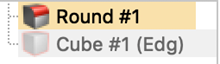
When
the Round is selected in the modeling view, the tree displays the Round
highlighted in yellow and the Cube grayed out, indicating that the Cube is
the parent/source object of the Round: