
Create and Register Webjects on the Windchill Server
Configure and register Altair Webjects for use with Windchill.
-
On your Windchill server, create a dedicated directory to store Altair's Webjects.
Example path: C:\ptc\Windchill_11.1\Windchill\tasks\ext
-
Copy Webject files.
-
Log in as Windchill administrator.
- Open the Windchill interface.
- Navigate to .
- Log in using your LDAP Server Administrator credentials.
-
Create a task delegate for each Webject.
Figure 1. 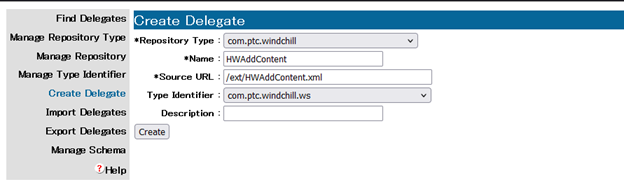
Table 1. Delegate Configuration Example Field Value Repository Type com.ptc.windchill Name HWAddContent Source URL /ext/HWAddContent.xml Type Identifier com.ptc.windchill.ws Description (optional - for, Altair Webject)