
Windchill Server上でのWebjectの作成と登録
Windchillで使用するためにAltair Webjectを設定し、登録します。
-
Windchillサーバー上で、AltairのWebjectを格納する専用のディレクトリを作成します。
パスの例: C:\ptc\Windchill_11.1\Windchill\tasks\ext
-
Webjectファイルをコピーします。
-
Windchill管理者としてログインします。
- Windchillインターフェースを開きます。
- に移動します。
- LDAPサーバー管理者の認証情報を使用してログインします。
-
Webjectごとにタスク委任を作成します。
図 1. 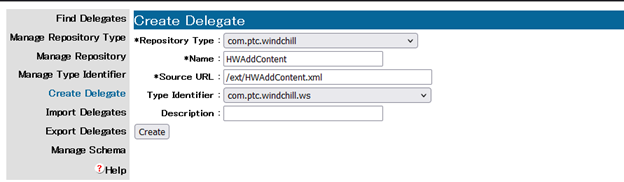
表 1. 委任の設定例 フィールド 値 Repository Type com.ptc.windchill 名前 HWAddContent Source URL /ext/HWAddContent.xml Type Identifier com.ptc.windchill.ws 説明 (オプション - Altair Webjectの場合)