Depuis la version 2026, Flux 3D et Flux PEEC ne sont plus disponibles.
Veuillez utiliser SimLab pour créer un nouveau projet 3D ou pour importer un projet Flux 3D existant.
Veuillez utiliser SimLab pour créer un nouveau projet PEEC (pas possible d'importer un projet Flux PEEC existant).
/!\ La documentation est en cours de mise à jour – des références au 3D peuvent subsister.
Introduction
About
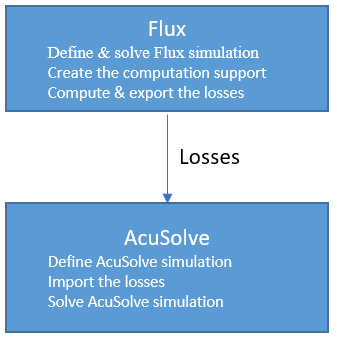
Flux-AcuSolve coupling allows to make thermal analysis in AcuSolve by taking the losses computed in Flux (Joule losses or Iron losses) as heat sources.
This specific document gives the optimal workflow to follow in Flux and AcuSolve to make the thermal analysis of a cable.
Concerning the software version to use: from Flux2018.1 (mandatory) and from AcuSolve 2017.2 (advised).Study case
In this document we consider a cable as study case.
Joule losses generated in the cable involve temperature increase which can destroy the materials.
The Flux-AcuSolve coupling allows predicting and evaluating the temperature increase.
Steps