
Modify Advanced Search Criteria
Modify to update an existing criteria.
-
Click
 on the left pane.
The Advanced Filter panel is displayed.
on the left pane.
The Advanced Filter panel is displayed. -
Click
 and then select one of the existing criteria.
The saved search criteria result is displayed.
and then select one of the existing criteria.
The saved search criteria result is displayed. - Modify the required filters and verify the search results.
-
Once satisfied, click . The list of
saved criteria list is displayed.
-
Hoverover the criteria.
Figure 1. Criteria List 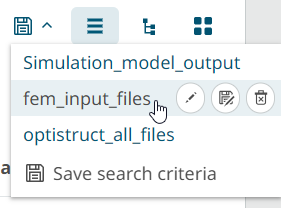
-
Click
 .
A confirmation message is displayed: Are you sure you want to update this search criteria.
.
A confirmation message is displayed: Are you sure you want to update this search criteria. - Click Yes the search criteria is updated.