
Create the New Cohesion Physics
The nest step is to add the Time Factor and create the library file (64 bit) to create the new cohesion Physics.
-
Add the Time Factor.
- In the Visual Studio Solution Explorer dialog box, double-click CVariableCohesion_v3_7_0.cpp.
- Press Ctrl + F to search for
contactResults.normalForce.This indicates the end of the Physics section where the Vector
F_cohesiveis added to the Normal Force of the contact. Cohesion is calculated from the energy density values (nCohesiveFactor) multiplied by the overlap area (nArea). - Locate the
F_cohesivevector in the source file as follows: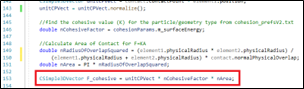
- Add the multiplying factor of the current simulation time to the
F_cohesivecalculation as follows:Create a new double calledcohesion_timebefore theF_cohesivecalculation and assign this as the value of the current simulation time: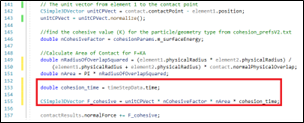
- Add a limit of 0 - 3 s for the cohesion increase
to take place and update the code as follows:

Note: Multiplying by time causes an error where, after a large time has elapsed (60 s), the cohesion value will have increased accordingly, and could be unexpectedly high as the cohesive force increase does not have any limitations. - Save the file.
-
Create the .
dlllibrary file (64 bit).- Go to .
- In the Active Solution Platform, select
Release and x64.
You can run this simulation with the Debug or Release
.dlls. It is usually recommended to test the simulation in the Debug mode and run the simulation using the Release mode once the model is finalized, as the Release mode is significantly faster to compute. - Select to compile the model.Note:
- If compilation is successful, the Output window in Visual
Studio will display “Build: 1 succeeded”, along with
the location of the newly created
*.dllfile.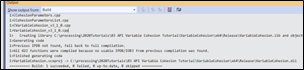
- If the build fails, additional information is displayed to explain build failure. It is recommended to always start with the first error message in the list as it may be the reason for subsequent errors.
- If compilation is successful, the Output window in Visual
Studio will display “Build: 1 succeeded”, along with
the location of the newly created
- Copy the newly created
.dllfile to the same location as thecohesion_input.demfile which is included with the tutorial files. - Copy and paste the
cohesion_prefsV2.txtfile into the same location.