
EDEM API 4000 Particle Replacement
This tutorial describes how to add an existing API model to a simulation which includes Bonded Particles. The API model replaces large spheres with clumps of smaller spheres.
Objective
The objective of this tutorial is to:
- Use the Bonded Particle Model V2
- Load a Particle Body Force
- Load a Custom Factory
- Post-process the customized simulation
- Introduce CUDA GPU-API
This tutorial uses a library file compiled with Visual Studio 2019 and a simulation already set up using EDEM version 2024.1. It also uses the Particle Replacement API and has been written for CPU and CUDA GPU.
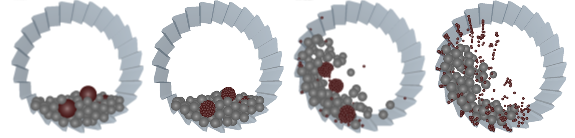
Important: Copy the following tutorial files into
your working directory before running the simulation:
ParticleReplacement.dllParticle_Replacement_prefs.txtParticle_Cluster_Data.txtReplacementTutorial.demReplacementTutorial.dfg- The
ReplacementTutorial_datafolder
EDEM API Functions
The following key API files are included with this tutorial in the
src folder:CRemoval.cppis the CPU Particle Body Force Physics model.ParticleReplacementBreakage_v3_7_0.cu– Is the CUDA GPU Physics model. This API file is used in the initial development of the CUDA code but when compiled the contents are copied into theCRemoval.cppfile underGPU_SOURCEand is no longer used.- To replace particles, one type of particle is removed and its position is
stored and passed to the
CReplacementFactoryfunction for creation of new particles in the same position. - EDEM Factories run on CPU only. To avoid passing
information from a GPU to a CPU (a complex and computationally slow
process), a
processParticleOfInterest()function has been implemented in the code. This function runs only on CPU, allowing efficient data transfer between CPU and GPU.
During simulation, the models perform the following:
Particle Body Force
- Loading: Reading in Preference
.txtData- When loading the library file into EDEM
the
Particle_Replacement_prefs.txtfile is read using the Setup function detailed inCRemoval.cpp. - This library file contains the name of the particle to replace (Whole) and the Type to replace it with (Fraction).
- The
StartBondingTime(0.4 s) is also read from the text file.
- When loading the library file into EDEM
the
- Running: Removing and storing Particle data
- At the
StartBondingTime, the code tags the Whole particles as ‘Particles of Interest’ using theexternalForcefunction. Both the CPU and GPU can tag Particles of Interest. - At the end of the Time Step, the
processParticleofInterestfunction is called for the CPU only.- The Size (scale), position, and velocity are written to an
array called
ParticleList, and stored in the CPU memory. - The Whole particle is removed using the
markForRemovalfunction.
- The Size (scale), position, and velocity are written to an
array called
- At the
Custom Factory
- Loading: Reading in Preference .txt Data
- When loading the library file, the
Particle_Cluster_Data.txtfile is read and stored in an array.
- When loading the library file, the
- Running: Creating Particles
- The factory always runs first in the process loop (. However, the factory is not activated until the
ParticleListcontains data. This process occurs after the bonding time has been reached. - If the
ParticleListcontains data (particles), then the factory will create new particles.- The
ParticleListcontains the position of the original Whole particle. - This position is used to create multiple Fraction particles in the same area.
- The factory loop runs until all the particles in the list have been processed and replaced with the Fraction particles.
- The
- When creating the particles, a Custom Property called
CREATIONTIME (Bond Creation Time)is assigned to the particles. This property has a value of the current simulation time.
- The factory always runs first in the process loop (. However, the factory is not activated until the
EDEM Bonded Model V2
- The built-in Bonded model utilizes the
CREATIONTIMEcustom property. - Any particles in contact which fulfil the following two conditions are
bonded together:
- Both particles have the same
CREATIONTIMEvalue. - The
CREATIONTIMEvalue is equal to the current simulation time.
This is an example of a custom API model integrating with an internal EDEM model. The API configures the conditions which triggers the internal model to bond the particles.
- Both particles have the same