
Altair HyperView 2026 Release Notes
General
New Features
- Python API for Hotspot()
-
The Hotspot() class covers most of the Hotspot tool functionality. All the criteria can be set, simulations can be chosen using dictionaries and/or wildcards.
Full coverage of ignore element types and sets is supported and the hotspot notes can be customized. Using ‘local’ or ‘part’ view modes allows looping over hotspots and capturing images in combination with CaptureImageTool().
Permanent notes, measures and sets can be added to the session, and the results can be exported in CSV format for further automation.Figure 1. 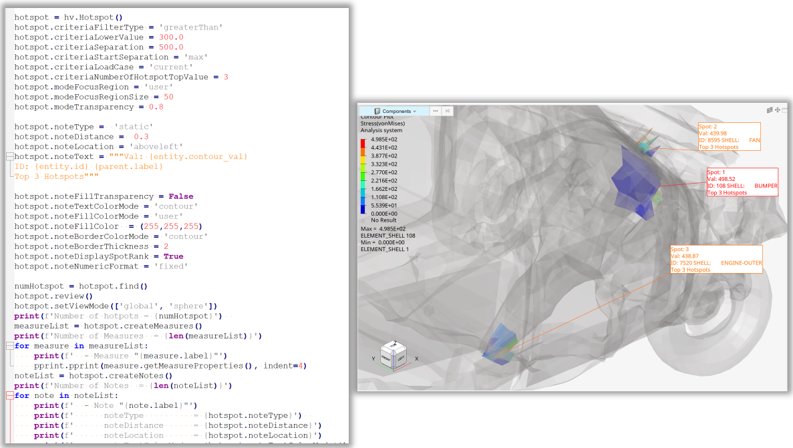
- Python API for Explosion()
-
The Explosion() class covers both ‘model’ and ‘translate’ mode. The direction can be provided both as tuple, string. A subset of the model parts can be given via a part collection, and the parts can be moved repetitively similar to the graphical user interface.
Figure 2. 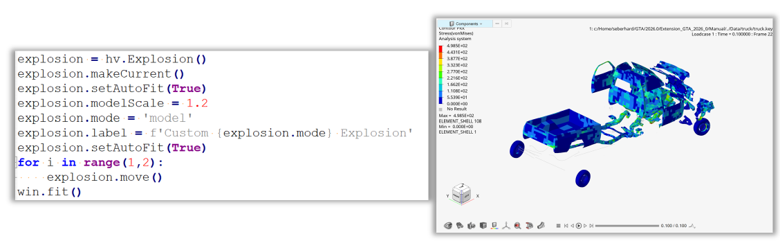
- Python API for TrackingSystem()
-
Using the Python class TrackingSystem() either a single node, a plane of a part can be used to define the tracking system. In addition, the displacements in global coordinates can be activated and rotations can be locked.
Figure 3. 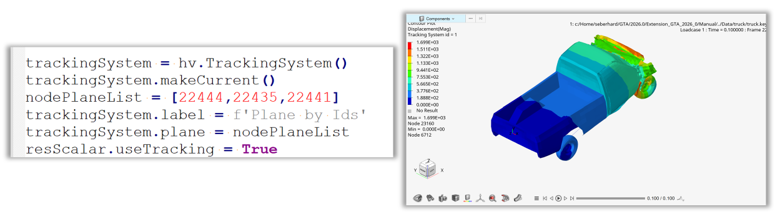
- Python API for Tracing()
-
The Tracing() class supports all the features for tracing nodes, parts, MBD systems and lines.
Lines can be added via node lists or files, and the line/part colors can be set via color lists. The simulation steps can be also set in list format.
Trace curves can also be created in separate windows with the same color and axis settings as the interactive mode.Figure 4. 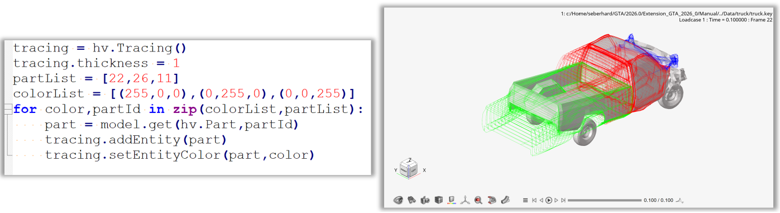
Enhancements
- Random Response
-
- Support added for Nastran OP2, XDB, Abaqus ODB, and Ansys RST files.
- Default file location for the input files of the model file if model file is imported in session.
- Filter added to sort by name or ID on the Subcase and Results dialog.
- 4K resolution dialog enhancements.
- 3D Model GLB Export
- Support added for the selection of time steps in transient animations.
- Python API Enhancements
-
- The Page() class has new method getWindows() to get the window objects of a page. Optional the type of the window can be given as a filter.
- The new Result() class method getLayers() returns for a data type from a given context (scalar, vector or tensor) the layer list.
- The Model() class has the two additional getList() methods:
- getSetList() – Returns a set object list, options to filter for pool and label are available.
- getTrackingSystemList() – Returns a list with all tracking systems objects.
- In addition, the Model() class has been enhanced with the
following statistical methods:
- getBoundaryBoxVolume()
- getBoundaryBoxCoordinates()
- getNumberOfNodes()
- getNumberOfElements()
- getNumberOfParts()
- getNumberOfSystems()
Resolved Issues
- HyperView does not display tensors in a material system on Quad8 elements from an OptiStruct analysis.
- Application crashes after deleting a section cut and a applying style to a different window.
- HVTrans crashes trying to convert a result file only after translating model+result files.
- Application crash when switching between steps after applying contour on some Abaqus ODB files.
- Application crashes while animating in linear static mode after adding entities for tracing.
- Application error while parsing Templex expression in Notes.
- Session with multi-window layout crashes while loading a result file in the first window.
- Copy/paste/apply style on multi-window layout leading to some windows missing entity data.
- HVTrans shows errors when the filepath for -c config option contains commas.
- Hidden elements are not getting displayed when Show option is used in the Find Entity toolbar.
- Linux: Application crashes when tracking system is set as resolved system in contour plot.
- Linux: Clicking on Load all in Load data dialog for large number of subcases crashes the product.
- Application crashes when a note attachment type is changed if component.label Templex is defined.
- Contour shows N/A when the model is loaded again in a second window.
- HVTrans fails to translate strain results from some Dyna result files.
- RMB Context menu to access apply style and other options missing when the Deformation panel is active.
- Application crashes when re-animating a linear static model after zooming into a few components.
- Apply Style and Copy/Paste Model not copying precision set on a Static MinMax measure.
- Application crashes when importing a TPL file after unchecking the plot_file and result_file parameters in the import dialog.
- Unknown symbol error messages seen in the message log when opening a TPL file.
- Component selection by contour max/min of window not working correctly for display mode All.
- Unable to move Model information note from top right to top left corner using the Entity Editor option.
- Material color applied improperly to hidden components.
- Performance drop when rotating/zooming/panning model containing Notes with Templex expressions.
- Feature lines are showing on an HTML 3D model by default if only the model is exported.
Solver Interfaces
Nastran Interface
Enhancements
- Composite stress results from Random Response Analysis (SOL 111).
- Composite failure index results from HDF5 format.
- Initial contact status from BCONCHK output.
- Element force results along material coordinate system in op2 and h5 format.
Resolved Issues
- Unable to read results from Simcenter Nastran Random Response Analysis (SOL111).
- Wrong CBEND stresses from *.op2 files.
- Sim center Nastran RMS values misreporting.
OptiStruct Interface
Enhancements
- HDF5 reader enhancement to support JOINT Force and Displacement results from JOINTG elements.
Resolved Issues
- Tensor results for QAUD8 elements in material system.
Radioss Interface
Resolved Issues
- Since HyperWorks version 2025.1, when reading Radioss results together with the Radioss input deck in HyperView, the RBODY elements were not created and displayed on the graphic.
Safety Tools
Resolved Issues
- MPDB Tool: In some cases, the reference plate, required for the SD calculation, was not correctly positioned and therefore the SD value not correctly computed.