
Altair HyperMesh CFD 2026 Release Notes
Highlights
HyperMesh CFD 2026 introduces the following new features:
- Geometric Modeling
-
- Add fillet tool.
- Template manager improvements.
- Direct Teamcenter integration.
- Tool to bulk rename parts.
- Performance improvement for model check.
- Case Setup (External Aerodynamics)
-
- Thermal simulations.
- Guide panel based workflow to set up wheels.
- Support for yawed simulations.
- New virtual fan models.
- Multiple STL export.
- Double click edit capability in the Property Editor.
- Post-processing
-
- - Compute statistical information with graphical feedback of minimum/maximum locations.
- Result Reader Option: Compute Powell sound source for computational aeroacoustics.
- HMCFD Report: Added the capability to include multiple datasets into a single report.
- HWCFD Report: Added the ability to use the state file’s stored views within a report.
- Support STL export within the GUI when no field variables are selected at Export context.
- Design Exploration
-
- New morphing capabilities.
- Physics AI workflow for KPI and field prediction.
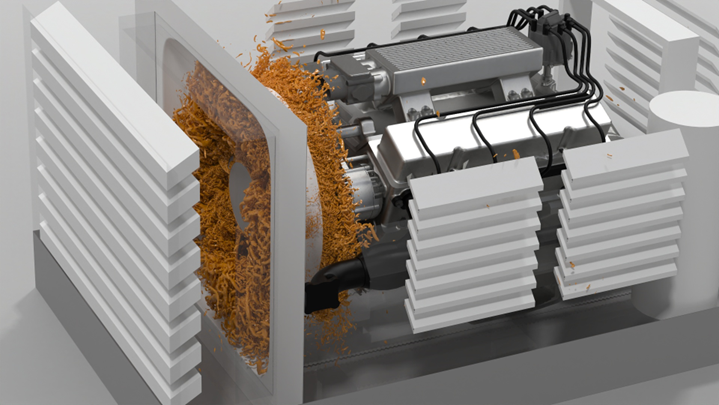
Geometric Modeling
New Features
- Create Fillet Tool
- Added a tool to create a fillet on geometry. It is useful to design surfaces with sharp angles. You can select lines and define the radius for creating the fillet.
- Direct Teamcenter Integration
- A new option has been added to connect to PDM systems, such as Teamcenter, Windchill, or OpenPDM. You can search for specific models and directly import BOM or CAD files into a HyperMesh CFD session. This option also allows you to automatically import a new revision of a part when it is updated in the PDM system.
- Tool to Bulk Rename Parts
- A right-click option has been added in the Part Browser to bulk rename parts. You can select multiple parts and either add a prefix or suffix, or find and replace specific words or characters.
Enhancements
- Auto Enclosure Improvement
- This tool has been enhanced to avoid shape distortion. Other
improvements include:
- Cavity modeling improvements.
- Improved the gap utility to improve patch quality.
- Template Manager Improvements
- Enhanced Template Manager to cover all tools for external aerodynamics modeling. You can define the entire manual process with the Template Manager using assembly names, part names, or metadata.
- Performance Improvement for Model Check
- Mesh check performance in the has been significantly improved and new options have been added to fix free edges. For large models, checks are now completed in under one minute.
- Split Part with Save CAD Representation Avoids Using the Original CAD Representation
- This keep the original part as is with the original CAD representation.
- Multi-select Legend List
- You can now multi-select the legend list and perform operations such as show/hide/isolate/delete on the selection. The list is also sorted alphabetically by default.
- Advance Selection Dialog Update
- The dialog now retains the previously used selection filter. The list is populated alphabetically. The column width and dialog size are consistent for all advance selection dialogs.
Resolved Issues
- The user interface first freezes, then eventually crashes, while entering V-P values for a porosity model.
- Batch mesher does not properly save a rigid body mesh.
- Nodal condition for zero pressure is not written to the INP file.
- Decimate utility does not work on Linux.
- Several terminal messages on invoke for HyperMesh CFD.
- Wrong results when using the Cavity Wrap option.
- Crash on exit for HyperMesh CFD on Linux.
- HyperMesh CFD crashes on invoke.
- Wrapping destroys a shape by swapping edges.
Case Setup
New Features
- Thermal Simulations
- Temperature is now supported as a transport variable. This enables a
range of simulations, such as powertrain cooling, thermal convection,
and passive scalar transport. Features include:
- Model selection: Boussinesq and Passive scalar.
- Thermal boundary conditions for solid parts and the wind tunnel.
- Absorbing boundary conditions for the wind tunnel inlet and outlet.
- Advanced heat exchanger models with coolant properties.
- Updated outputs and output controls to account for temperature as a variable.
- Updated temperature dependent material properties.
- Gravity setup.
- Guide Panel for Wheels with Overset Mesh
- Wheels are now set up using a guide panel, which replaces the guide bar.
This workflow follows the fan setup process and includes features such
as overset mesh setup and optional mesh control settings.
Figure 2. 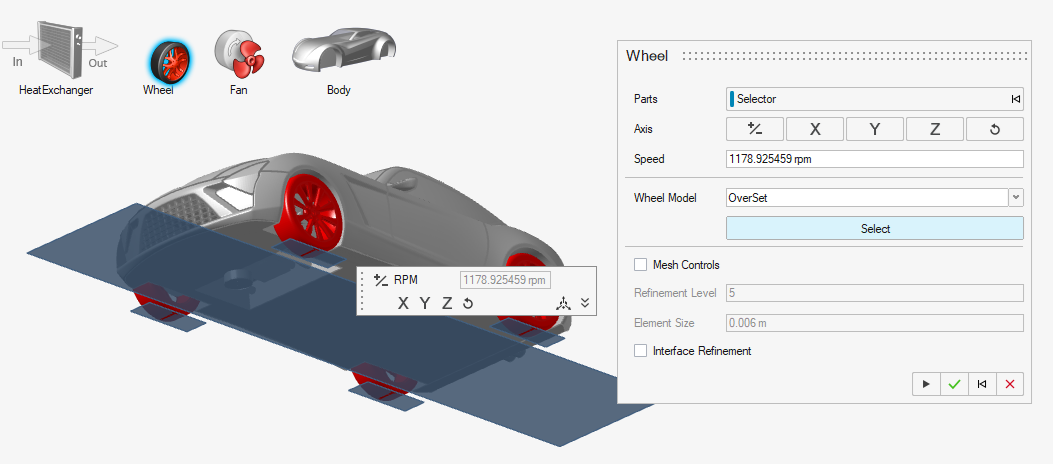
- Yawed Simulations
- Yawed vehicle simulations are supported via a standalone dialog that
lets you set up rotational transformations. This automatically applies
the yaw angle to belts and creates an STL-based belt part. The boundary
condition for the belts can be independently set and supports vectors
that are different from the inflow condition.
Figure 3. 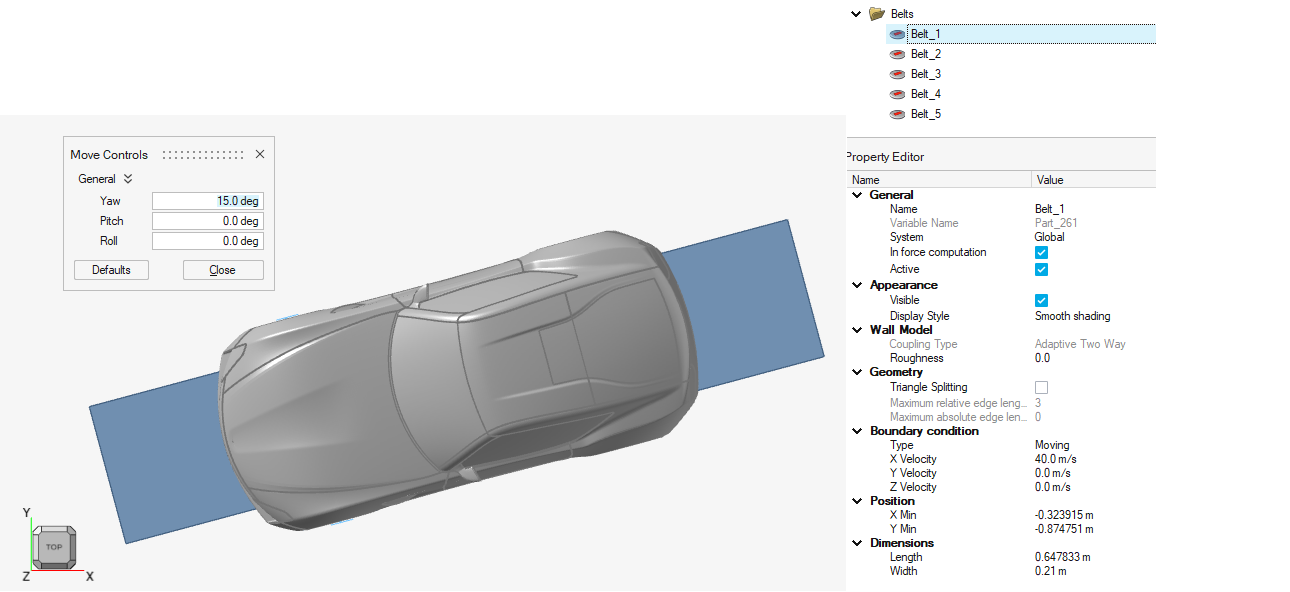
- Multiple STL Export
- The model assembly can now be split up into multiple STL files on export. This is performed automatically by the sub-assembly structure, one STL for each. You can control the output by organizing parts in sub-assemblies. The feature can be combined with compression and is set up in the Preferences menu.
- Virtual Fan with Momentum Source
- Momentum sources are now specified as a sub-model of the Virtual fan setup. Velocity and mass flow rate are both available.
- Double-click from the Property Editor
- Edit mode can be activated for derived entities directly from the Property Editor. All outputs and mesh control instances can be accessed right from the Property Editor with a simple double click.
Enhancements
- Inline Unit Switching
- Solver units such as time steps and output intervals now support inline
switching to time(s) and frequency (Hz). This is available in the Output
and Run dialogs.
Figure 4. 
- Outputs
-
- Triangulation is supported for section cuts.
- Triangle splitting is supported for monitoring surfaces.
- Vorticity, Q-criterion, and Lambda are Supported as Output Variables
-
- Sectional drag is activated by default.
- Wind tunnel position is adjusted based on the vehicle’s bounding box.
- Updated icon graphics.
- Python API
- Added support for:
- Mesh transition layers.
- Output variables.
Resolved Issues
- Crash upon editing sketches.
- Crash upon editing output frequency in the Output Controls dialog.
- Batch mode in Linux.
- Mesh controls dialog gets reset when opened for the first time.
- Permeability directions for porous media are not visible unless edited.
- XML parameters resolved for the following scenarios:
- Virtual fan settings for “ramp up iterations” and “initial pressure rise”.
- Coarsen output settings in the Output Controls dialog.
- Fluid BC and thermal BC are grouped into the same wall instance.
- Offset mesh distance was incorrectly computed.
- Inconsistent computations for repeated modifications to run time (steps) and scaling factor.
- Triangulation for section cuts is shown in the Property Editor.
- Triangle splitting option for belts is now functional when reimporting a template file.
- Objects created in Python differed from those created in the user interface when saved as HyperMesh CFD files.
- Ground patch was visible as a part when importing a HyperMesh CFD file.
- Editing ground patch in Python created a second instance.
- Editing target frequency in the Outputs menu shows the correct value after a focus loss.
- Visibility issues with selecting Nastran parts.
- Icons in dialog windows are correctly shown.
Post-processing
New Features
- Engineering Quantities: Surface Statistics
- Determine spatially-dependent statistics for a given variable on a user-selected surface. Displays spheres to indicate low (blue) and high (red) value locations on the surface. Minimum, maximum, area average, and the standard deviation are computed. Location of the minimum/maximum are reported for X/Y/Z.
- Result Reader Option: Compute Powell Sound Source
- Extension of the advanced flow variable computation: Vorticity, Q-criterion, Lambda 1/2/3, Powell Sound Source from CFD results within the back end reader. Models surface-generated Dipole Noise to capture sounds generated by flow interaction with solid boundaries, which is especially important for bluff bodies and airfoils.
- Support STL Export Within the User Interface
- Added the ability to export surfaces and derived surfaces from the user interface via the Export Dialog. Supported actions include the following browser tree context menu (right-click) options: export single/multiple/mixed boundaries, slice plane, and iso surface.
- HyperMesh CFD Report Updates
- Added the capability to include multiple datasets into a single report using multiple DATASET commands as well as the appropriate attributes. Added the capability to utilize user-defined views that have been stored in the user interface, allowing repeatable user-defined camera positions and zoom levels.
Enhancements
General enhancements include:
- Enhanced the robustness of *.cpstate files for load/apply state.
- Stride and range controls added to the transient time step control.
- Improved the "Streamlines by point" context.
- Report automation:
- Added the ability to use views from the *.cpstate file as stored in the GUI.
- Export full spectral information per frequency band for GSP calculations.
- Support for multiple DATASETs in one report template.
- Utilities: Support for the export, decimation of *.h3d, *.sos, and *.stl files (Beta).
Resolved Issues
- HyperMesh CFD Report: Custom Views, used together with focus parts, clipping geometry/surfaces and so on.
- Report utilities: Mapping results are not functioning on a surface when the target is *.stl.
- View images are incorrect when loading from state.
- For HyperMesh CFD, signal processing for point probe, the block size is applied correctly after context change.
- Scalar-based opacity not applied until focus for derived reps, global legend.
- Modified the field name of vorticity, lambda2, and q-criterion to be dependent on the calculation vector.
- Dark mode: When the legend is displayed and the image is exported, the font is displayed as white and is unreadable.
- location out of the circle; display issue.
- Box clips: Move tool does not take specified values.
- Segmentation error when loading H3D files with component names containing quotation marks into HyperMesh CFD.
- Animate slices resets the settings applied when exporting a video.
- User interface refresh issue on “Number of steps” in .
- Global legend: Reset default position after .
- context does not allow modification of streamline calculation.
- User interface for probe GSP does not recognize the block number after modification.
- An error has been resolved when the legend range was not properly reset for certain types of data files containing wall shear stress.
Design Exploration
New Features
- New morphing capabilities.
- PhysicsAI workflow for KPI and field prediction.
Solution
New Features
No changes have been introduced to CFD Solution in HyperMesh CFD 2026.
Known Issues
For more information on issues found throughout the release, and their workarounds, please see the Altair Community.