
Thermal
Overview
In the thermal settings, depending on the considered test, there are two possible
configurations:
- Either one can define the temperatures of active components (windings, magnet, Squirrel cage, damper, …) or define the physical properties of the materials needed to run the tests without any thermal computation.
- Else you can choose iterative process until convergence to perform electromagnetic computation coupled to thermal analysis.
Below, the workflows of all these processes are described for each kind of machine.
 |
|
|---|---|
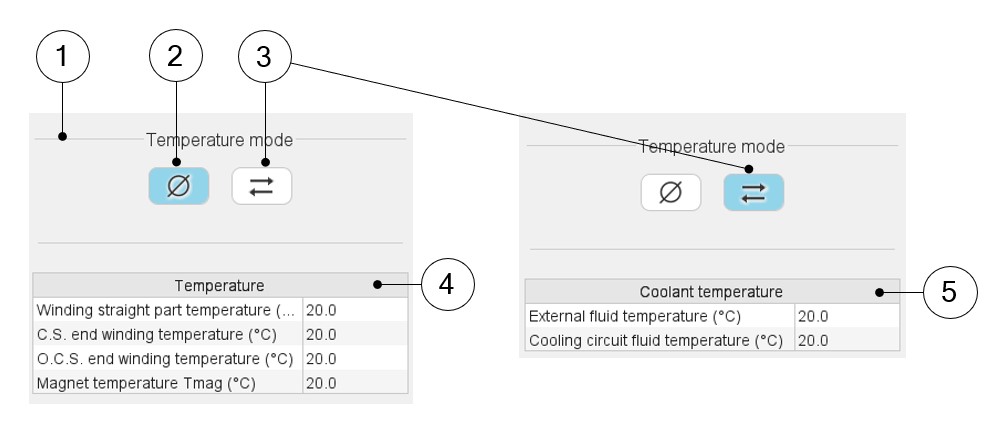
| 1 | Dialog box to define the thermal settings. Buttons allow us to choose one of the two thermal solving modes with or without thermal solving. |
| 2 | The first option of thermal setting is to run the test with only electromagnetic computation without any thermal analysis. This option is the default one available for all the tests. |
| 3 | Thermal solving mode with iterations between electromagnetic and thermal computations. |
| 4 | Thermal solving mode with iterations between electromagnetic and
thermal computations. With the first solving mode (i.e. without thermal solving mode) the temperatures of the active parts like the windings (3 locations) and the magnets - in this example – must be defined for characterizing the physical properties of the associated materials. |
| 5 | With the second solving mode (i.e. with the iterative thermal solving mode) the coolant temperatures must be defined: External fluid temperature and cooling circuit fluid temperature (if there is a cooling circuit). |