
Settings, inputs
Overview
Settings allow defining the context in which the test is going to be performed. Their definition is specific to each test.
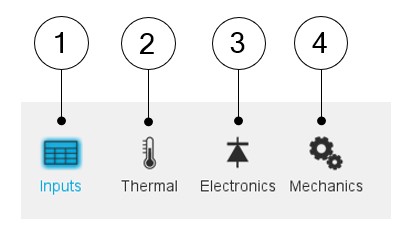
Settings are defined into the following main domains:
- Inputs: to define the main conditions of the test to be performed
- Electronics: To define the power electronics stage feeding the machine
- Mechanics: To define the mechanical loss model parameters
- Thermal
- To make the choice of thermal solving (when available)
- To define the active components temperatures (windings, magnets etc.)
 |
|
|---|---|
| 1 | Setting of the main user’s inputs before running the test. |
| 2 | Button to define the thermal inputs (Solving mode or active components temperatures) |
| 3 | Button to define the user inputs of the power electronics stage |
| 4 | Button to define the parameters of the mechanical loss model |
Next sections of this document describe more in-depth of the available settings.
Management of inputs
 |
|
|---|---|
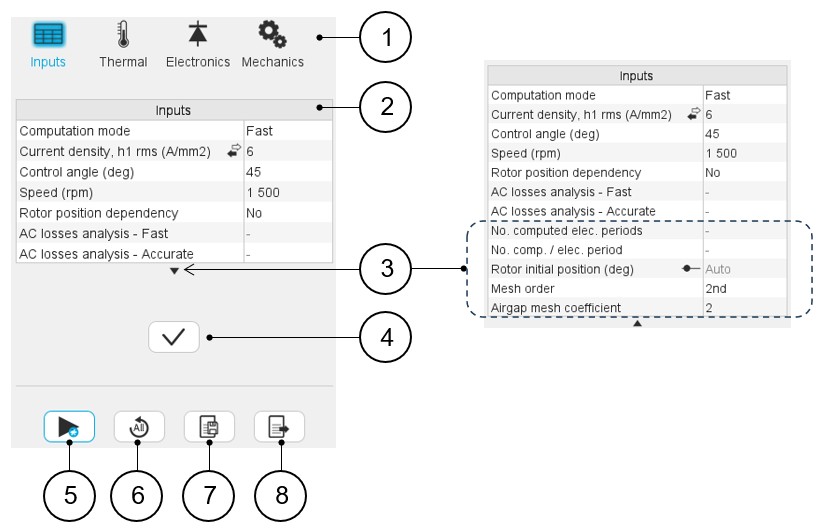
| 1 | Test settings definition. To define the general conditions
related to the machine:
Note: For more details refer to the
dedicated section “Test settings” in the user help document for
each type of machine and test. |
| 2 | User input parameters to be defined. |
| 3 | By default, only standard parameters are displayed. When needed, click on the arrow to visualize the advanced user inputs. |
| 4 | Button to apply input parameter values. |
| 5 | Button to start running the test (Input parameters are validated after clicking this button). |
| 6 | Button to restore default parameter values (Inputs as well as the settings like Thermal, Electronics and Mechanics parameters). |
| 7 | Button to save the test result. |
| 8 | Button to export test results into *.txt or *.xlsx files. |
Subsections
Electronics
For more details, please refer to Electronics.
Mechanics
For more details, please refer to Mechanics.
Thermal
For more details, please refer to Thermal.