
Inputs
Standard inputs ––––--
Speed
The speed of the machine is to be considered.
Set of losses
- Stator Joule losses
- Stator iron losses
- Rotor Joule losses
- Rotor iron losses
- Mechanical losses
Max. allowed deviation
The maximum temperature deviation allows us to consider the optimization algorithm has converged. All the final temperatures must have a lower deviation.
Input import
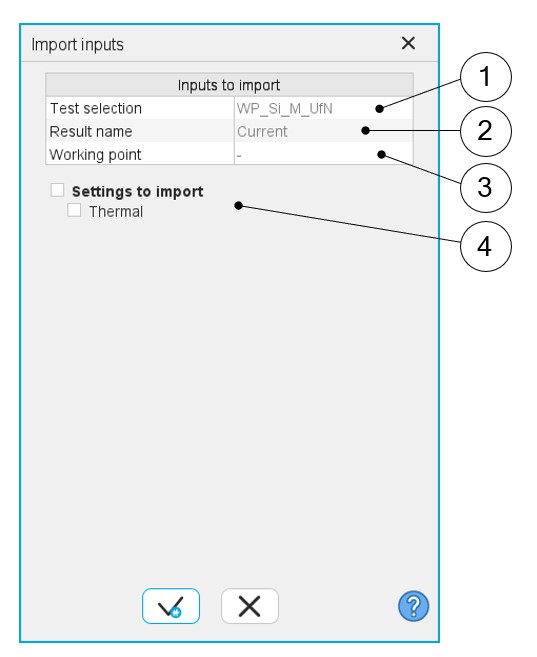
The set of inputs concerning speed and losses, can be imported from another test already performed in Motor Factory Test environment.
It can be current results or saved test results.
If the referent test has been performed with the thermal computations, the resulting temperatures can also be imported.
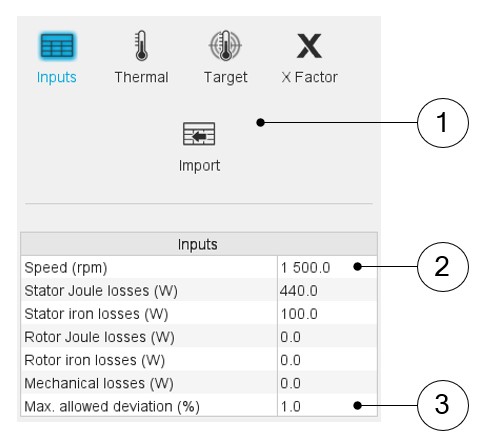
See the illustration below.
 |
|
|---|---|
| 1 | Fill in the table to define the speed, all the losses to be considered, the maximum evaluation duration, and the time step. |
| 2 | Click on the button “import” to import inputs corresponding to a solved test. All existing data from the selected test will be imported into the inputs of the thermal characterization. The data that does not exist in the outputs of the selected test is set to 0. |
| 3 | Choose what must be the maximum temperature deviation that will allow us to consider that the optimization algorithm has converged. |
 |
|
|---|---|
| 1 | Selection of the test. Only solved tests are available in the drop-down list. |
| 2 | Current tests as well as saved tests can be selected. |
| 3 | When several working points are computed in the selected test, each of them can be selected to consider the corresponding losses and speed. |
| 4 | Thermal data can also be imported. The thermal settings can be imported like the external fluid temperature and the cooling circuit fluid temperature. |
Advanced inputs ––––--
There are no advanced inputs required for this test.