
Table
List of working points
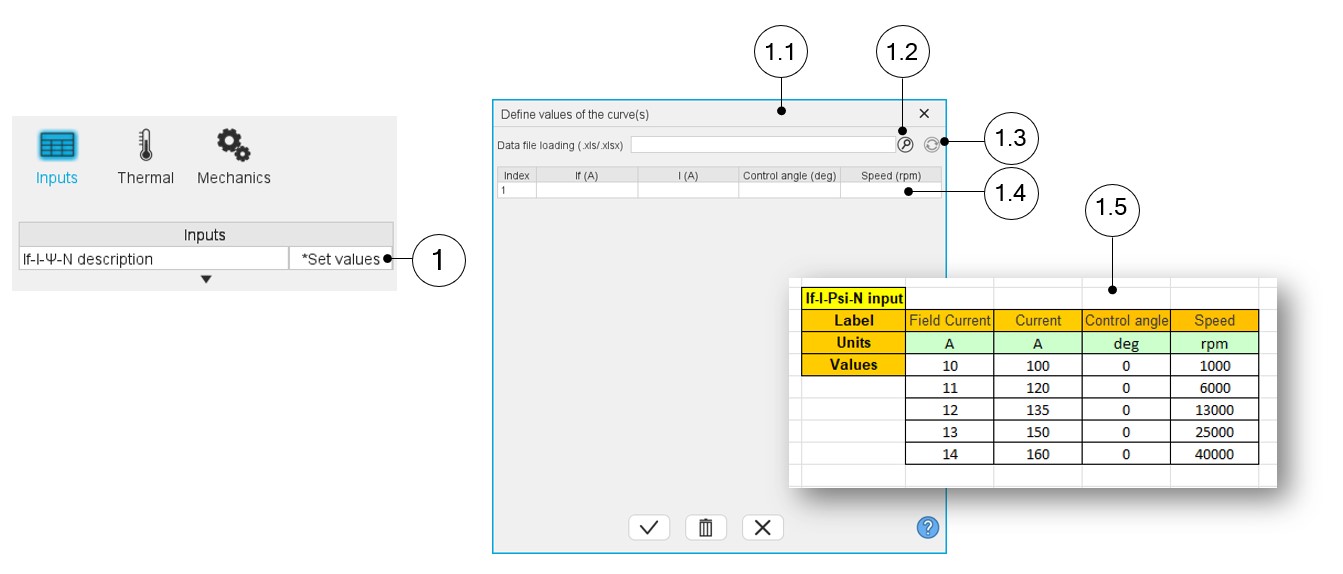
Two ways are possible to define the list of working points: either filling the table line per line or by importing an Excel file in which all the working points to be considered are defined.
 |
|
|---|---|
| 1 | Click on the button “Set values” of the field “User working point list” to define the working points in a dialog box. |
| 1.1 | Dialog box opened after having clicked on the button “Set values” in the field “Cycle description”. |
| 1.2 | Browse the folder to select an Excel file which describes the duty cycle. |
| 1.3 | Button to refresh the table data when the considered Excel file has been modified. |
| 1.4 | Fields to be filled with data to describe the duty cycle to be considered. |
| 1.5 | Excel file template to define the list of working points. |
Note: There must be at least two working points.
Note: The speed column must contain increasing speeds.