Inputs
Standard inputs ––––--
Introduction
The aim is to define a list of working points characterized with the torque and the speed.
To know the framework in which the working points can be selected, the torque-speed envelope is computed considering the four inputs data: the maximum line current, the maximum line-line voltage, the command mode and the maximum speed to be considered.
By default, the list of working points is built with points on the torque-speed envelope.
But one can define a list of working points located anywhere under (or on) the torque-speed envelope.
Torque-Speed envelope
- OverviewBy default, with the “Auto” mode, the list of working points is automatically built by considering seven points on the machine torque-speed envelope. The torque-speed envelope depends on the four following input parameters:
- Max. line current, rms
- Max. Line-Line voltage, rms
- Command mode
- Maximum speed
It is also possible to define our own working point list by filling in a table with the targeted speeds and torques.
Table 1. Two ways for defining the working point list 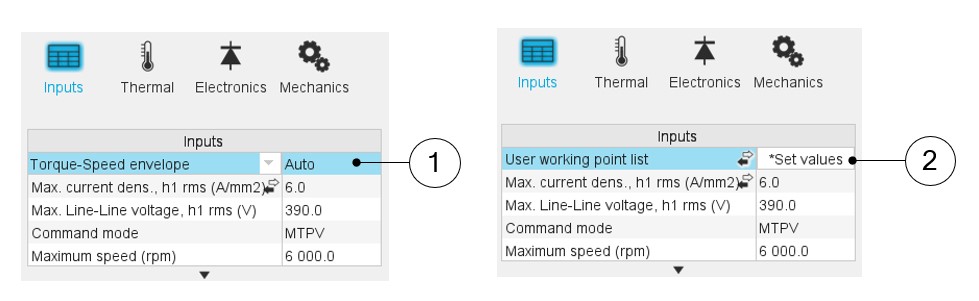
1 Automatic mode: working points are automatically considered on the torque-speed envelope 2 We can define our own working point list by filling in a table with the targeted speeds and torques - Process to define the working point list
Two ways are possible to define the list of working points: either filling the table line per line or by importing an Excel file in which all the working points to be considered are defined.
Table 2. List of working points to be defined 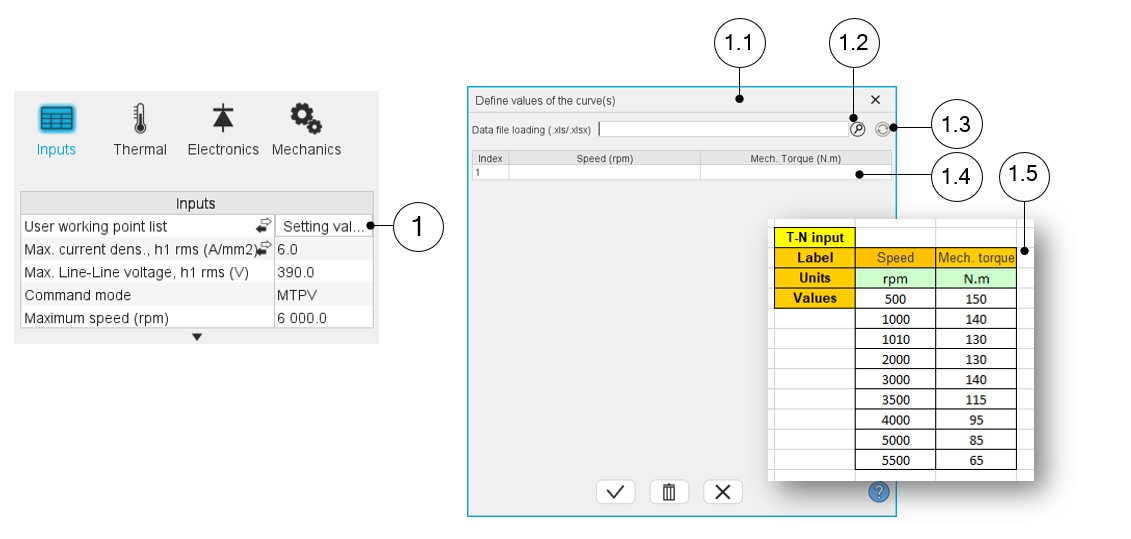
1 Click on the button “Set values” of the field “User working point list” to define the working points in a dialog box. 1.1 Dialog box opened after having clicked on the button “Set values” in the field “Cycle description”. 1.2 Browse the folder to select an Excel file which describes the duty cycle. 1.3 Button to refresh the table data when the considered Excel file has been modified. 1.4 Fields to be filled with data to describe the duty cycle to be considered. 1.5 Excel file template to define the list of working points.
Current definition mode
There are 2 common ways to define the electrical current.
Electrical current can be defined by the current density in electric conductors.
In this case, the current definition mode should be « Density ».
Electrical current can be defined directly by indicating the value of the line current (the RMS value is required).
In this case, the current definition mode should be « Current ».
Max. line current, h1 rms
Max. current dens. h1, rms
Max. Line-Line voltage, h1 rms
Command mode
Maximum speed
The computation and analysis of the torque-speed curves are performed over a given speed range.
- Radiated sound power spectrograms versus engine order or frequency
- Overall radiated sound power per engine order versus speed
- Overall weighted radiated sound power versus speed
- Case 1: The maximum speed is lower than the base speed Nbase (corner
point speed of the torque-speed curve) Nmax < Nbase.
In that case, whatever the command mode (MTPA or MTPV), the behavior of the machine will be studied over the speed range [0, Nmax].
That allows the user to precisely choose the range of speed to be considered for computing and displaying the torque-speed curve and especially maps like efficiency maps.
- Case 2: The maximum speed is greater than the base speed (corner point
speed) Nmax > Nbase.
The relevance of the maximum speed given by the user is analyzed to evaluate if it is reachable by the machine.
If the user maximum speed is unreachable by the machine, the correction of this value is automatically performed.
The resulting new maximum speed is linked to a limit torque. This limit torque is obtained by applying a reduction coefficient to the base point torque.
Advanced input ––––--
Max. engine order
Two kinds of inputs are possible: either set an engine order or a number of points per electrical period. Define the Max. engine order (Maximum engine order) or the No. points / elec. period (Number of points per electric period).
When decomposing the Maxwell pressure, applied on the stator, to get its harmonic contributions, the “max. engine order” (Maximum engine order) is required to compute its decomposition in function of the time.
"Engine order" refers to a mechanical revolution period of the motor whereas frequency refers to the considered electrical period.
Obviously, both are linked with speed.
For instance, radiated sound power can be displayed either by considering frequency or engine order.
No. points / elec. period
The second possibility is to set a “No. points / elec. Period” meaning a number of points per electrical period.
For transient computations the minimum needed number of points per electrical period is 40.
So, when the engine order is not high enough to reach this constraint, It is automatically modified to get 40 computation points per electrical period.
Max. mode / spatial order
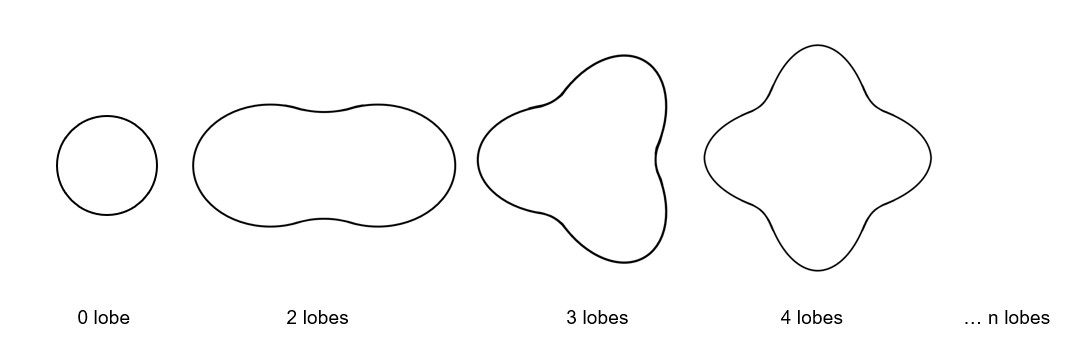
The “max. mode / spatial order” (Maximum mode / spatial order) input allows the user to define the number of modes to be considered for the acoustic structural analysis. If the user selects 25, it means that the highest number of lobes in the stator deformation will be equal to 25 lobes. All deformations corresponding to more than 25 lobes will be dismissed.
No. points / tooth pitch
The “No. comp. / tooth pitch” (Number of computations per tooth pitch) allows to choose the number of Maxwell pressure evaluations per tooth. The more points selected, the more accurate the Maxwell pressure harmonic decomposition will be.
No. points for speed interpolation
The “No. points for speed interpolation” (Number of points for speed interpolation) allows to manage the computation of the radiated sound power per engine order. It allows to manage the data interpolation between the speeds indicated as inputs. Thanks to that, the curves “Radiated sound power per engine order versus speed” and “weighted radiated sound power versus speed” can have a better discretization which leads to a better displaying of the local peaks.
The default value is equal to 100. The range of possible values is [50,300]
No. comp. for Jd,Jq
To get maps in the Jd-Jq plan, a grid is defined. The number of computation points along the d-axis and q-axis can be defined with the user input « No. comp. for current Jd, Jq » (Number of computations per quadrant for D-axis and Q-axis phase currents).
The default value is equal to 5. This default value provides a good compromise between the accuracy of results and computation time. The minimum allowed value is 5.
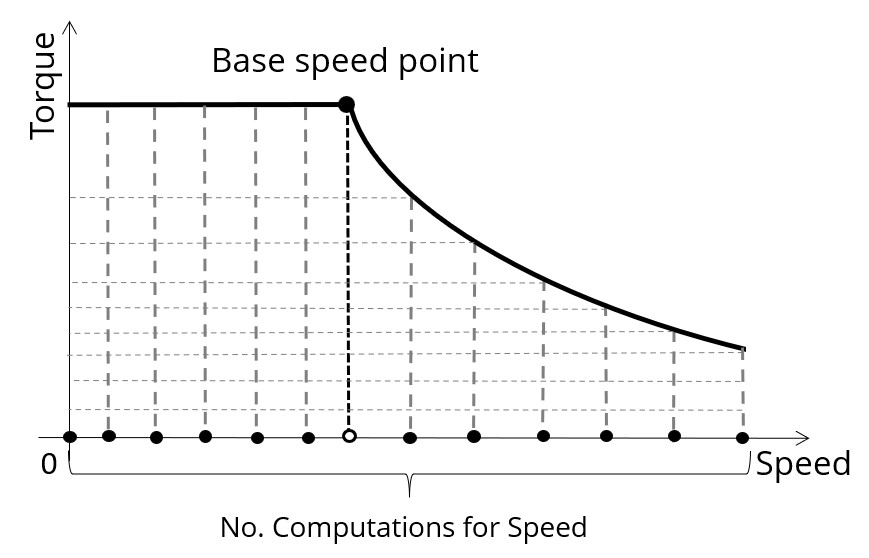
No. comp. for speed
The “No. comp. for speed” (Number of computations for speed) corresponds to the number of points to be considered in the speed range from 0 to the maximum speed.
Half of these points are distributed from 0 to the base speed. The remaining points are distributed from the base speed to the maximum speed.
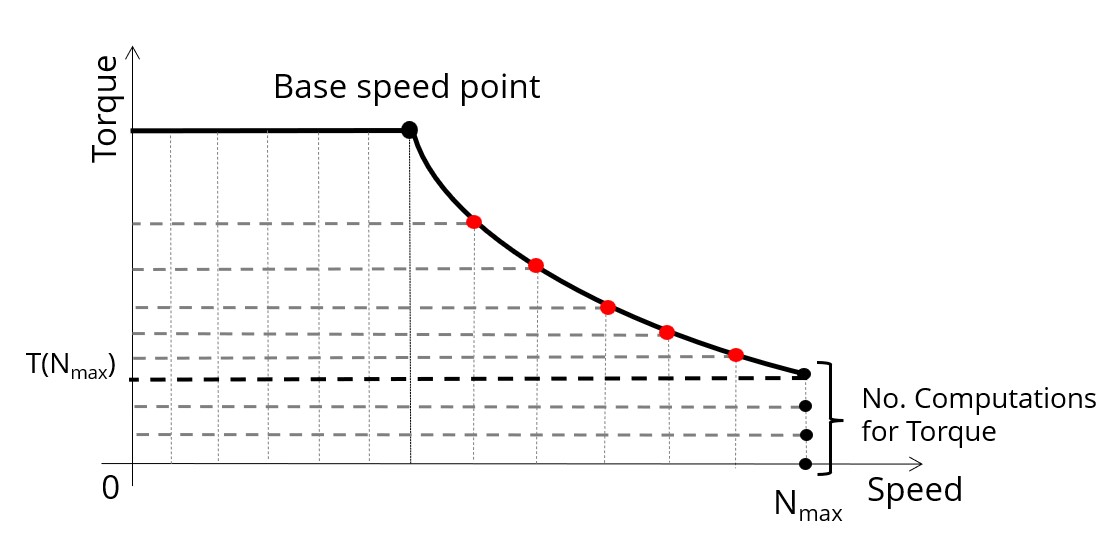
No. comp. for torque
For the speed range [Nbase; Nmax.], the number of computations for torque is imposed by the number of computations for speed in the speed range [Nbase; Nmax.] (Red points in the image shown below).
The advanced user input parameter “No. comp. for torque” allows to finalize the grid within the torque range [0, T (Nmax.)] at the maximum speed (Black points in the image shown below).
The default value is equal to 7. The minimum allowed value is 3. The maximum recommended value is 20.
Rotor initial position
By default, the “Rotor initial position” is set to “Auto”
(except in the test Characterization / Cogging where it is a user input whose default value is 0).
When the “Rotor initial position mode” is set to “Auto”, the initial position of the rotor is automatically defined by an internal process of FluxMotor.
The resulting relative angular position corresponds to the alignment between the axis of the stator phase 1 (reference phase) and the direct axis of the rotor north pole.
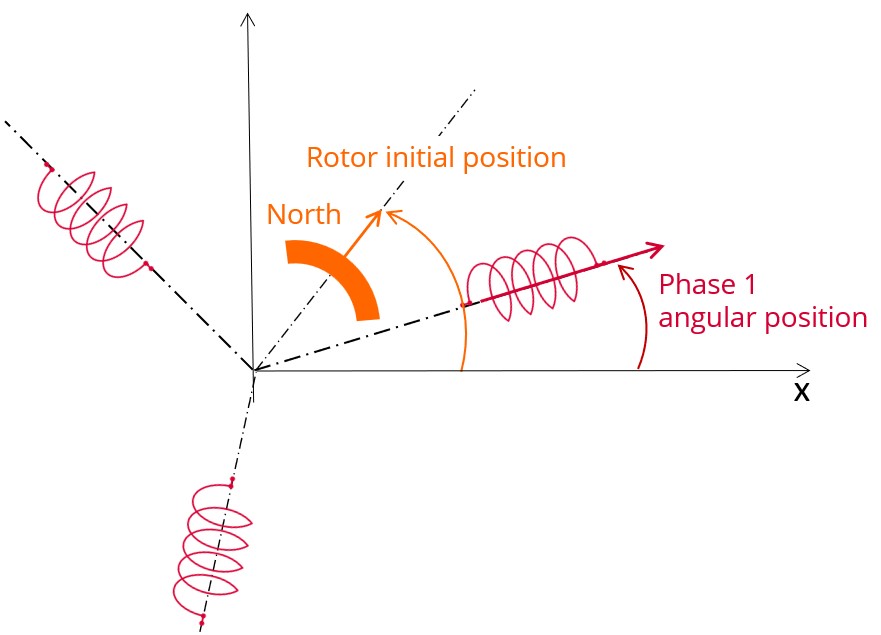
The winding axis of the reference phase is defined from the phase shift of the first electrical harmonic of the magneto motive force (M.M.F.).
Mesh order
To get the results, Finite Element Modelling computations are performed.
The geometry of the machine is meshed.
Two levels of meshing can be considered: First order and second order.
This parameter influences the accuracy of results and the computation time.
By default, second order mesh is used.
Airgap mesh coefficient
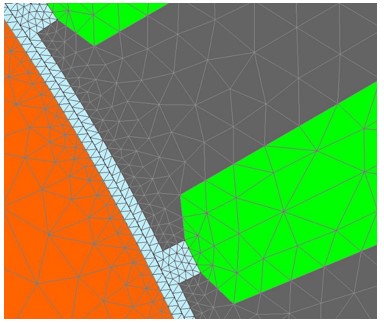
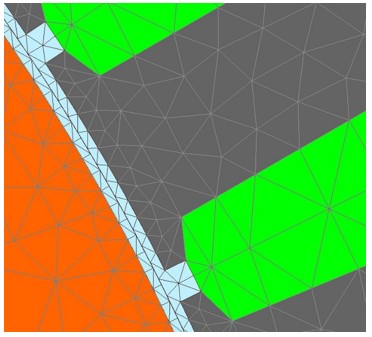
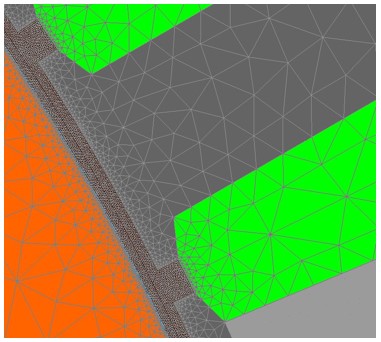
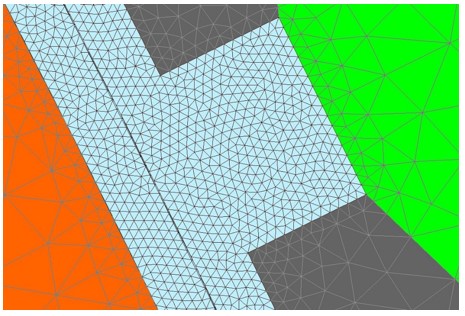
The advanced user input “Airgap mesh coefficient” is a coefficient which adjusts the size of mesh elements inside the airgap. When the value of “Airgap mesh coefficient” decreases, the mesh elements get smaller, leading to a higher mesh density inside the airgap, increasing the computation accuracy.
The imposed Mesh Point (size of mesh elements touching points of the geometry), inside the Altair Flux software, is described as:
MeshPoint = (airgap) x (airgap mesh coefficient)
Airgap mesh coefficient is set to 1.5 by default.
The variation range of values for this parameter is [0.05; 2].
The impact of the airgap mesh coefficient on resultant meshing is illustrated bellow:
Advice for use
The modal analysis as well as the radiation efficiency are based on an analytical computation where the stator of the machine is considered as a vibrating cylinder.
The considered cylinder behavior is weighted by the additional masses like the fins or the winding and the subtractive masses like the slots and the cooling circuit holes.
This assumption allows to get fast evaluation of the behavior of machine in connection to NVH. In no way this can replace a mechanical Finite Element modeling and simulation.
- The limits of the analytical model are reached or overpassed
- Unusual topology and/or dimensions of the teeth/slots
- Complexity of the stator-frame structure when it is composed with several components for instance
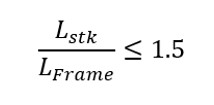
- The ratio between the total length of the frame Lframe and the stack length
of the machine Lstk in any case, this ratio must be lower than 1.5: