Inputs
Standard inputs ––––--
Max. Line-Line voltage, h1 rms
Rated power supply frequency
The value of the rated power supply frequency of the machine: “Rated power supply frequency” (rated power supply frequency) must be provided.
The rated power supply frequency is the electrical frequency applied at the terminals of the machine for the base speed point.
Maximum speed
The value of the « Maximum speed » (Maximum speed).) must be provided.
The analysis of the test results is performed over a given speed range defined between 0 and the maximum speed. This allows to evaluate the behavior of the machine as a function of speed (like rotor Joule losses, total losses, power factor...) in this range of speed.
Advanced inputs ––––--
Electrical equivalent scheme identification
In the first step of the internal process of computation, it is required to identify the model (non-linear electrical equivalent scheme). This implies the computation for each component of the electrical scheme (resistance and inductances maps) as a function of the Line-Line voltage and the power supply frequency.
Both following inputs allow to fix the discretization required to identify the non-linear model.
Id. - No. comp. for voltage
In the first step of the internal process of computation, it is required to identify the model (non-linear electrical equivalent scheme). This implies the computation for each component of the electrical scheme (resistance and inductances maps) as a function of the Line-Line voltage and the power supply frequency.
The number of computations for the voltage must be defined with the user input « Id - No. Comp. for voltage » (Electrical equivalent scheme identification - Number of computations for Line-Line voltage) is required to identify the non-linear model.
Id. - No. comp. for frequency
In the first step of the internal process of computation, it is required to identify the model (non-linear electrical equivalent scheme). This implies the computation for each component of the electrical scheme (resistance and inductances maps) as a function of the Line-Line voltage and the power supply frequency.
The number of computations for the frequency must be defined with the user input « Id - No. Comp. for frequency » (Electrical equivalent scheme identification - Number of computations for power supply frequency) is required to identify the non-linear model.
Operation of model (Op.)
In the second step of the internal process of computation, it is required to operate (solve) the model (non-linear electrical equivalent scheme) to generate sets of curves in function of the Line-Line voltage, the power supply frequency, and the slip to get the performances of the machine as in the T(Slip) test.
Forth following inputs allow to fix the discretization required to operate the non-linear model in order to get the data set of T(U,f,s) curves representing the behavior of the machine in function of the Line-Line voltage, the power supply frequency and the slip(or speed).
Op. - No. comp. for voltage
The number of computations for the voltage must be defined with the user input « Op. - No. comp. for voltage » (Operation of model to generate T(U,f,s) - Number of computations for Line-Line voltage).
Op. - No. comp. for frequency
The number of computations for the frequency must be defined with the user input « Op. - No. comp. for frequency. » (Operation of model to generate T(U,f,s) - Number of computations for power supply frequency).
Op. Slip distribution mode
- Slip distribution mode = Logarithmic
When “Logarithmic” is selected, the distribution of the computed points is automatically done. The number of computations to be done in the slip range must be set in the next field: “No. comp. in slip range”.
- Slip distribution mode = Linear
When “Linear” is selected, the distribution of the computed points is automatically done. The number of computations to be done in the slip range must be set in the next field: “No. comp. in slip range”.
- Slip distribution mode = Table
When “Table” is selected, the list of slips to be considered must be defined by using the next field: “Slip table” and by clicking on the button “Set values”.
Two ways are possible to fill the table: either filling the table line by line or by importing an excel file where all the slips to be considered are defined.
Note: The slips must be listed in ascending order.
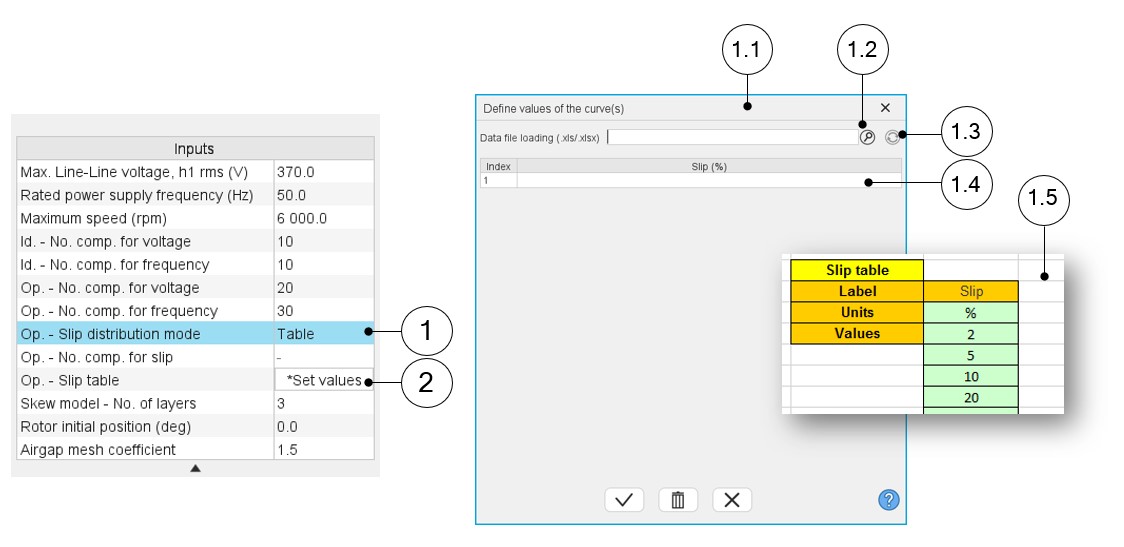 |
|
|---|---|
| 1 | Select the “Table” option. |
| 2 | Click the button “Set values” in the field “Slip table” to open a dialog box to define the list of slips to be considered. Refer to the next illustration which shows how to fill the Slip table. |
| 1.1 | Dialog box opened after clicked on the button “Set values” in the field “Slip table”. |
| 1.2 | Browse the folder to select an Excel file which is defined the list of slips. |
| 1.3 | Button to refresh the table data when the considered Excel file has been modified. |
| 1.4 | Fields to be filled with data to describe the slips to be considered. |
| 1.5 | Excel file template to define the list of slips. Excel template used to import a list of slips is stored in the folder Resource/Template in the installation folder ofFluxMotor. |
Op. – No. comp. for slip
The number of computations for the slip must be defined with the user input « Op. - No. comp. for slip » (Operation of model to generate T(U,f,s) - Number of computations for slip).
The default value is equal to 100. This default value provides a good overview of the machine behavior. The minimum allowed value is 10.
- The machine operating mode is “Motor”, so the slip range is [0,1].
- The slip distribution mode used is logarithmic or linear.
- The computation time of the test is not highly impacted by this input and huge values can be used if needed as 200.
Op. - Slip table
Skew model – No. of layers
Rotor initial position
The initial position of the rotor considered for computation can be set by the user in the field « Rotor initial position » (Rotor initial position). The default value is equal to 0.
Airgap mesh coefficient
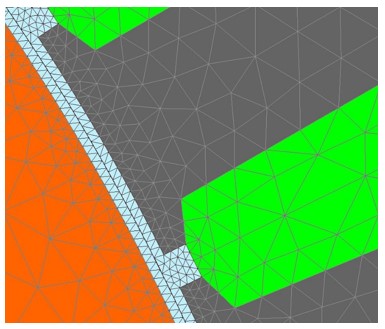
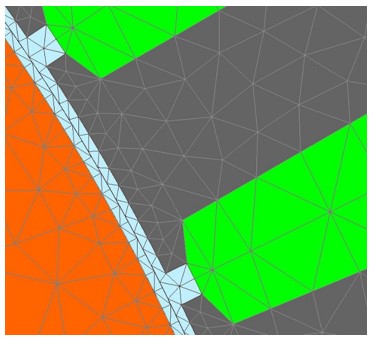
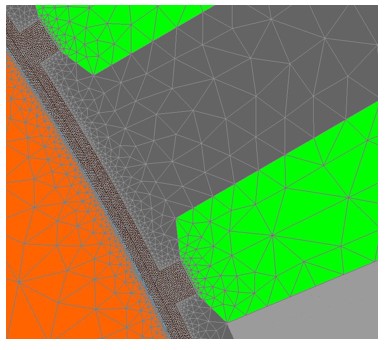
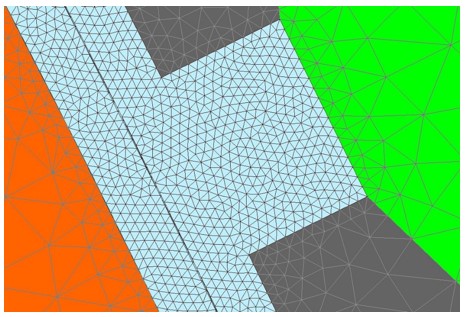
The advanced user input “Airgap mesh coefficient” is a coefficient which adjusts the size of mesh elements inside the airgap. When the value of “Airgap mesh coefficient” decreases, the mesh elements get smaller, leading to a higher mesh density inside the airgap, increasing the computation accuracy.
The imposed Mesh Point (size of mesh elements touching points of the geometry), inside the Altair Flux software, is described as:
MeshPoint = (airgap) x (airgap mesh coefficient)
Airgap mesh coefficient is set to 1.5 by default.
The variation range of values for this parameter is [0.05; 2].
The impact of the airgap mesh coefficient on resultant meshing is illustrated bellow: