
Inputs
Standard inputs
Sharing data between tests
An import button is available for allowing sharing the data simulated in Flux between “Characterization / Model / Map” and “Performance mapping / Efficiency map” tests.
Indeed, by implementing the rotor position dependency option for the model map test and efficiency map test of synchronous machines, this update facilitates the seamless transfer of settings, inputs, and crucially, simulated data in Flux between the two tests. As they use the same Flux data in most cases and significant computation time is required to obtain it, users can now accelerate the test resolution and optimize their workflow.
- Reluctance Synchronous Machines - Inner rotor
- Synchronous Machines with wound field – Inner Salient Pole - Inner rotor
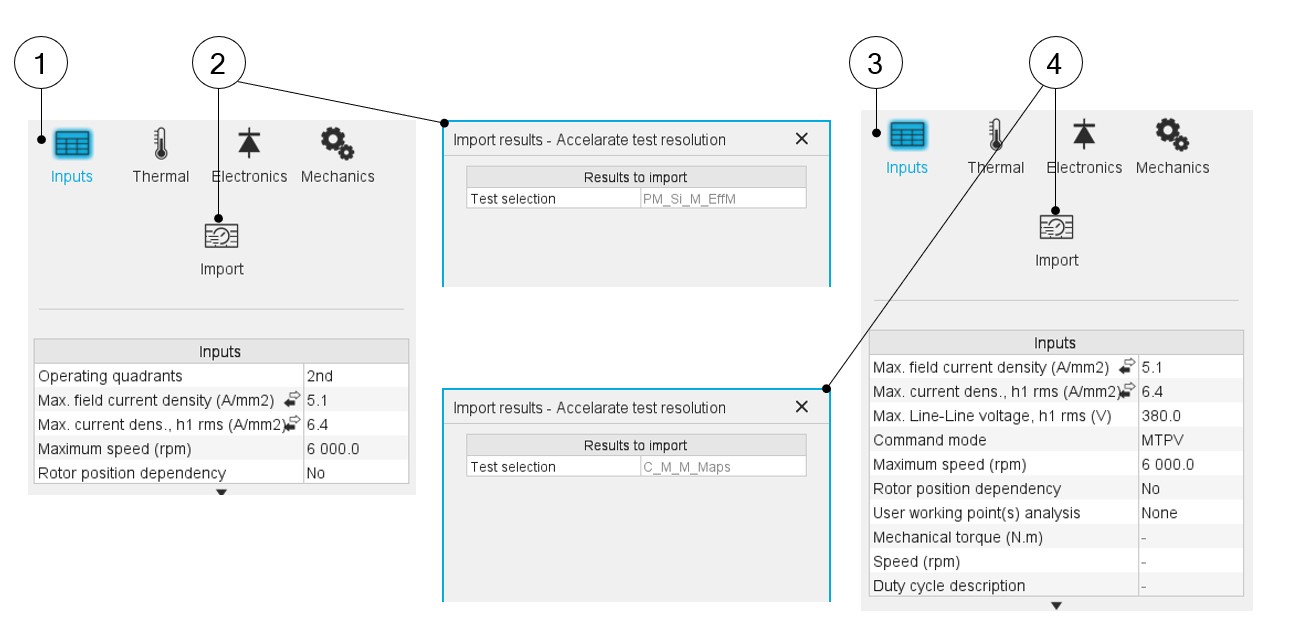
Upon completing a model map test, users can activate the import button in the efficiency map test GUI. This enables them to effortlessly import the settings and corresponding Flux data from the previous test, eliminating the need to rerun Flux for identical data, a step that typically consumes a substantial portion of computation time during efficiency mapping.
 |
|
|---|---|
| 1 | Open model map test environment when an efficiency map test is available for import |
| 2 | Click the import button and import the settings, inputs, and Flux data of the latest efficiency map test |
| 3 | Open efficiency map test environment when a model map test is available for import |
| 4 | Click the import button and import the settings, inputs, and Flux data of the latest model map test |
Standard inputs ––––--
Operating quadrants
It defines the quadrants in the Jd - Jq plane where the test will be carried out. Options allow computing and displaying 1, 2 or 4 quadrants.
By default, the considered quadrants are the “1st and 2nd” (i.e., the grid is defined for both negative and positive values of the current in the d axis and positive ones in the q axis). This option is chosen as default because the Synchronous Machine with wound field heritages the characteristic of both Synchronous Machine with Permanent Magnets and Reluctance Synchronous Machines which work respectively in the second and the first quadrant in the motor operating mode.
The other possible values for this input are “2nd”, “2nd and 3rd“, and “all”.
Current definition mode
There are 2 common ways to define the electrical current.
Electrical current can be defined by the current density in electric conductors.
In this case, the current definition mode should be « Density ».
Electrical current can be defined directly by indicating the value of the line current (the RMS value is required).
In this case, the current definition mode should be « Current ».
Max. field current
Max. field current density
Max. line current, h1 rms
Max. current dens. h1, rms
Maximum speed
The analysis of test results is performed over a given speed range to evaluate losses as a function of speed, like iron losses, mechanical losses, and total losses.
The speed range is fixed between 0 and the maximum speed to be considered « Maximum speed » (Maximum speed).
Rotor position dependency
Advanced inputs ––––--
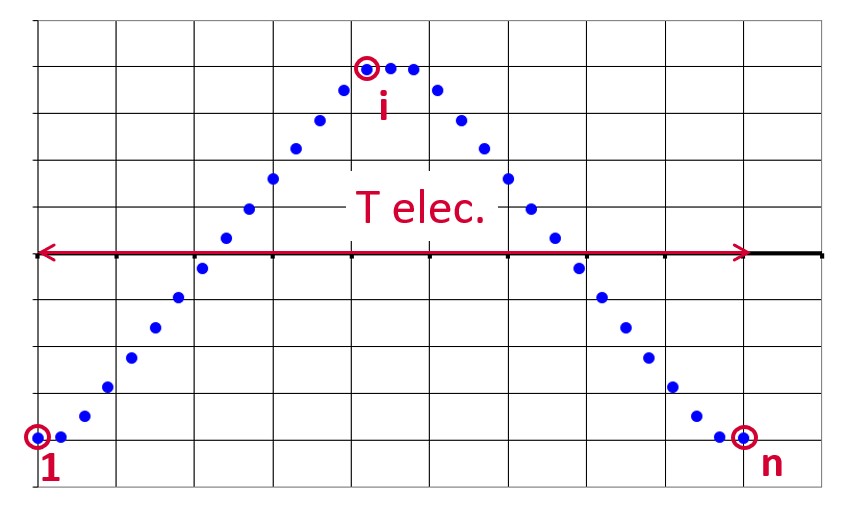
No. computed elec. periods
The user input “No. computed elec. periods” (Number of computed electrical periods only required with rotor position dependency set to “Yes”) influences the computation time of the results.
No. comp. / elec. period
The number of computations per electrical period “No. comp. / elec. period” (Number of computations per electrical period) influences the accuracy of results and the computation time.
No. comp. for Jd,Jq
To get maps in the Jd-Jq plan, a grid is defined. The number of computation points along the d-axis and q-axis can be defined with the user input « No. comp. for current Jd, Jq » (Number of computations per quadrant for D-axis and Q-axis phase currents).
The default value is equal to 6. This default value provides a good compromise between the accuracy of results and computation time. The minimum allowed value is 5.
No. comp. for if
- Computation of the back-EMF:
To compute the Back-EMF for different magnetization states, the field current If is discretized from zero to its maximum value.
The number of computation points for the If discretization can be defined with the user input « No. comp. for If » (Number of computations for field current).
The default value is equal to 6. This default value provides a good compromise between the accuracy of results and computation time. The minimum allowed value is 5.
- Computation of maps in Jd,Jq plan:
To get maps along the If dimension, the field current is discretized from zero to its maximum value. The number of computation points along the If - axis can be defined with the user input « No. comp. for If » (Number of computations for If - axis field currents).
The default value is equal to 6. This default value provides a good compromise between the accuracy of results and computation time. The minimum allowed value is 5.Note: If one uses more than one quadrant, the total number of computations for Jd and Jq will be calculated based on the No. comp. for current Jd, Jq input and the number of quadrants. For example, if No. comp. for current Jd, Jq is set to 10 and the quadrant is set to “1st and 2nd “, then the total number of computations for Jd is 10, but 19 for Jq considering Jd = 0 is shared between both quadrants
No. comp. for speed
The number of computations for speed corresponds to the number of points to consider in the range of speed. It can be defined via the user input “No. comp. for speed” (Number of computations for speed).
The default value is equal to 10. The minimum allowed value is 5.
Rotor initial position
By default, the “Rotor initial position” is set to “Auto”.
When the “Rotor initial position mode” is set to “Auto”, the initial position of the rotor is automatically defined by an internal process.
The resulting relative angular position corresponds to the alignment between the axis of the stator phase 1 (reference phase) and the direct axis of the rotor.
When the “Rotor initial position” is set to “User input” (i.e. toggle button on the right), the initial position of the rotor considered for computation must be set by the user in the field « Rotor initial position ». The default value is equal to 0. The range of possible values is [-360, 360].
Notice: The computations are performed by considering the relative angular position between the rotor and stator.
This relative angular position corresponds to the angular distance between the direct axis of the rotor north pole and the axis of the stator phase 1 (reference phase).
The value of the rotor D-axis location, which is automatically defined for each saliency part.
Below is illustrated the Rotor and stator phase relative position
The relative angular position between the axis of the stator phase 1 (reference phase) and the rotor D-axis position must be controlled to perform the tests. See the picture below which will allow defining the working point of the machine.
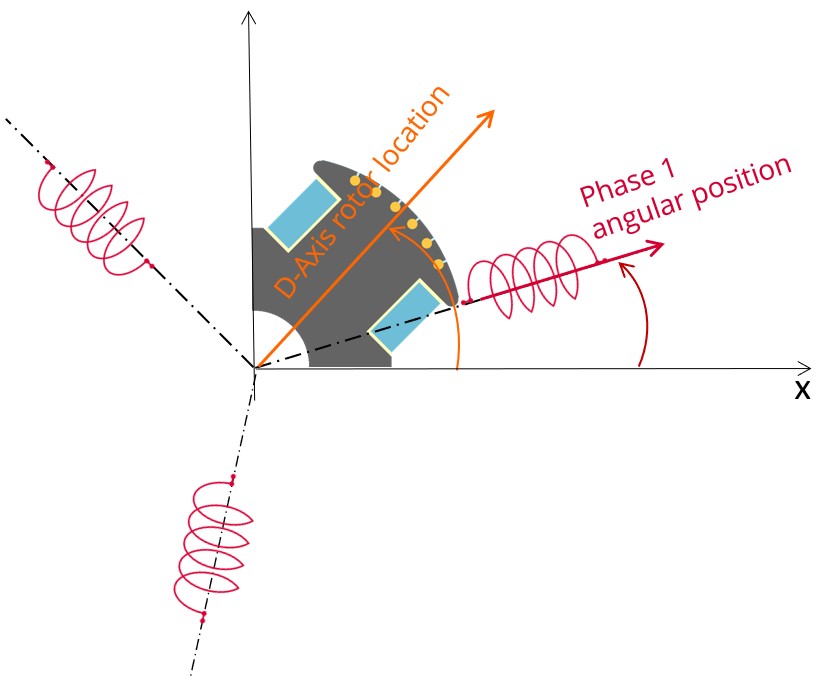
The winding axis of the reference phase is defined from the phase shift of the first electrical harmonic of the magneto motive force (M.M.F.).
Skew model – No. of layers
Mesh order
To get the results, Finite Element Modelling computations are performed.
The geometry of the machine is meshed.
Two levels of meshing can be considered: First order and second order.
This parameter influences the accuracy of results and the computation time.
By default, second order mesh is used.
Airgap mesh coefficient
The advanced user input “Airgap mesh coefficient” is a coefficient which adjusts the size of mesh elements inside the airgap. When the value of “Airgap mesh coefficient” decreases, the mesh elements get smaller, leading to a higher mesh density inside the airgap, increasing the computation accuracy.
The imposed Mesh Point (size of mesh elements touching points of the geometry), inside the Altair Flux software, is described as:
MeshPoint = (airgap) x (airgap mesh coefficient)
Airgap mesh coefficient is set to 1.5 by default.
The variation range of values for this parameter is [0.05; 2].
The impact of the airgap mesh coefficient on resultant meshing is illustrated bellow: