
Duty cycle
User working point(s) analysis
- User working point(s) analysis = None (=default mode)
This corresponds to the basic configuration of the test, with no additional working point analysis.
- User working point(s) analysis = Single point
This allows computing the machine performance on a working point which must be specified by the user with the targeted speed and torque.
In that case the next two fields must be filled in with the targeted speed and mechanical torque.
Table 1. User working point analysis = Single point 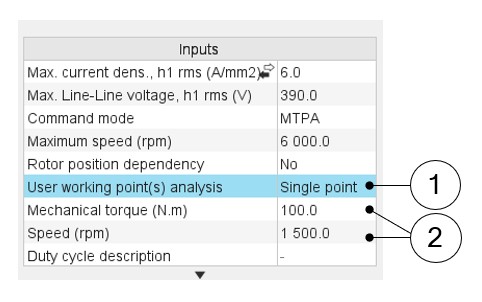
1 Select the “Single point” option to perform a computation on one working point. 2 Define the targeted working point mechanical torque and speed. - User working point(s) analysis = Duty cycle
This allows computing the machine performance all over the considered duty cycle.
This duty cycle must be defined by using the next field: "Duty cycle description" and by clicking on the button "Set values".
Two ways are possible to fill in the table: either filling the table line by line or by importing an excel file in which all the working point of the duty cycle are defined.Note: A working point is defined by a time, a speed, and a mechanical torque.Table 2. User working point analysis = Duty cycle 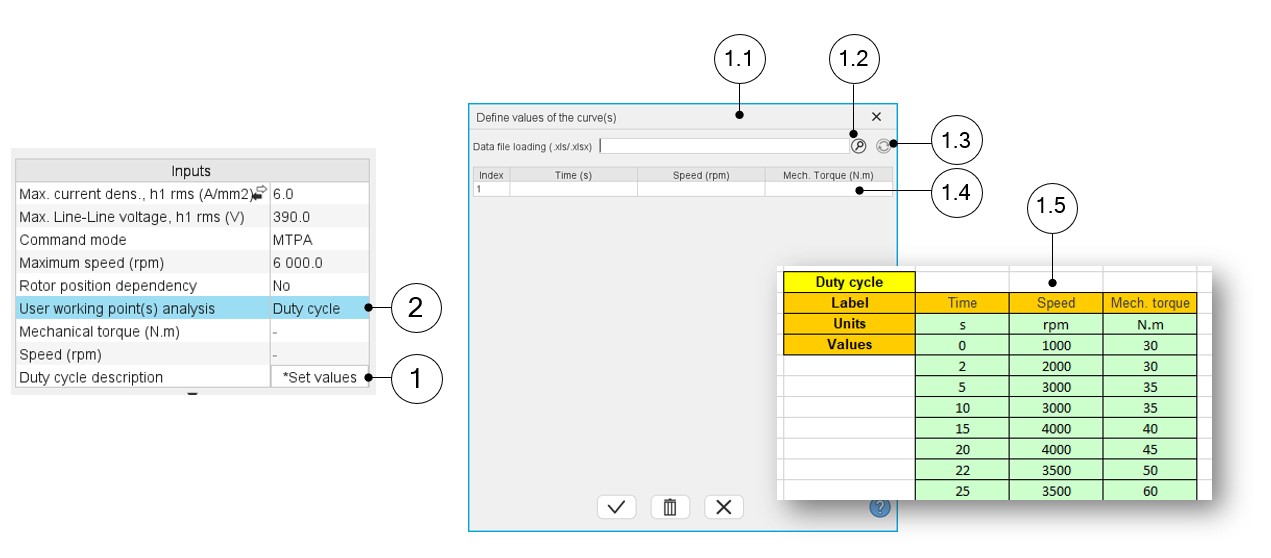
1 Select the “Duty cycle” option. 2 Click in the button “Set values” of the field “Duty cycle” to open a dialog box to define the duty cycle. Refer to the next illustration which shows how to fill the Duty cycle table.
1.1 Dialog box opened after having clicked on the button “Set values” in the field “Cycle description” 1.2 Browse the folder to select an Excel file which describes the duty cycle. 1.3 Button to refresh the table data when the considered Excel file has been modified. 1.4 Fields to be filled with data to describe the duty cycle to be considered. 1.5 Excel file template to define the duty cycle