
Depuis la version 2026, Flux 3D et Flux PEEC ne sont plus disponibles.
Veuillez utiliser SimLab pour créer un nouveau projet 3D ou pour importer un projet Flux 3D existant.
Veuillez utiliser SimLab pour créer un nouveau projet PEEC (pas possible d'importer un projet Flux PEEC existant).
/!\ La documentation est en cours de mise à jour – des références au 3D peuvent subsister.
Composed Non Meshed Coil by File Import
Introduction
To be able to create a composed non meshed coil with a lot of points and avoid to have limitation in the execution of python containing too much lines, a new type of non meshed coil has been added and called Composed coil by file import.
This new type of composed coil will be powerful:
- For Flux users, to be able to create non meshed coil without restriction on the number of definition points.
- And indirectly also by SimLab users. In SimLab, it is possible to generate a file with a list of points of the neutral fiber of a body, and then use this file to create an non-meshed coil in SimLab equivalent to this new type of composed non meshed coil in Flux.
Composed Coil by file import
A dedicated type is available to create a composed non meshed coil directly by importing a csv file.
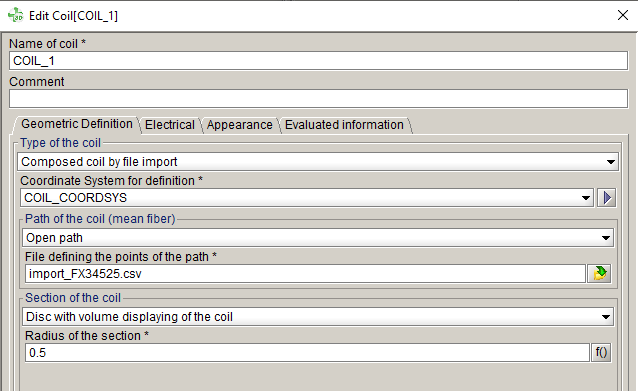
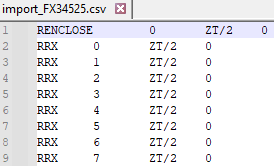
| The CSV should be formatted as below | |
|---|---|
|
 |
Difference between 2 possibilities of creation by import
It exists 2 possibilities of creation of composed non meshed coil by import:
- By using the Composed coil type + using the
"Import" button to fill the table with points
informations, contained in a txt file (already existing).Conseil : Recommended for few points
- By using the Composed coil by file import type, with
directly a selection of csv file, without table in the dialog box (added in
this release 2024.1).Conseil : No limit of number of points. It's recommended when a lot of points are required.
| Difference between the both possibilities of creation of non mesh coil by import | |
|---|---|
| Composed coil + "Import" button | Composed coil by file import |
Fill the table in the dialog box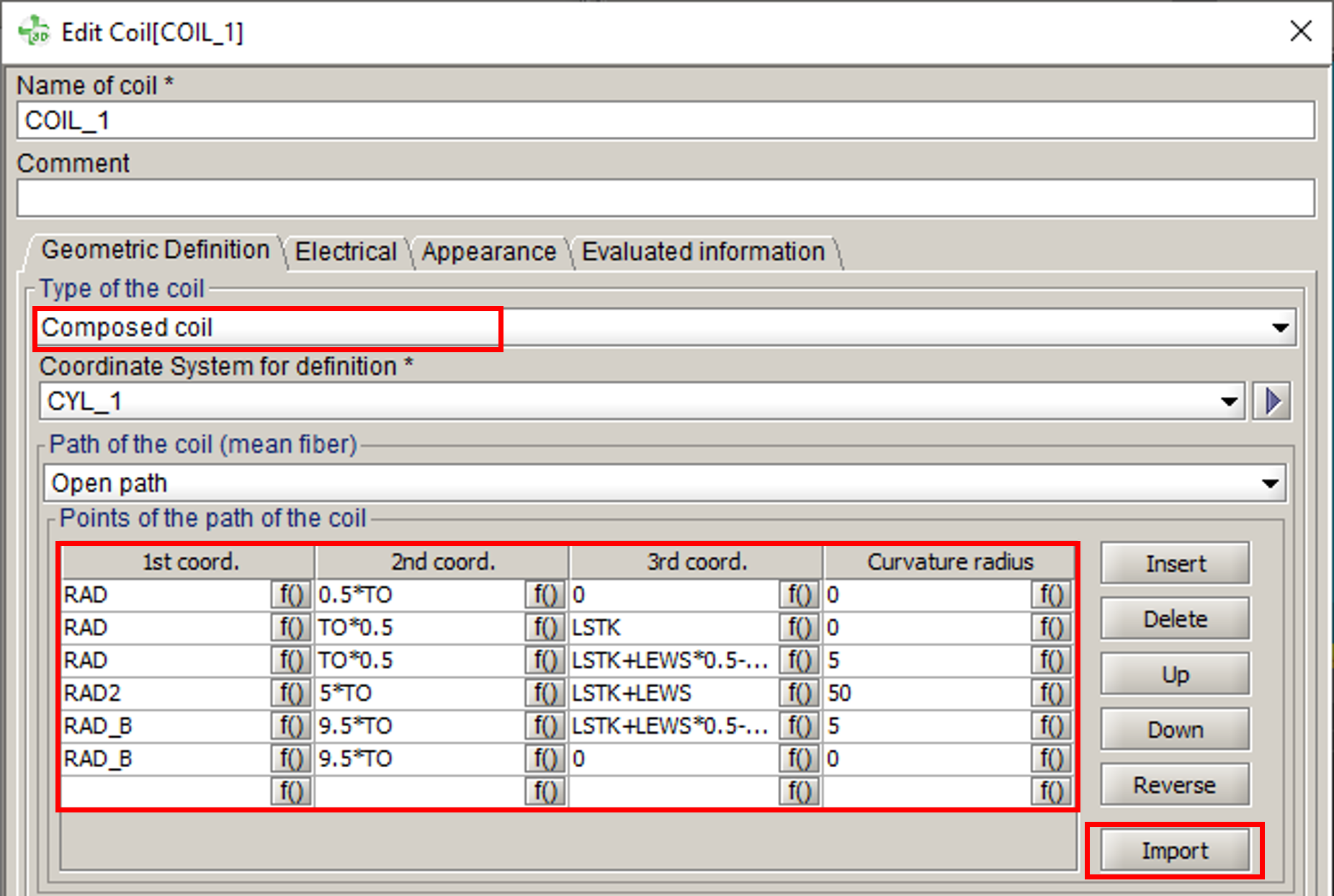 |
No table in the dialog box |
|
Limited number of points, because there is a limitation on the number of lines of a script python when it is executed. |
No limitation of the number of points, because the python command contains only the csv file, not all the coordinates of each point. |
| The corresponding python contains the list of point with X,Y,Z coordinates and the curvature radius.* | The corresponding python contains only the csv file.** |
Python Examples
- *Composed coil type
ComposedCoil(name='COIL_2', strandedCoil=CoilConductor['COILCONDUCTOR_1'], turnNumber='1', seriesOrParallel=AllInSeries(), coilDuplicationBySymmetriesPeriodicities=CoilDuplication(), coordSys=CoordSys['XYZ1'], coilPath=ClosedPathCoil(coilPoints=[CoilPoint(coordinates=['0', '0', '0'], radius='0'), CoilPoint(coordinates=['0', '10', '20'], radius='0'), CoilPoint(coordinates=['0', '10', '30'], radius='0'), section=PointCoilSection(sectionRadius='1'), color=Color['Turquoise'], visibility=Visibility['VISIBLE']) - **Composed coil by file import type
ComposedCoilByFile(name='Coil_1',
  strandedCoil=CoilConductor['COILCONDUCTOR_1'],
  turnNumber='1',
  seriesOrParallel=AllInSeries(),
  coilDuplicationBySymmetriesPeriodicities=CoilDuplication(),
  coordSys=CoordSys['COIL_COORDSYS'],
  coilPath=OpenPathCoilByFile(file='import_FX34525.csv'),
  section=DiscCoilSection(sectionRadius='1'),
  color=Color['Turquoise'],
  visibility=Visibility['VISIBLE'])