
Since version 2026, Flux 3D and Flux PEEC are no longer available.
Please use SimLab to create a new 3D project or to import an existing Flux 3D project.
Please use SimLab to create a new PEEC project (not possible to import an existing Flux PEEC project).
/!\ Documentation updates are in progress – some mentions of 3D may still appear.
Skin depth computation
Introduction
A calculator enabling to compute the skin depth is available in Flux.
Access
To open the calculator, in the Mesh menu, click on Skin depth computation.
Calculator for skin depth computation
The calculator is presented as follows:
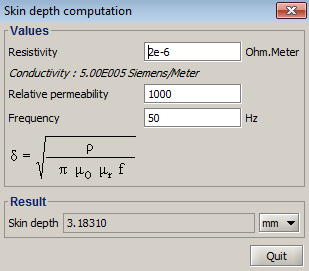
Compute the skin depth
To calculate the skin depth:
- In the Values area:
fill in the fields: Resistivity, Relative permeability, Frequency
- In the Result area:
- choose the units
- read the skin depth value
Applications / Dimensions
The calculator for Skin depth computation is available in 2D, 3D and Skew for the following applications:
- Steady State AC Magnetic
- Transient Magnetic
- Steady State AC Magnetic coupled with Transient Thermal