Pairs and Symmetric Modeling in Inspire Motion
Inspire Motion supports symmetrical modeling, leveraging geometric or physical symmetry in mechanical systems to simplify both modeling and editing. Symmetrical modeling takes advantage of mirrored or repeated components, allowing systems to be represented with fewer entities and parameters.
- vehicles with identical left and right suspension and tire assemblies, and
- excavators with linkages and hydraulic actuators mirrored along the boom.
- reduce modeling effort,
- eliminate misalignment issues, and
- ensure synchronicity across the model.
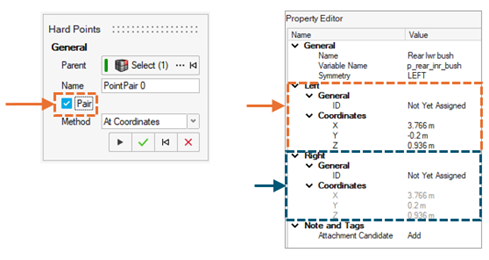
Symmetrical modeling is implemented using the Pair feature in entities such as points, markers, and joints. When activated, the Pair feature generates two entities symmetric about the global x–z plane. In the Model Browser, a single entity is listed, while the modeling window displays two mirrored graphics. Edits made on one side are automatically reflected on the other.
You can designate either the left or right side as the reference, establishing a reference–dependent relationship. It is up to you to decide which side of the global x–z plane is considered left and right, but the convention should be kept consistent across the model.
For asymmetric pairs, the Model Browser still shows a single entity and the modeling window shows two graphics; however, each side is controlled independently.
Pair entities can also be combined with regular entities, enabling a hybrid model where only selected components are mirrored.