


|
Creating Folders
A user with an Administrator or Designer role can create folders.
|
NOTE |
Users that log on with a Designer role will have their own personal folder created and displayed on the Workbooks page (e.g., ~designer). The personal folders: · Are displayed and can be accessed for users with an Administrator or Designer role. · Are where Designers can create workbooks and build dashboards. For more information, refer to Altair Panopticon Web Authoring Guide on how to create workbooks on the Web client. |
Steps:
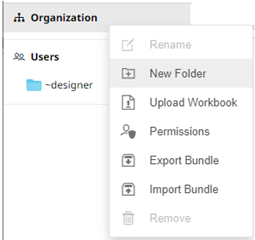
1. On the Workbooks tab, right-click on the topmost folder, and select New Folder.
|
NOTE |
Only Administrators are allowed to change the permissions on the root folder. |
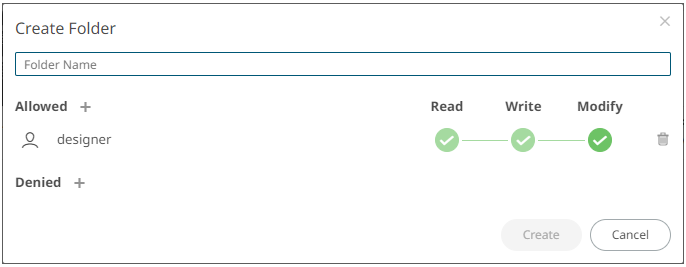
The Create Folder dialog displays.
|
NOTE |
· Everyone is available in the Allowed section by default. · Removing the Everyone group will mean that the folder and its subfolders will not be available for public access. · The default group permissions on the root folder are WRITE + READ. |
2. Enter a Folder Name.
3. Proceed to defining the Authorization to Allowed or Denied groups and users.
4. Click  .
.
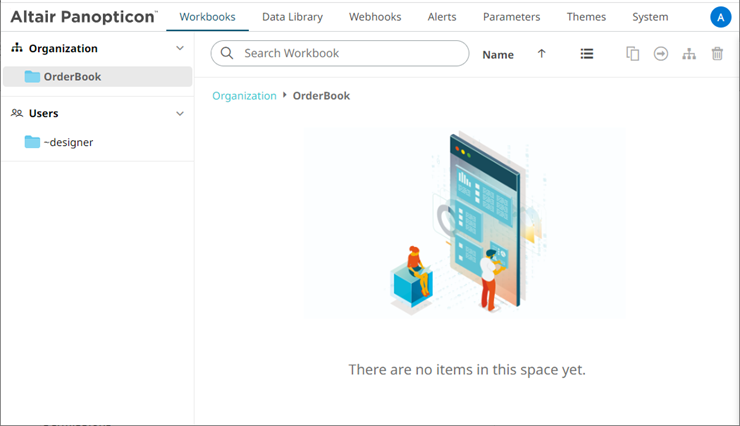
The new folder is displayed on the expanded Folder hierarchy list and on the Root Folder list.
|
NOTE |
· Folders and subfolders can be deleted if they do not contain published workbooks. · The folders and subfolders on the Workbooks page will also be available on the Data Library, Webhooks, and Themes pages. |