|
Adding Global Parameters
Follow the steps below to add global parameters with a Designer role.
Steps:
1. On the Parameters tab, click
the Add  icon of a global folder (root
or subfolder).
icon of a global folder (root
or subfolder).
A new parameter entry displays.
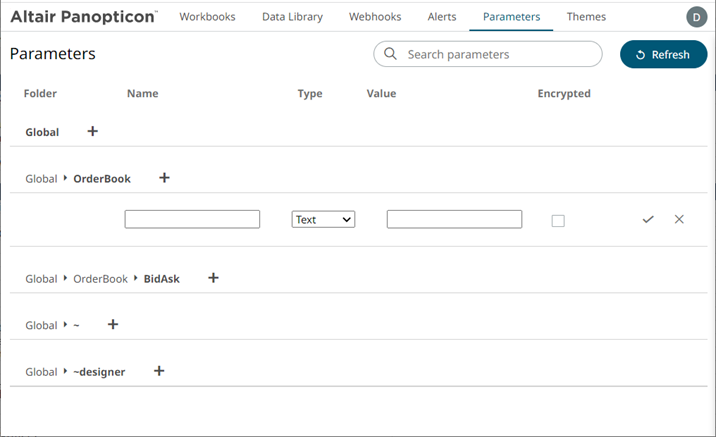
2. Enter a Name for the new parameter.
3. Select the Type: Text, Numeric, or Time.
4. Enter the Default Value.
|
NOTE |
· You can enter several default values, separated by a comma. · Single quotes on parameter value/s are removed when saving global parameters. · For the Time type, the following formats for the default value are accepted: o "yyyy-MM-dd" o "yyyy-MM-ddTHH:mm:ss" o "yyyy-MM-ddTHH:mm:ss.SSS"
|
5. Check the Encrypted box to encrypt the value.
|
NOTE |
Encryption is only supported for text parameters. |
6. Click  . The new parameter is added in the
list.
. The new parameter is added in the
list.
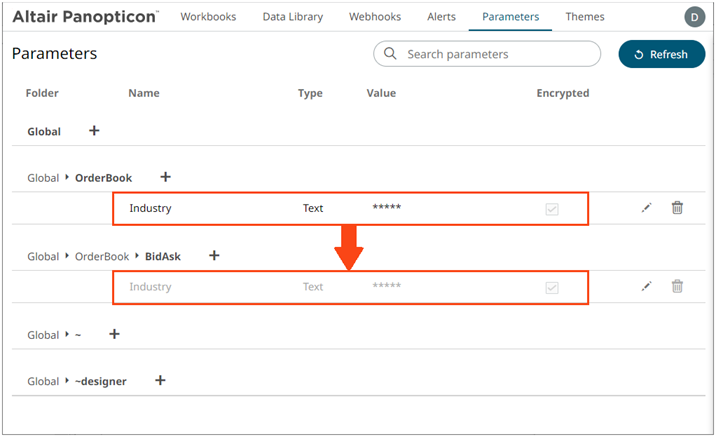
Global parameters added in the parent/root folder are inherited by the corresponding subfolders.