Navigating Tables
Tables open in the Prepare window may be easily navigated in a number of ways.
Navigation controls
The following controls have been enabled in Monarch Data Prep Studio to allow quick movement through a table.
-
Ctrl + Home – Go to first cell of the first row of the table
-
Ctrl + End – Go to the last cell of the last row of the table
-
Ctrl + Right arrow – Go to right-most cell in the current row
-
Ctrl + Left arrow – Go to the left-most cell in the current row
Searching for data
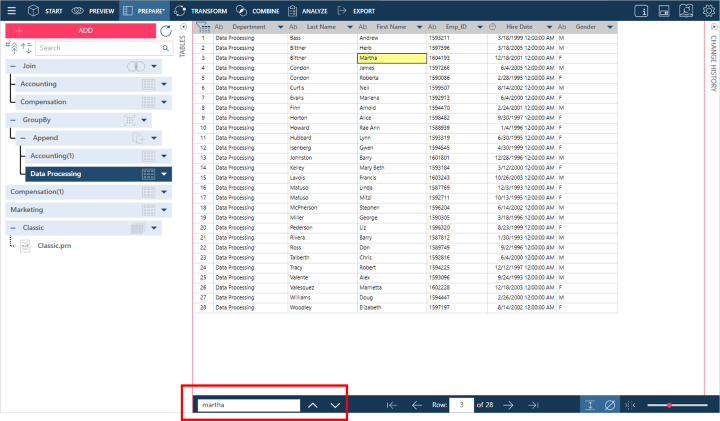
You can search for specific data in tables by using the Search field located at the bottom of your workspace. Enter the string you would like to search for and then either press Enter on your keyboard or click the Search for Next  button located to the right of this field. The first cell including the string you are searching for is highlighted. Keep pressing Enter or clicking the Search for Next button to locate all instances of this string. To reverse the search direction, click on the Search for Previous
  button.
Working with rows
The row number of any given table is provided at the bottom of your workspace.

To go to a specific row in your table, simply enter the row number you wish in the row field provided. To go to the first and last rows of the table, click on the First Row  and Last Row
  buttons, respectively. As well, the Previous Page
  and Next Page
  buttons take you to views of previous and next pages of data, respectively. You can increase row heights by selecting the Row Height
  button to fit multi-line data into your rows.
Showing nulls and whitespace characters
Two buttons, which appear at the lower right-hand corner of the Prepare window, have been enabled in Monarch Data Prep Studio to help you visualize your data better. The Show Nulls  button helps you see null values (i.e., empty fields). Clicking on the Show Whitespace Characters
  button displays spaces, tab indents, and line breaks between text characters; these indicators are displayed as
  , →, and
  , respectively.
(c) 2023 Altair Engineering Inc. All Rights Reserved.