


|
Text Axis Variable Configuration for the Text Combination Graph
The Text Axis Combination graph has a time time axis variable that you can configure. There is no need to drag and drop columns to this variable.
Steps:
1. Click on the Text Axis variable drop area of the Text Combination graph. The Text Axis Settings pane displays.
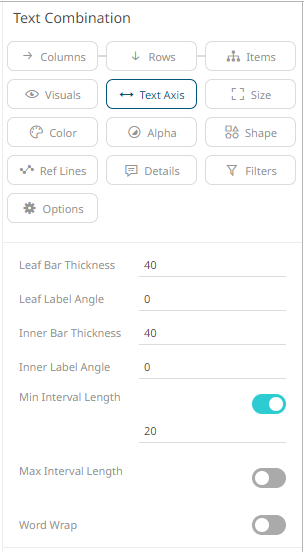
2. Define or select the value of the following settings:
|
Setting |
Description |
|
Leaf Bar Thickness |
The thickness of the leaf or lowest level of data. The default value is 40. |
|
Leaf Label Angle |
The Label angle of the leaf or lowest level of data of the crosstab axis. Default is 0, accepts values between -90 and +90. |
|
Inner Bar Thickness |
The width or height allocated for the non-leaf components of the Table axis in pixels. The default value is 40. |
|
Inner Label Angle |
The angle of the non-leaf labels. Default is 0, accepts values between -90 and +90. |
|
Min Interval Length |
The minimal interval in pixels between cross tabbed visualizations. Enabled by default and the value is set to 20. |
|
Max Interval Length |
The maximum interval in pixels between cross tabbed visualizations. Tap the slider to enable. The default value is 400. |
|
Word Wrap |
Determines whether to wrap the visualization axis text. |
3. Click the Save  icon on the toolbar.
When
saved, the  notification
is displayed.
notification
is displayed.