|
[Appendix]
Properties: Streams
The Streams.properties file located in the App_Data folder (i.e., c:\streamsserverdata), contains majority of properties for controlling the configuration of the Panopticon Streams. The following properties can be overridden by updating the file.
|
Property |
Access |
||||||
|
Attribute |
access.administrator.groups |
||||||
|
Description |
The role that is mapped to the administrator group. |
||||||
|
Default Value |
admin |
||||||
|
Property |
Access |
||||||
|
Attribute |
access.default.roles |
||||||
|
Description |
The default roles applied to all users of the server. For example, if access.default.roles=DESIGNER,ADMINISTRATOR and a user with a VIEWER role logs on to the server, then the user will simultaneously have a VIEWER, DESIGNER, and ADMINISTRATOR roles. However, if no default roles are wanted, then leave the property blank. NOTE: The roles that can be assigned in this property can only be ADMINISTRATOR, VIEWER, ANONYMOUS, and/or DESIGNER. This property is case sensitive. |
||||||
|
Default Value |
VIEWER |
||||||
|
Property |
Access |
||||||
|
Attribute |
access.designer.groups |
||||||
|
Description |
The role that is mapped to the designer group. |
||||||
|
Default Value |
designer |
||||||
|
Property |
Access |
||||||
|
Attribute |
access.viewer.groups |
||||||
|
Description |
The role that is assigned to the viewer group. NOTE: Currently not in use. Development ongoing. |
||||||
|
Default Value |
|
||||||
|
Property |
Access |
||||||
|
Attribute |
access.list.delimiter |
||||||
|
Description |
The value delimiter to use when parsing access groups. Examples: access.list.delimiter=, access.administrator.groups=group1,group2
The groups are mapped to {'group1', 'group2'}
access.list.delimiter=, access.administrator.groups=group1;group2,group3
The groups are mapped to {'group1;group2', 'group3'}
access.list.delimiter=; access.administrator.groups=group1;group2,group3
The groups are mapped to {'group1', 'group2,group3'} |
||||||
|
Default Value |
',' (comma) |
||||||
|
Property |
Authentication: Header |
||||||
|
Attribute |
authentication.header.role.delimiter |
||||||
|
Description |
The delimiter used to separate the roles. Example: role1, role2,role3 |
||||||
|
Default Value |
, (Comma) |
||||||
|
Property |
Authentication: Header |
||||||
|
Attribute |
authentication.header.roles |
||||||
|
Description |
The name of the header that contains all the roles. |
||||||
|
Default Value |
|
||||||
|
Property |
Authentication: Header |
||||||
|
Attribute |
authentication.header.rolesdynamic |
||||||
|
Description |
Supports the ability to create dynamic roles using free form patterns or string replacement. To create dynamic roles, use '{header value to be used}'. Example: authentication.header.rolesdynamic={HEADER_ROLES},financials,role_for_company_{HEADER_COMPANY}
Given this table:
Then the roles to create the authentication token will be the following: · designer · watcher · financials · role_for_company_industrials · role_for_company_consumers |
||||||
|
Default Value |
|
||||||
|
Property |
Authentication: Header |
||||||
|
Attribute |
authentication.header.username |
||||||
|
Description |
The name of the header that contains the username |
||||||
|
Default Value |
|
||||||
|
Property |
Authentication: Logout |
||||||
|
Attribute |
authentication.logout.redirect.url |
||||||
|
Description |
Takes a URL as a parameter. Clicking the logout button redirects the user to the specified URL. If this property is not set, user will be returned to the start page of Panopticon. |
||||||
|
Default Value |
|
||||||
|
Property |
Authentication: OAuth 2.0 |
||||||
|
Attribute |
authentication.oauth2.client.ID |
||||||
|
Description |
The ID of the OAuth 2.0 client. |
||||||
|
Default Value |
|
||||||
|
Property |
Authentication: OAuth 2.0 |
||||||
|
Attribute |
authentication.oauth2.client.secret |
||||||
|
Description |
The secret used by the OAuth 2.0 client. |
||||||
|
Default Value |
|
||||||
|
Property |
Authentication: OAuth 2.0 |
||||||
|
Attribute |
authentication.oauth2.identity.attribute.roles |
||||||
|
Description |
The attribute that will be extracted from the identity response and used as the role. There can be multiple assigned roles for a user. |
||||||
|
Default Value |
|
||||||
|
Property |
Authentication: OAuth 2.0 |
||||||
|
Attribute |
authentication.oauth2.identity.attribute.roles.pattern |
||||||
|
Description |
Takes regex used to extract the roles from the OAuth 2.0 server identity response. For example, the returned string: cn=admin,ou=groups,dc=openam,dc=openidentityplatform,dc=org,cn=designer,ou=groups,dc=openam,dc=openidentityplatform,dc=org contains two roles, admin and designer The regex to extract the roles is cn=([^,]+). |
||||||
|
Default Value |
|
||||||
|
Property |
Authentication: OAuth 2.0 |
||||||
|
Attribute |
authentication.oauth2.identity.attribute.username |
||||||
|
Description |
The attribute that will be extracted from the identity response and used as the username. |
||||||
|
Default Value |
|
||||||
|
Property |
Authentication: OAuth 2.0 |
||||||
|
Attribute |
authentication.oauth2.identity.url |
||||||
|
Description |
The URL to the REST service that provides details about the authenticated user. |
||||||
|
Default Value |
|
||||||
|
Property |
Authentication: OAuth 2.0 |
||||||
|
Attribute |
authentication.oauth2.login.callback.url |
||||||
|
Description |
The callback URL. The URL should be the same as one of the specified callback URLs used by the client. The URL should refer to the Panopticon Streams |
||||||
|
Default Value |
|
||||||
|
Property |
Authentication: OAuth 2.0 |
||||||
|
Attribute |
authentication.oauth2.login.redirect.url |
||||||
|
Description |
Redirects the user to the specified URL after successfully logging in. This property can be left blank, in which case the user is redirected to the URL they requested to access. |
||||||
|
Default Value |
|
||||||
|
Property |
Authentication: OAuth 2.0 |
||||||
|
Attribute |
authentication.oauth2.login.response.type |
||||||
|
Description |
The response type. The only response type that is currently supported is CODE. The value can also be left blank. |
||||||
|
Default Value |
|
||||||
|
Property |
Authentication: OAuth 2.0 |
||||||
|
Attribute |
authentication.oauth2.login.scope |
||||||
|
Description |
The requested scope. The field can be left blank. |
||||||
|
Default Value |
|
||||||
|
Property |
Authentication: OAuth 2.0 |
||||||
|
Attribute |
authentication.oauth2.login.state |
||||||
|
Description |
The requested state. The field can be left blank. |
||||||
|
Default Value |
|
||||||
|
Property |
Authentication: OAuth 2.0 |
||||||
|
Attribute |
authentication.oauth2.login.url |
||||||
|
Description |
The URL to the OAuth 2.0 login resource. |
||||||
|
Default Value |
|
||||||
|
Property |
Authentication: OAuth 2.0 |
||||||
|
Attribute |
authentication.oauth2.logout.redirect.url |
||||||
|
Description |
Logging out revokes the token from the authentication server if the property authentication.oauth2.logout.url is set to the revocation URL. If this property is not set, the server will only remove its own token. If none of these properties are set, the server will attempt to redirect to the start page of the Panopticon when logging out. |
||||||
|
Default Value |
|
||||||
|
Property |
Authentication: OAuth 2.0 |
||||||
|
Attribute |
authentication.oauth2.logout.url |
||||||
|
Description |
The URL to the OAuth 2.0 logout resource. This field can be left blank. |
||||||
|
Default Value |
|
||||||
|
Property |
Authentication: OAuth 2.0 |
||||||
|
Attribute |
authentication.oauth2.token.method |
||||||
|
Description |
The method on how the token should be retrieved. Supported values are QUERY, BODY, and HEADER. |
||||||
|
Default Value |
|
||||||
|
Property |
Authentication: OAuth 2.0 |
||||||
|
Attribute |
authentication.oauth2.token.url |
||||||
|
Description |
The URL to the OAuth 2.0 token resource. |
||||||
|
Default Value |
|
||||||
|
Property |
Service authentication level |
||||||
|
Attribute |
authentication.role |
||||||
|
Description |
The authentication role. |
||||||
|
Default Value |
|
||||||
|
Property |
Service authentication level |
||||||
|
Attribute |
Authentication.required |
||||||
|
Description |
The property that will make the authentication required. It will force the user to login in order to use any of the services provided by the server. |
||||||
|
Default Value |
true |
||||||
|
Property |
Authentication: SAML |
||||||
|
Attribute |
authentication.saml.serviceprovider.id |
||||||
|
Description |
The ID of the service provider configured in the IdP. |
||||||
|
Default Value |
|
||||||
|
Property |
Authentication: SAML |
||||||
|
Attribute |
authentication.saml.assertionconsumerservice.url |
||||||
|
Description |
The
URL to the Panopticon assertion consumer service. |
||||||
|
Default Value |
|
||||||
|
Property |
Authentication: SAML |
||||||
|
Attribute |
authentication.saml.identityprovider.url |
||||||
|
Description |
The URL to the IdP login service. |
||||||
|
Default Value |
|
||||||
|
Property |
Authentication: SAML |
||||||
|
Attribute |
authentication.saml.assertion.username |
||||||
|
Description |
User attribute for username configured in the IdP. |
||||||
|
Default Value |
|
||||||
|
Property |
Authentication: SAML |
||||||
|
Attribute |
authentication.saml.assertion.roles |
||||||
|
Description |
User attribute for roles configured in the IdP. |
||||||
|
Default Value |
|
||||||
|
Property |
Authentication: SAML |
||||||
|
Attribute |
authentication.saml.certificate.name |
||||||
|
Description |
The name of the certificate used to validate signature and/or sign outgoing SAML messages |
||||||
|
Default Value |
|
||||||
|
Property |
Authentication: SAML |
||||||
|
Attribute |
authentication.saml.certificate.password |
||||||
|
Description |
The password of the certificate used to validate signature and/or sign outgoing SAML messages. |
||||||
|
Default Value |
|
||||||
|
Property |
Authentication: SAML |
||||||
|
Attribute |
authentication.saml.challenge.required |
||||||
|
Description |
This property determines whether the IdP-first authentication with SAML is enabled or not. To enable, set this property to false. |
||||||
|
Default Value |
true |
||||||
|
Property |
Authentication: SAML |
||||||
|
Attribute |
authentication.saml.identityprovider.logout.url |
||||||
|
Description |
The URL to the IdP logout service. |
||||||
|
Default Value |
|
||||||
|
Property |
Authentication: SAML |
||||||
|
Attribute |
authentication.saml.keystore.file |
||||||
|
Description |
The location of the Keystore file that contains the certificate. |
||||||
|
Default Value |
|
||||||
|
Property |
Authentication: SAML |
||||||
|
Attribute |
authentication.saml.keystore.password |
||||||
|
Description |
The password to the Keystore file. |
||||||
|
Default Value |
|
||||||
|
Property |
Authentication: SAML |
||||||
|
Attribute |
authentication.saml.identityprovider.certificate.file |
||||||
|
Description |
Takes a file path to a certificate file that contains the IdP’s public key. |
||||||
|
Default Value |
|
||||||
|
Property |
Authentication: SAML |
||||||
|
Attribute |
authentication.saml.identityprovider.signature.validation.required |
||||||
|
Description |
Specifies whether to require a valid IdP signature to be present on the SAML response. Default value is false. |
||||||
|
Default Value |
false |
||||||
|
Property |
Authentication: SAML |
||||||
|
Attribute |
authentication.saml.provider |
||||||
|
Description |
The IdP provider. Possible values are OPENSAML, OPENAM. |
||||||
|
Default Value |
OPENSAML |
||||||
|
Property |
Authentication: SAML |
||||||
|
Attribute |
authentication.saml.keystore.type |
||||||
|
Description |
The key store type. Possible values are JKS, JCEKS, PKCS12. |
||||||
|
Default Value |
JKS |
||||||
|
Property |
Authentication: SAML |
||||||
|
Attribute |
authentication.saml.login.redirect.url |
||||||
|
Description |
Redirects the user to the specified URL after successfully logging in. This property can be left blank, in which case the user is redirected to the URL they requested to access. |
||||||
|
Default Value |
|
||||||
|
Property |
Authentication: SAML |
||||||
|
Attribute |
authentication.saml.logout.redirect.url |
||||||
|
Description |
Redirects the user back to the specified URL after logging out. This is mainly used with a proxy. In which case, the Panopticon Visualization Server does not know the endpoint which the user is going towards to, and therefore cannot redirect the user back to the Overview page. If you are using OpenAM this is required, otherwise this property can be left blank. |
||||||
|
Default Value |
|
||||||
|
Property |
Authentication: SAML |
||||||
|
Attribute |
authentication.saml.openam.meta.alias |
||||||
|
Description |
The meta alias for the IdP if you are using OpenAM. |
||||||
|
Default Value |
|
||||||
|
Property |
Authentication: SAML |
||||||
|
Attribute |
authentication.saml.protocolbinding |
||||||
|
Description |
Protocol binding for the use of SAML authentication. Possible values are HTTP-Redirect, HTTP-POST, HTTP-Artifact, HTTP-POST-SimpleSign, or SOAP. |
||||||
|
Default Value |
HTTP-Redirect |
||||||
|
Property |
Service authentication login request |
||||||
|
Attribute |
authentication.timeout.callback |
||||||
|
Description |
The timeout (in milliseconds) for the user between initiated login and callback. The default value is five minutes. |
||||||
|
Default Value |
300000 |
||||||
|
Property |
Authentication: Token |
||||||
|
Attribute |
authentication.token.cookie |
||||||
|
Description |
Used when sticky load balancer is using cookies. |
||||||
|
Default Value |
stoken |
||||||
|
Property |
Authentication: Token |
||||||
|
Attribute |
authentication.token.domain |
||||||
|
Description |
The domain in which the token cookie should be registered under. |
||||||
|
Default Value |
|
||||||
|
Property |
Authentication: Token |
||||||
|
Attribute |
authentication.token.persistence |
||||||
|
Description |
This property is used to determine if the token should persist if the browser is closed or if it should only last while the browser is open. There are two possible values: PERSISTENT and SESSION. PERSISTENT will persist the token in the browser even if the browser has been closed and reopened. SESSION will remove the token from the browser if it is shutdown. IMPORTANT: After modifying the property value to SESSION, ensure to clear the AppData/Token folder before starting the server. |
||||||
|
Default Value |
PERSISTENT |
||||||
|
Property |
Authentication: Token |
||||||
|
Attribute |
authentication.token.refreshable |
||||||
|
Description |
This property determines if the token can refresh itself. The web client can identify if the token is about to expire and then request a new token with the existing token. A token is refreshable if the property is set to true. The token will expire and invalidate the user session if the property is set to false. |
||||||
|
Default Value |
true |
||||||
|
Property |
Authentication: Token |
||||||
|
Attribute |
authentication.token.secret |
||||||
|
Description |
The secret is used to sign the token. The secret will be auto-generated when the server starts for the first time. NOTE: This value should be kept a secret. |
||||||
|
Default Value |
Auto-generated |
||||||
|
Property |
Authentication: Token |
||||||
|
Attribute |
authentication.token.validity.seconds |
||||||
|
Description |
The number of seconds that the token should be valid. |
||||||
|
Default Value |
604800 |
||||||
|
Property |
Authentication |
||||||
|
Attribute |
authentication.type |
||||||
|
Description |
The type of the authentication mechanism that will be used on the Panopticon Streams. |
||||||
|
Default Value |
BASIC |
||||||
|
Property |
Cache |
||||||
|
Attribute |
cache.plugin.ID |
||||||
|
Description |
The ID of the cache plugin that will be used. Possible value: BinaryTableFile-Cache |
||||||
|
Default Value |
BinaryTableFile-Cache |
||||||
|
Property |
Cache |
||||||
|
Attribute |
cache.purge.condition |
||||||
|
Description |
The condition for determining when the cache should be purged or cleared. Possible values: NONE, MEMORY. |
||||||
|
Default Value |
MEMORY |
||||||
|
Property |
Cache |
||||||
|
Attribute |
cache.purge.condition.memory.threshold |
||||||
|
Description |
The memory threshold used to determine if the cache should be purged or not. The values are presented in percent, 0-100. 80 means that the cache will be purged if the memory consumption reaches 80 % or more. |
||||||
|
Default Value |
80 |
||||||
|
Property |
Cache |
||||||
|
Attribute |
cache.purge.enabled |
||||||
|
Description |
Enable or disable the purge functionality. Possible values: true, false |
||||||
|
Default Value |
true |
||||||
|
Property |
Cache |
||||||
|
Attribute |
cache.schedule.clear.enabled |
||||||
|
Description |
Enable the cache clearing schedule. This is scheduling the clear cache operation which will remove all the expired cache entries. |
||||||
|
Default Value |
true |
||||||
|
Property |
Cache |
||||||
|
Attribute |
cache.service.enabled |
||||||
|
Description |
Enables and disable the service cache |
||||||
|
Default Value |
true |
||||||
|
Property |
Cache |
||||||
|
Attribute |
cache.service.type |
||||||
|
Description |
The service cache mechanism being used. |
||||||
|
Default Value |
IN_MEMORY |
||||||
|
Property |
CEP: Application |
||||||
|
Attribute |
cep.application.autostart |
||||||
|
Description |
Determines whether all of the stored applications in the Streams server should auto start when the Streams server starts. |
||||||
|
Default Value |
false |
||||||
|
Property |
CEP: Application |
||||||
|
Attribute |
cep.kafka.application.state.path |
||||||
|
Description |
Where the tmp folder of the Panopticon Streams data are created. |
||||||
|
Default Value |
C:/PanopticonStreams/Data/tmp/kafka-streams |
||||||
|
Property |
CEP: Kafka |
||||||
|
Attribute |
cep.kafka.connection.timeout |
||||||
|
Description |
The connection timeout towards Kafka. The value is presented in milliseconds. |
||||||
|
Default Value |
10000 |
||||||
|
Property |
CEP: Kafka |
||||||
|
Attribute |
cep.kafka.input.retention.ms |
||||||
|
Description |
Specifies the retention period of input streams. |
||||||
|
Default Value |
60000 |
||||||
|
Property |
CEP Kafka |
||||||
|
Attribute |
cep.kafka.monitoring.consumer.interceptor |
||||||
|
Description |
Names of classes that will be used to monitor data consumed from topics in a Streams application. In addition, these are hooks that will allow an external application to inspect this traffic. NOTE: The default value enables the Confluent Control Center to show metrics for a Streams application. |
||||||
|
Default Value |
io.confluent.monitoring.clients.interceptor.MonitoringConsumerInterceptor |
||||||
|
Property |
CEP Kafka |
||||||
|
Attribute |
cep.kafka.monitoring.producer.interceptor |
||||||
|
Description |
Names of classes that will be used to monitor data produced to topics in a Streams application. In addition, these are hooks that will allow an external application to inspect this traffic. NOTE: The default value enables the Confluent Control Center to show metrics for a Streams application. |
||||||
|
Default Value |
io.confluent.monitoring.clients.interceptor.MonitoringProducerInterceptor |
||||||
|
Property |
CEP: Kafka |
||||||
|
Attribute |
cep.kafka.output.retention.ms |
||||||
|
Description |
Specifies the retention period of output streams. |
||||||
|
Default Value |
900000 |
||||||
|
Property |
CEP: Kafka |
||||||
|
Attribute |
cep.kafka.properties |
||||||
|
Description |
The user-defined file that contains the properties for controlling the Kafka configurations in the Panopticon Streams. |
||||||
|
Default Value |
kafka.properties |
||||||
|
Property |
CEP: Kafka |
||||||
|
Attribute |
cep.kafka.schemaregistry.url |
||||||
|
Description |
The URL to the Schema Registry. |
||||||
|
Default Value |
http://localhost:8081 |
||||||
|
Property |
CEP: Kafka |
||||||
|
Attribute |
cep.kafka.servers |
||||||
|
Description |
The URL to all the Kafka servers. |
||||||
|
Default Value |
localhost:9092 |
||||||
|
Property |
CEP: Kafka |
||||||
|
Attribute |
cep.kafka.session.timeout |
||||||
|
Description |
The timeout for the Kafka session. The value is presented in milliseconds. |
||||||
|
Default Value |
15000 |
||||||
|
Property |
CEP: Kafka |
||||||
|
Attribute |
cep.kafka.table.retention.ms |
||||||
|
Description |
Specifies the retention period for tables. |
||||||
|
Default Value |
86400000 |
||||||
|
Property |
CEP: Kafka |
||||||
|
Attribute |
cep.kafka.topic.partitions |
||||||
|
Description |
Propagates the server-wide default for topic partitions. NOTES: · The Partition Count priority is applied in the following sequence (top to bottom): 1. Topic level 2. Application level 3. Property level · The event processor create topic gets the partition count for that topic. If the topic exists, it checks for an existing partition count and deletes the topic if it has a different value, and then creates it with the provided partition count. · Kafka server with auto topic creation on connect will cause issues due to preemptive metric collector component. This can be fixed with Kafka-client version 2.3 onward upgrade and adding "allow.auto.create.topics=false" in KafkaConsumer properties for TopicMetricsThread: o PreviewSubscriptionThread o TopicInputSchemaRepository |
||||||
|
Default Value |
1 |
||||||
|
Property |
CEP: Kafka |
||||||
|
Attribute |
cep.kafka.watcher.wait |
||||||
|
Description |
The interval (in milliseconds) at which Streams will check the status of the ZooKeeper, Kafka Broker, and Schema Registry services. |
||||||
|
Default Value |
5000 |
||||||
|
Property |
CEP: Kafka |
||||||
|
Attribute |
cep.kafka.zookeeper.servers |
||||||
|
Description |
The URL to the ZooKeeper servers. |
||||||
|
Default Value |
localhost:2181 |
||||||
|
Property |
CEP: Kafka |
||||||
|
Attribute |
cep.type |
||||||
|
Description |
The CEP type. For now, the available value is KAFKA. |
||||||
|
Default Value |
KAFKA |
||||||
|
Property |
Host Lookup |
||||||
|
Attribute |
connector.host.lookup.script.timeout |
||||||
|
Description |
The timeout (in milliseconds) to wait for the host lookup script to run and return the host info. |
||||||
|
Default Value |
5000 |
||||||
|
Property |
Host Lookup |
||||||
|
Attribute |
connector.host.lookup.scripts |
||||||
|
Description |
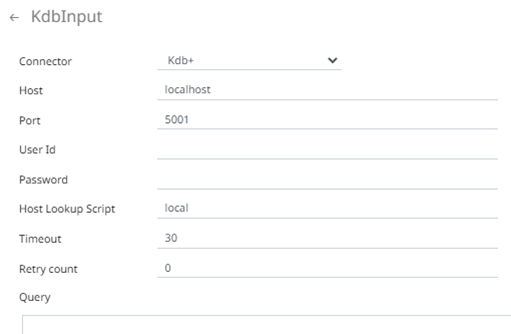
List of comma-separated key-value pairs, where key and value are separated by an equals sign. · Key is any name given to a host lookup script. Used inside connectors UI as Host Lookup Script. NOTE: The Host Lookup Script value can be parameterized. When a key is used in the connector, it is searched in the Streams.properties file and the corresponding shell script is run to get the host information. An exception is thrown if the key used in the connector is not configured in the Streams.properties file. · Value is the full path of the shell script that is accessible on the server. Examples: · For Windows connector. host.lookup.scripts=local=E://Data/host.bat,formatted=E://Data/hostFormatted.bat There are two keys specified in this property which are local and formatted. The shell script for the local key is host.bat which is: @echo off echo %1 After executing the host lookup script, the received connection details will be the values entered in the connector UI.
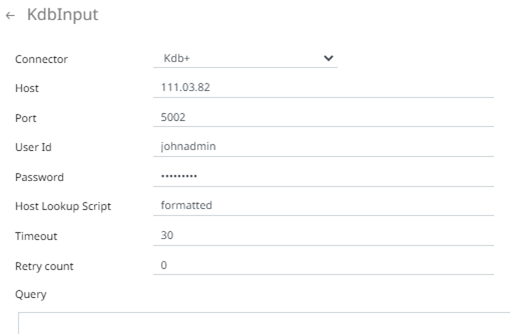
{ "host": "localhost", "port": 5001, "username": "", "password": "" } NOTES: · The port should be a number and has no double quotes. This is done to avoid unwanted casts. · Only host and port are mandatory. The shell script for the formatted key is hostFormatted.bat which is: @echo off echo { echo "host":"localhost", echo "port":5001, echo "username":"john", echo "password":" Pass1w0rd" echo } Specifying the formatted key as the Host Lookup Script value, the Host, Port, User Id, and Password entries will be disregarded.
The connection details from the host lookup script will be used instead. { "host": "localhost", "port": 5001, "username": "john", "password": "●●●●" } · For Linux connector.host.lookup.scripts=local=/etc/panopticon/appdata/host.sh,formatted=/etc/panopticon/appdata/hostFormatted.sh There are two keys specified in this property which are local and formatted. The shell script for the local key is host.sh which is: echo $@ After executing the host lookup script, the received connection details will be the values entered in the connector UI.
{ "host": "localhost", "port": 5001, "username": "", "password": "" } The shell script for the formatted key is hostFormatted.sh which is: echo { echo \"host\":\"192.168.1.172\", echo \"port\":5001, echo \"username\":\"john\", echo \"password\":\"Pass1w0rd\" echo } Specifying the formatted key as the Host Lookup Script value, the Host, Port, User Id, and Password entries will be disregarded.
The connection details from the host lookup script will be used instead. { "host": "localhost", "port": 5001, "username": "john", "password": "●●●●" } NOTE: Backslash is not supported in the Streams.properties file. Forward slash is used instead in the path of the scripts. |
||||||
|
Default Value |
|
||||||
|
Property |
Amazon Kinesis – Data Streams connector |
||||||
|
Attribute |
connector.kinesis.datastreams.accesskeyid |
||||||
|
Description |
The Access Key ID from the AWS account. |
||||||
|
Default Value |
|
||||||
|
Property |
Amazon Kinesis – Data Streams connector |
||||||
|
Attribute |
connector.kinesis.datastreams.secretaccesskey |
||||||
|
Description |
The Secret Access Key ID from the AWS account. |
||||||
|
Default Value |
|
||||||
|
Property |
Python connector |
||||||
|
Attribute |
connector.python.host |
||||||
|
Description |
The default Python Pyro instance host address. NOTES: For connector.python.host, connector.python.password, connector.python.port, and connector.python.serializertype properties: · If set in the Streams.properties file, these fields will be hidden in the Python connector and will be applied to the Python transform as well. · These default Streams Server connection properties will be applied at runtime. · These default Streams Server connection properties will override old Python connection settings. |
||||||
|
Default Value |
|
||||||
|
Property |
Python connector |
||||||
|
Attribute |
connector.python.password |
||||||
|
Description |
The default HMAC Key. |
||||||
|
Default Value |
|
||||||
|
Property |
Python connector |
||||||
|
Attribute |
connector.python.port |
||||||
|
Description |
The default Python Pyro host port. |
||||||
|
Default Value |
|
||||||
|
Property |
Python connector |
||||||
|
Attribute |
connector.python.serializertype |
||||||
|
Description |
The default Python serialization type. Possible values are serpent or pickle. |
||||||
|
Default Value |
|
||||||
|
Property |
REST Documentation |
||||||
|
Attribute |
documentation.enabled |
||||||
|
Description |
Enable or disable the OpenAPI Specification documentation for the REST interface. |
||||||
|
Default Value |
false |
||||||
|
Property |
REST |
||||||
|
Attribute |
error.default.message |
||||||
|
Description |
The error message that will be displayed instead of the actual error message. This is used to mask or hide error messages that may contain internal or sensitive details. |
||||||
|
Default Value |
|
||||||
|
Property |
File Upload |
||||||
|
Attribute |
file.upload.size.max.bytes |
||||||
|
Description |
Limit for files size to be uploaded through the web browser (i.e., workbooks, streams applications, streams data sources). |
||||||
|
Default Value |
1000000 |
||||||
|
Property |
Log level |
||||||
|
Attribute |
logger.level.file |
||||||
|
Description |
Controls the level that is logged to file. |
||||||
|
Default Value |
WARNING |
||||||
|
Property |
Server Metrics |
||||||
|
Attribute |
metrics.authorization.level |
||||||
|
Description |
Specifies the required authorization level to get server metrics. Available values are ANONYMOUS, VIEWER, DESIGNER, ADMINISTRATOR. NOTES: This property is case sensitive. |
||||||
|
Default Value |
ADMINISTRATOR |
||||||
|
Property |
Server Metrics |
||||||
|
Attribute |
metrics.collection.rate |
||||||
|
Description |
Specifies the rate at which metrics are collected in milliseconds. |
||||||
|
Default Value |
1000 |
||||||
|
Property |
Server Metrics |
||||||
|
Attribute |
metrics.file.flush.rate |
||||||
|
Description |
Specifies how often metrics should be saved to disk in milliseconds. Only used if the metrics.publisher.type is set to FILE. |
||||||
|
Default Value |
10000 |
||||||
|
Property |
Server Metrics |
||||||
|
Attribute |
metrics.memory.queue.size |
||||||
|
Description |
Specifies how many metric entries are stored in memory. When the number of metrics goes above the specifies value, the oldest value is removed to make room for the newest one (FIFO). Only used if the metrics.publisher.type is set to MEMORY. |
||||||
|
Default Value |
1000 |
||||||
|
Property |
Server Metrics |
||||||
|
Attribute |
metrics.publisher.type |
||||||
|
Description |
Specifies the current metric publisher that is used. Available values are NONE, MEMORY, FILE, EMAIL, INFLUX_DB, JDBC, KAFKA, KDB, MQTT, REST, TEXT. |
||||||
|
Default Value |
KAFKA |
||||||
|
Property |
Server Metrics |
||||||
|
Attribute |
metrics.publisher.configuration |
||||||
|
Description |
Specifies the id for which metric publisher configuration to use. |
||||||
|
Default Value |
|
||||||
|
Property |
Repository |
||||||
|
Attribute |
repository.import.archived.applications |
||||||
|
Description |
Allows to import all application backups from the <appdata>/CEP/Archive/. Refer to step 4 in the Migration to Streams Server 2021.0 from an Older Version section for more information. |
||||||
|
Default Value |
true |
||||||
|
Property |
Repository |
||||||
|
Attribute |
repository.pack.enabled |
||||||
|
Description |
The repository tracks all changes to all applications. If you have a very large number of applications, or have kept the repository for a very long time, the sheer number of files inside the .streams-repository subdirectory could cause the repository to become slower. Set this property to true to have the repository pack all the files into fewer larger ones for faster access. |
||||||
|
Default Value |
false |
||||||
|
Property |
REST |
||||||
|
Attribute |
rest.response.error.stacktrace.included |
||||||
|
Description |
Include the error stackrace in REST responses. |
||||||
|
Default Value |
false |
||||||
|
Property |
Server |
||||||
|
Attribute |
server.id |
||||||
|
Description |
Specifies an id for the current server. The value of this property will be part of each metric entry so that it can be tied to a specific server if a server cluster is used. If no value is specified, the MAC address of the localhost network will be attempted to be used to identify the server. If this is not possible, a UUID will be generated. |
||||||
|
Default Value |
|
||||||
|
Property |
SOAP |
||||||
|
Attribute |
soap.enabled |
||||||
|
Description |
Enable or disable the SOAP interface |
||||||
|
Default Value |
True |
||||||
|
Property |
Licensing |
||||||
|
Attribute |
license.hwu.hosted |
||||||
|
Description |
Boolean stating if you wish to use Hosted or Local Altair Units licensing. Set to true if you wish to use hosted licensing. |
||||||
|
Default Value |
false |
||||||
|
Property |
Licensing |
||||||
|
Attribute |
license.hwu.hosted.authorization.username |
||||||
|
Description |
Username to the Altair One account. |
||||||
|
Default Value |
|
||||||
|
Property |
Licensing |
||||||
|
Attribute |
license.hwu.hosted.authorization.password |
||||||
|
Description |
Password to the Altair One account. |
||||||
|
Default Value |
|
||||||
|
Property |
Licensing |
||||||
|
Attribute |
license.hwu.hosted.authorization.token |
||||||
|
Description |
An authorization token generated through the Altair One admin portal. Used to authorize a machine to the Hosted Altair Units system. |
||||||
|
Default Value |
|
||||||
|
Property |
Licensing |
||||||
|
Attribute |
license.hwu.operating.system |
||||||
|
Description |
The operating system where the Panopticon Streams is installed. Possible values are: WIN_X86, WIN_X64, MAC, LINUX_X64, or LINUX_ARM64 NOTE: If the Java bitness (e.g., 32-bit) is different from the operating system (e.g., 64-bit), it is recommended to add the Java bitness in this property (e.g., WIN_X86). |
||||||
|
Default Value |
|
||||||
|
Property |
Licensing |
||||||
|
Attribute |
license.hwu.uri |
||||||
|
Description |
The path where the License Server is running e.g., 6200@191.255.255.0 where the syntax is PORTNUMBER@HOST. If multiple servers are used, they should be separated by ‘;’. NOTES: · Multiple License Servers are not supported when the Panopticon Stream is on a Linux machine. · If value is not set in the Streams.properties, the environment variable ALTAIR_LICENSE_PATH serves as the backup path and will be used |
||||||
|
Default Value |
|
||||||
|
Property |
Licensing |
||||||
|
Attribute |
license.hwu.version |
||||||
|
Description |
Value must match the license version found in the Altair Units license file. |
||||||
|
Default Value |
19.0 |
||||||
|
Property |
Licensing |
||||||
|
Attribute |
license.mode |
||||||
|
Description |
The license mode. Possible values are: FILE or HWU. To use the Altair Units license, set this property to HWU. |
||||||
|
Default Value |
FILE |
||||||
|
Property |
Timeout Session |
||||||
|
Attribute |
timeout.session.enabled |
||||||
|
Description |
Boolean value stating if timeout functionality should be used or not. |
||||||
|
Default Value |
false |
||||||
|
Property |
Timeout Session |
||||||
|
Attribute |
timeout.session.exception.delimiter |
||||||
|
Description |
The delimiter to use for the usernames stated in the timeout.session.exception.usernames property. |
||||||
|
Default Value |
, (comma) |
||||||
|
Property |
Timeout Session |
||||||
|
Attribute |
timeout.session.exception.usernames |
||||||
|
Description |
Usernames that should be excluded from the timeout functionality. Separated by the delimiter stated in the timeout.session.exception.delimiter property. |
||||||
|
Default Value |
|
||||||
|
Property |
Timeout Session |
||||||
|
Attribute |
timeout.session.minutes |
||||||
|
Description |
Minutes of inactivity before a user session is terminated by logging out the user. |
||||||
|
Default Value |
480 |
||||||