


|
Uploading Binary Models to Altair Knowledge Hub
Monarch Utility provides a means of uploading binary models to Altair Knowledge Hub.
STEPS:
-
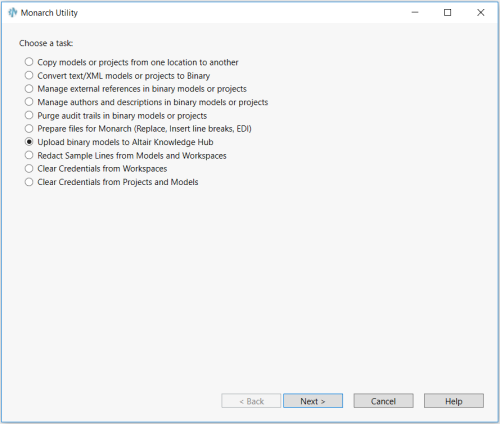
Launch the Monarch Utility by selecting Start > All Programs > Altair Monarch 2020 > Altair Monarch 2020 Utility and ensure that the button for Upload binary models to Altair Knowledge Hub is selected in the wizard that displays. Press Next when you are finished.
-
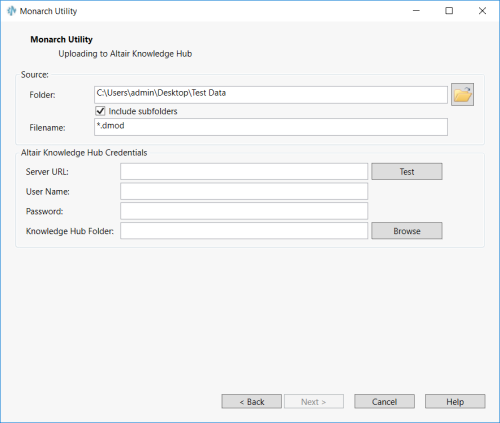
In the next screen that displays, enter the path to the source folder containing the model and project files you want uploaded in the Source Folder screen. You can use the Browse
 button
located beside this field to search for the appropriate folder.
button
located beside this field to search for the appropriate folder. -
Check the box for Include subfolders if you wish to upload the contents of all subfolders as well.
-
Enter your Knowledge Hub credentials, including server URL, username, and password, into the fields provided. You can test the connection by clicking the Test button.
-
If you wish to specify a Knowledge Hub folder in which to upload the models, enter the folder name into the field provided. You can also use the Browse button to launch the Knowledge Hub Folder Explorer window and search for this folder in the Knowledge Hub server.
The next screen reiterates your instructions for the conversion operation. Select Finish to proceed with upload if the indicated operation is correct. If you wish to make changes to the operation, select Back.
A process log showing the status of the conversion operation displays.
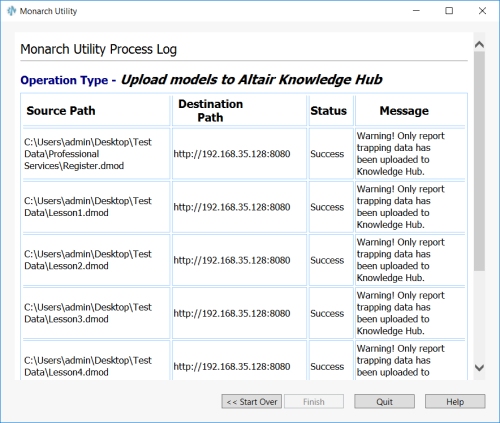
This log displays the source paths of the models that were uploaded, their destination paths, a status message about the task's success or failure, and, when applicable, a status message.