


|
Working with the Altair ODBC Drivers
The ODBC Drivers included with Monarch Classic are very similar to the data connectors in Data Prep Studio in that both connector types allow you to access data from a number of database types. Monarch's ODBC drivers support access to the following database types:
|
|
Setting up the Altair ODBC drivers
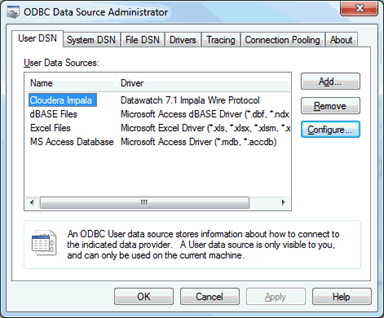
The Altair ODBC Drivers are set up using Windows' ODBC Data Source Administrator.
Steps:
-
Select Start > Control Panel > Administrative Tools > Data Sources (ODBC).

-
Select Add.
-
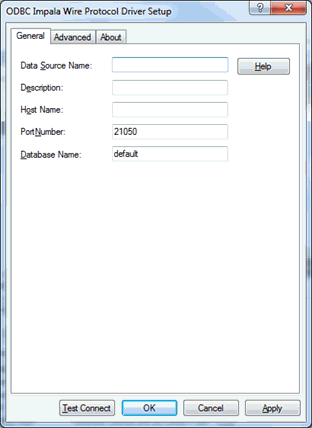
From the Create New Data Source dialog that displays, select an Altair Driver to set up. A setup dialog for this driver displays.
-
Provide a data source name so that you can easily identify this driver from a list.
-
Type in the host name and the database name you wish to gain access to.
-
Select Test Connect to check whether or not you have the credentials necessary to access the database you named in Step 4.
-
Enter your user name and password into the appropriate fields of the Login dialog that displays.
-
Click OK. A message box displays to inform you of the status of your connection.
-
Select OK on the setup dialog if you are satisfied with the test connection results.
Notes on the Salesforce driver connection
When setting up the Salesforce driver, the ODBC Salesforce Driver Setup dialog displays. After confirming a connection to the database you desire, select the Web Service tab of the setup dialog.
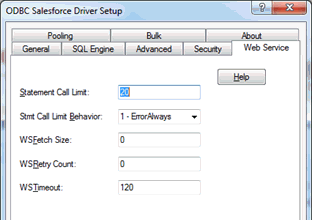
The Statement Call Limit field has a default value of 20 – this limit results in a maximum number of 40,000 rows returned when the database is accessed. To remove this limit, set the Statement Call Limit value to 0.
Known issues
-
Tables from Cassandra may not display correctly when imported into Monarch Classic via the ODBC import function if they contain numeric values with decimal figures. This issue is not observed in the ODBC and Cassandra connectors of Data Prep Studio.
-
Tables from JIRA may not display correctly when imported into Monarch Classic via the ODBC import function.
-
Some drivers currently have issues supporting passwords containing special characters (e.g., semi-colon, single quote, double quotes, etc.). These drivers include:
-
Active Directory
-
Box Cloud Storage
-
Apache Cassandra
-
Google Ads
-
Google BigQuery
-
Google Drive
-
Google Sheets
-
Hubspot
-
NetSuite
-
OData
-
SharePoint
-
Spark SQL
-
SugarCRM
-
Zendesk.
-